Ventis™ MX4 Product Manual
31 © 2014 Industrial Scientific Corporation
cup is upright and readable.
o The cup’s nipple points up and away from
the monitor.
Turn (counterclockwise) the regulator’s knob.
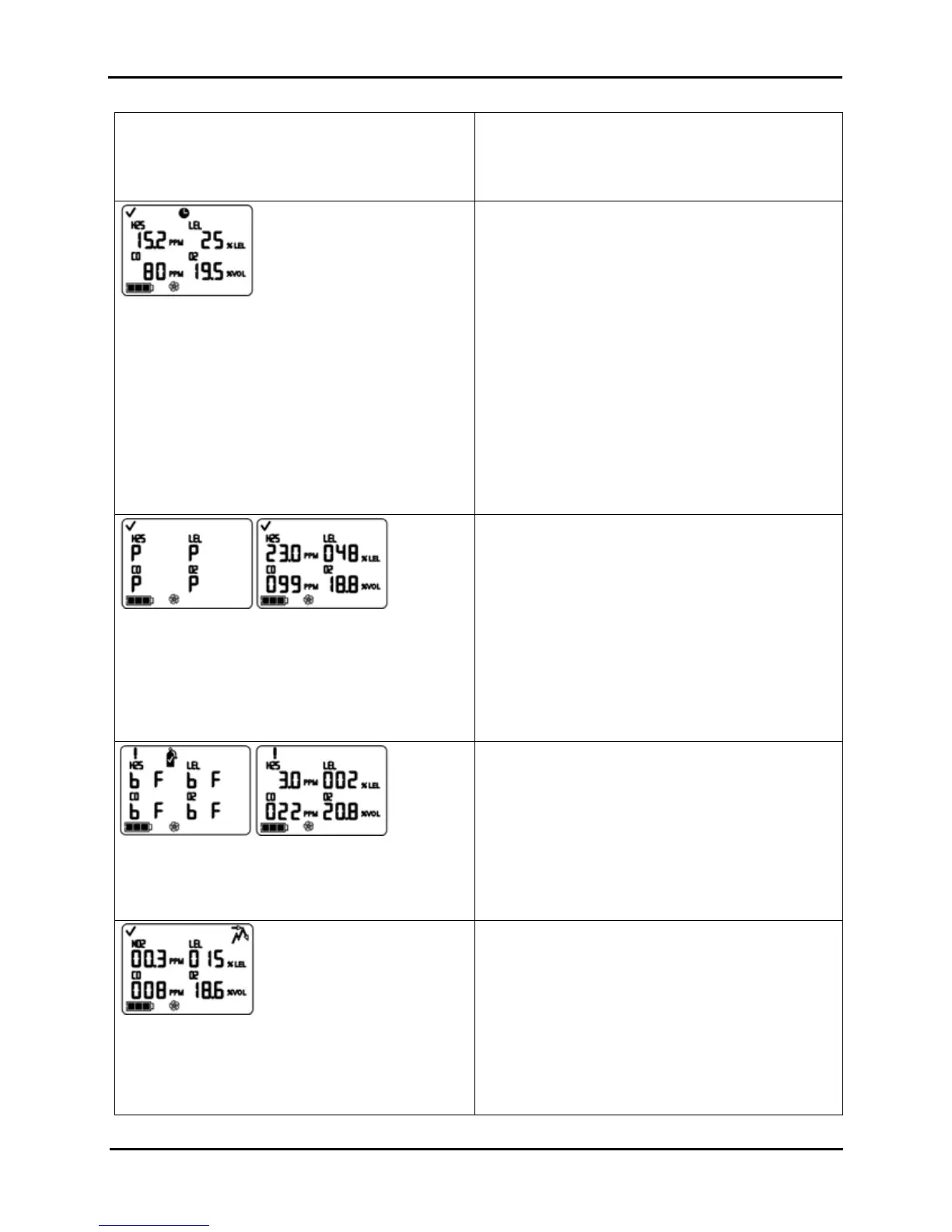
Bump Test In-progress Screen
Displays when gas is sensed within five minutes. The
clock icon flashes to indicate the test is in-progress. The
sensor reading(s) display. The LEL and toxic sensor
readings increase and the O
2
reading decreases.
s the bump test progresses, observe the display
activity (left).
After the bump test, the Bump Test Results Screen
displays.
STOP THE FLOW OF GAS.
After bump testing, or if bump testing is terminated at
anytime during the process, stop the flow of gas
from the cylinder as follows.
For an aspirated monitor with a demand flow
regulator, disconnect the tubing from the pump inlet.
For an aspirated or diffusion monitor with a
positive flow regulator, turn (clockwise) the
regulator’s knob.
Bump Test Results (Pass) Screen
The above displays an all sensor pass result. If one or
more sensors fail, the “F” shows in place of the “P”. The
pass/fail screen (left) and the final sensor reading
screen (right) display alternately three times. A single
beep sounds to indicate the bump test is completed.
No User Action Required
After a passed bump test, the monitor goes into gas
monitoring mode.
Bump Test Results (Fail) Screen
The “bF” displays under each gas type to indicate a
bump test failure. The system level alarm turns on and
the gas cylinder icon flashes.
After a failed bump test, the Bump Test Fail Screen
displays and a low level audio alarm turns on.
The monitor should be fully calibrated after a failed bump
test.
NOTE: After a full calibration, the O
2
sensor must pass a bump test to
clear the bump test fail status.
Peak Readings Screen
Displays the peak icon and peak gas concentrations for
each installed sensor since the last time the peak
readings were cleared. (For O
2
, the lowest reading is
shown.)
Press and release ENTER to clea
the peak values, if
desired.
Press ON/OFF/MODE to advance to one of two screens.
If toxic sensors are installed, the user advances to
the TWA Readings Screen.
If no toxic sensors are installed, the user advances
to the Gas Monitoring Screen.


 To Next Page