Ventis™ MX4 Product Manual
21 © 2014 Industrial Scientific Corporation
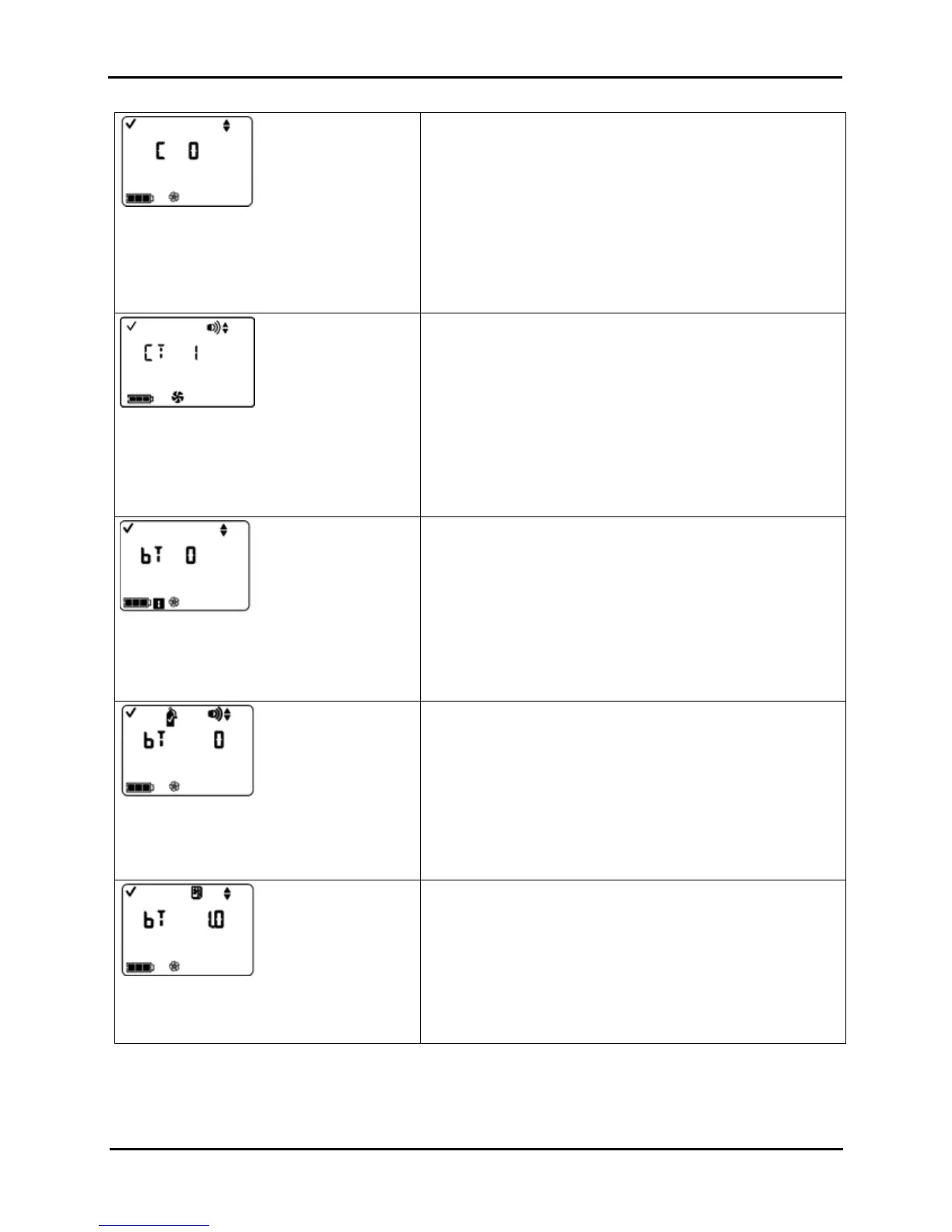
Confidence Indicator On-Off Screen
Options
0 = Disable/off
1 = Enable/on
With an enabled confidence indicator, the monitor will emit a
signal, every 90 seconds in gas monitoring mode, to inform the
user it is operational.
Press ENTER to edit the value, if needed.
Press ON/OFF/MODE to set the value and advance to one of two
screens.
If the confidence indicator is enabled, the Confidence
Indicator Type Set Screen displays.
If the confidence indicator is disabled, the Bump Test In-
field Option Screen displays.
Confidence Indicator Type Set Screen
Options
1 = audible chirp
2 = LED flash
3 = combination audible chirp and LED flash
Sets the type of signal that will be emitted by an enabled
confidence indicator.
Press ENTER to edit the value, if needed.
Press ON/OFF/MODE to set the value and advance to the Bump
Test In-field Option Screen.
Bump Test In-field Option Screen
Options
0 = Disable/off
1 = Enable/on
When enabled, permits all monitor users to bump test the monitor
from the gas monitoring mode.
Press ENTER to edit the value, if needed.
Press ON/OFF/MODE to set the value and advance to one of two
screens.
If Bump Test In-field is enabled, the Bump Due Warning
Option Screen displays.
If the Bump Test In-field is disabled, the Alarm Latch Set
Screen displays.
Bump Due Warning Option Screen
Options
0 = Disable/off
1 = Enable/on
When enabled, the monitor will sound two beeps every 30
seconds and its display icons will indicate a bump test is due.
Press ENTER to edit the value, if needed.
Press ON/OFF/MODE to set the value and advance to the Bump
Test Time Set-point Screen.
Bump Test Time Set-point Screen
Value range: .5 days to 7.0 days
Value increment: .5 days
Sets the elapsed time allowed between bump tests.
Press ENTER to edit the value, if needed; press repeatedly or
hold down to speed the increment pace.
Press ON/OFF/MODE to set the value and advance to the Bump
Test Percentage Requirement Screen.


 To Next Page