Ventis™ MX4 Product Manual
23 © 2014 Industrial Scientific Corporation
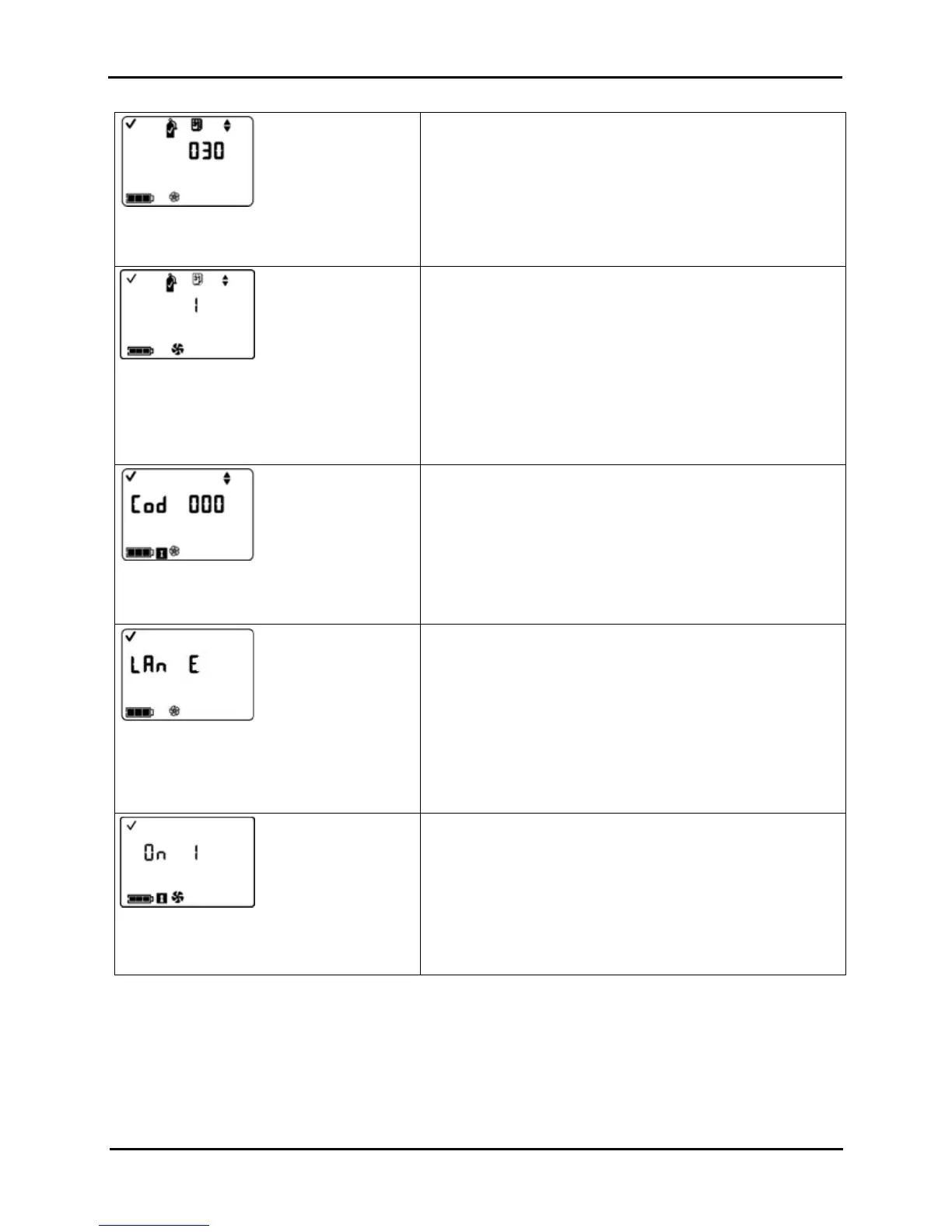
Calibration Due Set-point Screen
Value range: one to 365 days
Value increment: one day
Sets the elapsed time allowed between calibrations.
Press ENTER to edit the value, if needed.
Press ON/OFF/MODE to set the value and advance to the
Calibration Days Set Screen.
Calibration Days Set Screen
Options
0 = display days since last calibration
1 = display days until next calibration
Sets how the Calibration Days Screen will display in operation
mode.
NOTE: The up arrow ( ▲) will be featured on-screen when the
unit is set to display the number of days before a sensor’s
next calibration is due. The down arrow (▼) will be featured
when the unit is set to display the number of days since the
last calibration was performed. A value will be displayed for
each installed sensor.
Press ENTER to edit the value, if needed.
Press ON/OFF/MODE to set the value and advance to the
Security Code Set Screen
Security Code Set Screen
Valid values: 000 to 999.
Increment value: one
A security code value of 000 permits all monitor users to enter
configuration mode and gain access to change the monitor’s
settings. A value other than 000 will restrict access to the
configuration mode; it will also restrict access to the shutdown
process for an instrument that is configured for “always on”.
Press ENTER to edit the value, if needed; press repeatedly or
hold down to speed the increment pace.
Press ON/OFF/MODE to set the value and advance to the
Language Selection Screen.
Language Selection Screen
Options
E = English
F = French
d = German
Allows the choice of display languages as applied to select
screens.
Press ENTER to edit the value, if needed.
Press ON/OFF/MODE to set the value and return to the LEL Type
Set Screen.
Always-on Set Screen
Options
0 = Disable/off
1 = Enable/on
When enabled, the shutdown process is security-code protected
only if the security code is not equal to 000. If the code is set to
anything other than 000, the user will be prompted to enter the
unit's security code to complete the shutdown process.
Press ENTER to edit the value, if needed.
Press ON/OFF/MODE to set the value and advance to the next
configuration mode screen.


 To Next Page