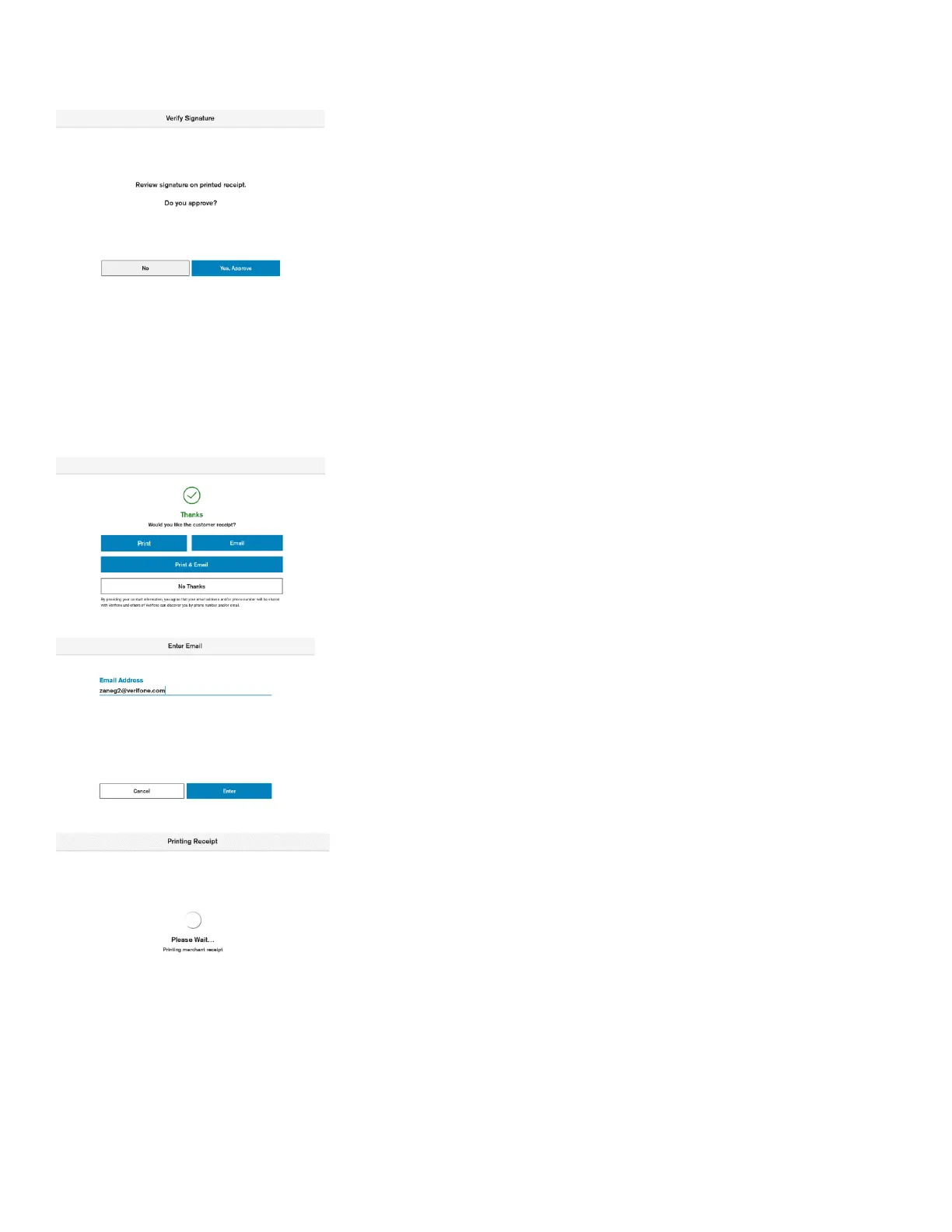
Description
If the CVM for the card is Signature the device will print merchant receipt,
that needs to be signed, the device will prompt the merchant to verify and
approve the customer signature. Otherwise, the terminal will skip the
signature validation and proceed with customer receipt printing.
Signature entry is prompted when the transaction amount is higher than
the signature required minimum amount.
User Action
The customer signs the receipt.
If the signature does not match with the signature on the card, the “No”
button must be pressed. The transaction will be declined, and a reversal
will be sent.
If the signature matched the signature on the card, the “Yes, Approve”
button must be pressed.
Description
If the button “Print” is selected, then the customer receipt will be printed.
If the button “Email” is selected, then the device will prompt the user to
enter email address.
If the button “Print & Email” is selected, then the device will prompt the
user to enter email address and after the customer receipt will be printed.
If “No Thanks” is selected, the device will proceed with the merchant
receipt printing.
Description
The device prints out merchant receipt. After the terminal prints receipts
the full payment process is completed. The device returns to the default
amount entry screen.













 To Next Page