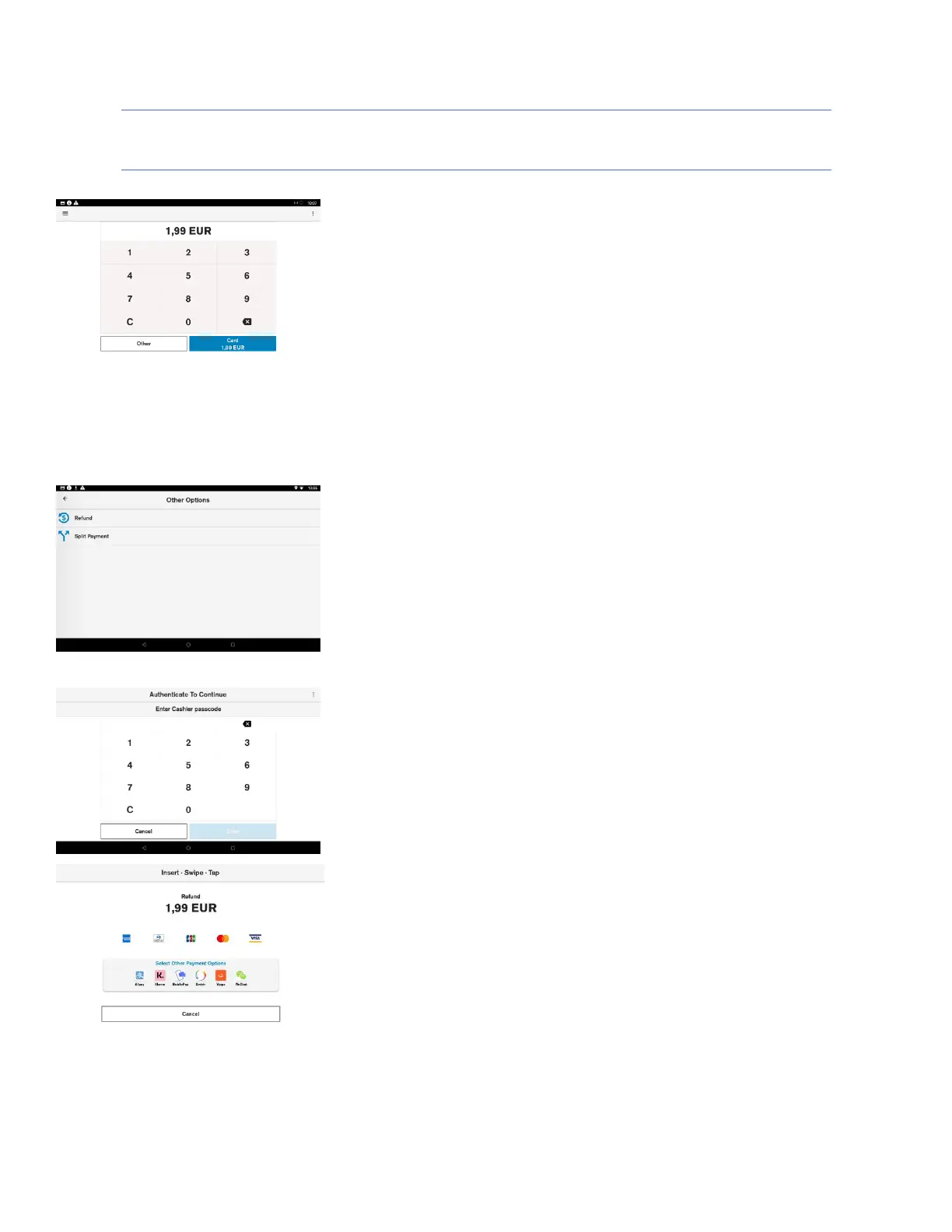
Refund transaction
Description
The merchant is prompted to enter the amount of the transaction. The
transaction amount is validated to make sure it does not exceed the
maximum amount. Refund transactions with an amount of 0.00 are not
allowed.
Pressing the “C” button will reset the current amount.
The top right menu allows the merchant to clear the amount.
The top left menu gives access to administrative functions.
Selecting the “Other” button presents the user with other transaction
options such as refund.
User action
The user must select the “Other” button to access the refund option.
Description
By selecting the “Other” button, the terminal will display the non-
purchase transaction types.
User action
The user must select “Refund”.
Description
If the user authentication feature is enabled, the user is prompted for the
passcode before performing refund transaction.
User action
The user must enter the cashier, the merchant or the admin passcode, to
proceed with the processing of the refund transaction.
Description
After user authentication the customer can insert, tap, or swipe the card.
User action
The user inserts, taps or swipes payment card to proceed with payment
processing.













 To Next Page