Configuration and Operation
LD8 Operations Manual AB-V-MA-00635_RevA2 15
4 CONFIGURATION AND OPERATION
There are two ways in which the LD8 can be configured; via the WebUI or by using a licensed version of the
VERIPOS Quantum software. It is recommended to use Quantum (see the Quantum User Manual) if available.
It is not recommended to use both the Quantum program and the WebUI at the same time. If Quantum is not
available, configuration must be performed through the WebUI terminal application, which requires commands
to be entered and issued to the unit. This section details the commands required to perform LD8 system
configuration via the terminal.
4.1 WEBUI OVERVIEW
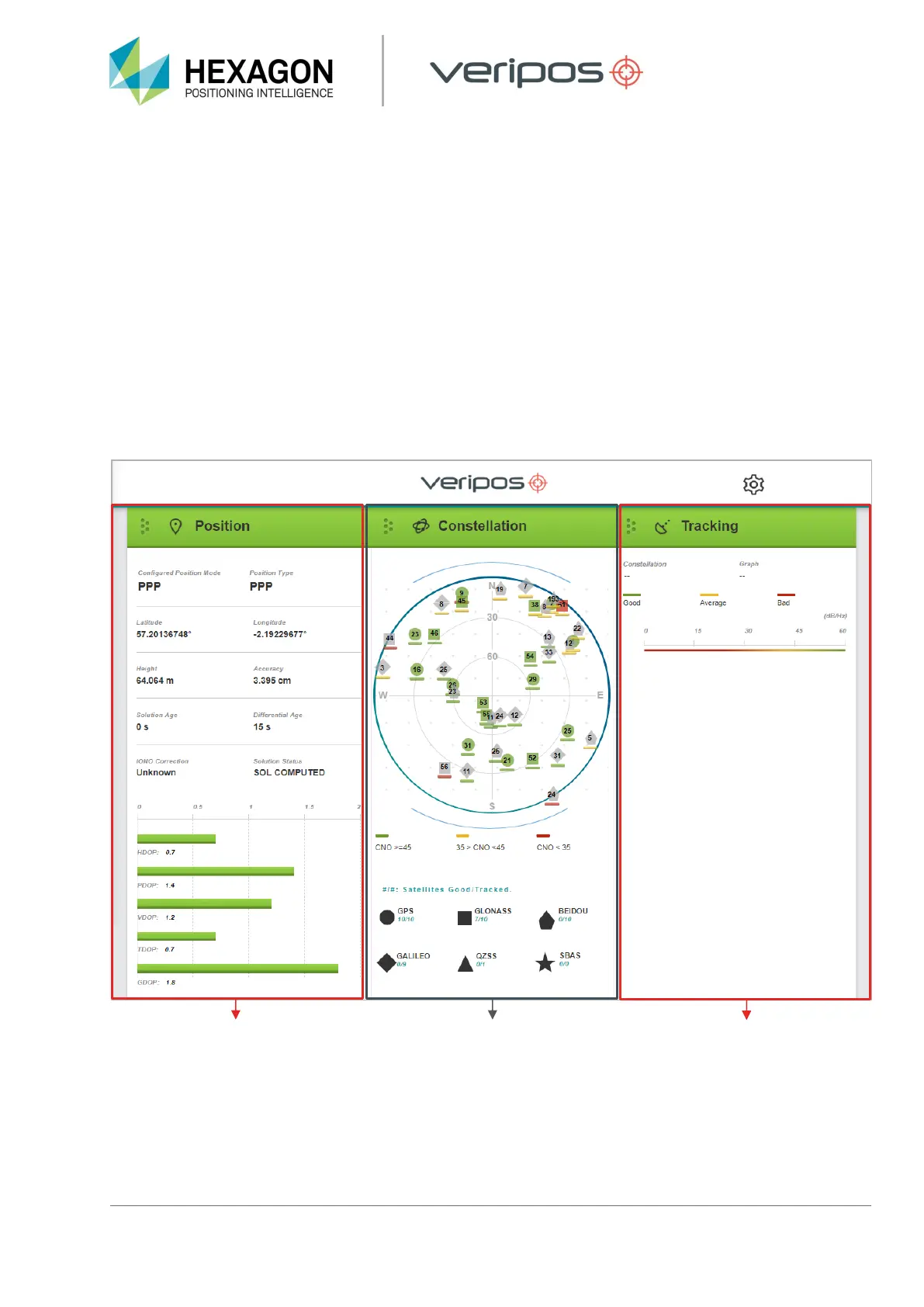
Once connected to the LD8 via Ethernet and the WebUI has been loaded, the user will be presented with
information relating to the receiver status. The LD8 WebUI displays status information relating to the behaviour
of the system. There are further sections available when scrolling down the page which provide limited
information and functionality.
Information related to the calculated
position is displayed, providing
calculation status, latitude,
longitude, height and differential
age.
This section displays a polar plot,
showing GNSS satellites currently
being tracked. Each satellite can be
clicked on to display elevation,
azimuth and signal strength details
(scrolling may be required to see
this information).


 To Next Page