68
/ USING NETWORK
CONNECTIONS
verizonwireless.com | ©2019 Verizon Wireless. All Rights Reserved.
./ WIRELESS ACCESS POINT CONNECTION
A Wireless Access Point network connection allows wireless
devices to connect to the local area network (LAN) using the
2.4 GHz or 5 GHz Wi-Fi network.
Note: Once disabled, all wireless devices connected to that wireless
network will be disconnected from the LAN network and internet.
To view the connection settings:
1. In the Network Connections page, click the Network(Home/
Oce) connection link.
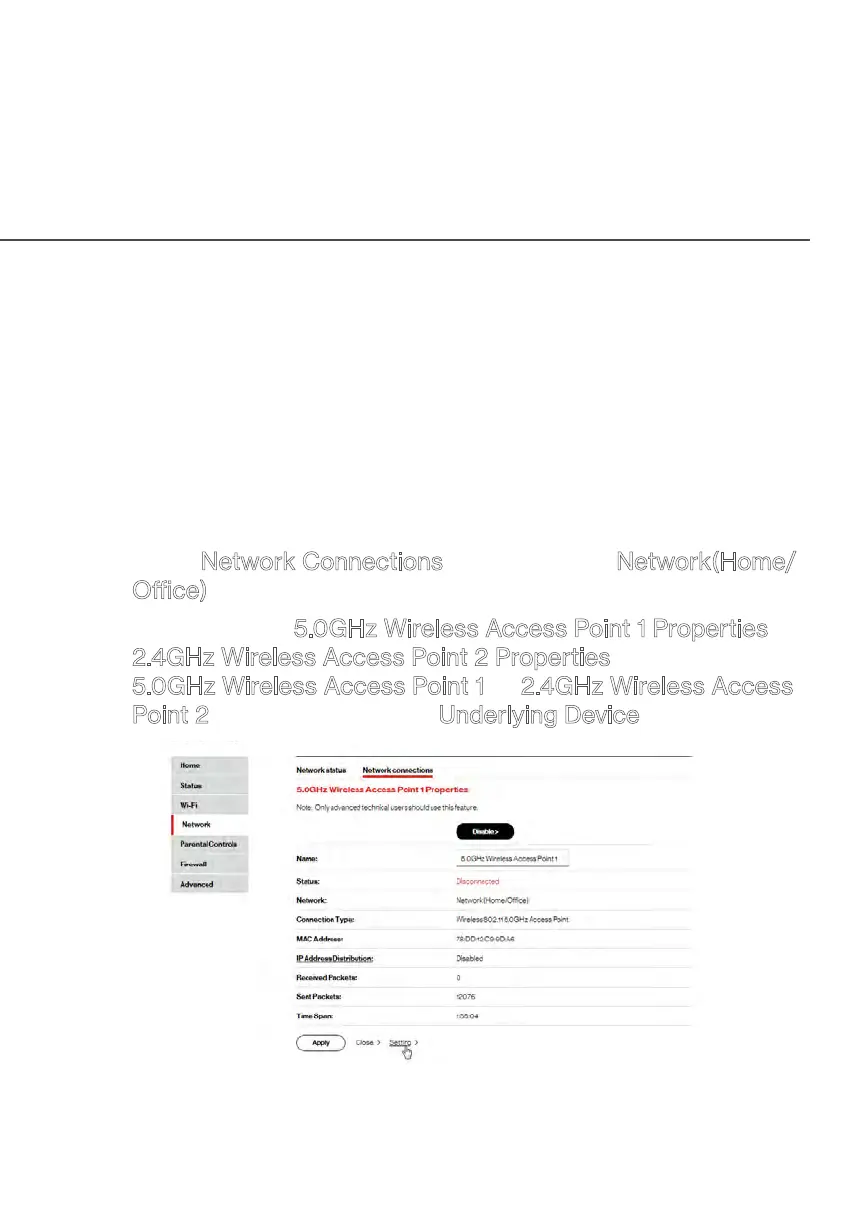
2. To access the 5.0GHz Wireless Access Point 1 Properties or
2.4GHz Wireless Access Point 2 Properties page, click the
5.0GHz Wireless Access Point 1 or 2.4GHz Wireless Access
Point 2 link listed under the Underlying Device section.


 To Next Page