2
Bollente trutankless® VERO Series Water Heaters www.trutankless.com
BOLLENTE
trutankless® VERO All-Electric Water Heater
Operation and Installation Guide
Welcome to the world of endless hot water! Your trutankless VERO BR/BC device is truly a marvel of modern design and
engineering and is now ready to supply you with unlimited hot water on demand.
PROGRAMMING YOUR TRUTANKLESS® VERO WATER HEATER
Your licensed contractor may have already set some basic system parameters, like temperature, and water ow, and date/time
at the time of installation. You can verify these settings to ensure the best performance from your trutankless water heater.
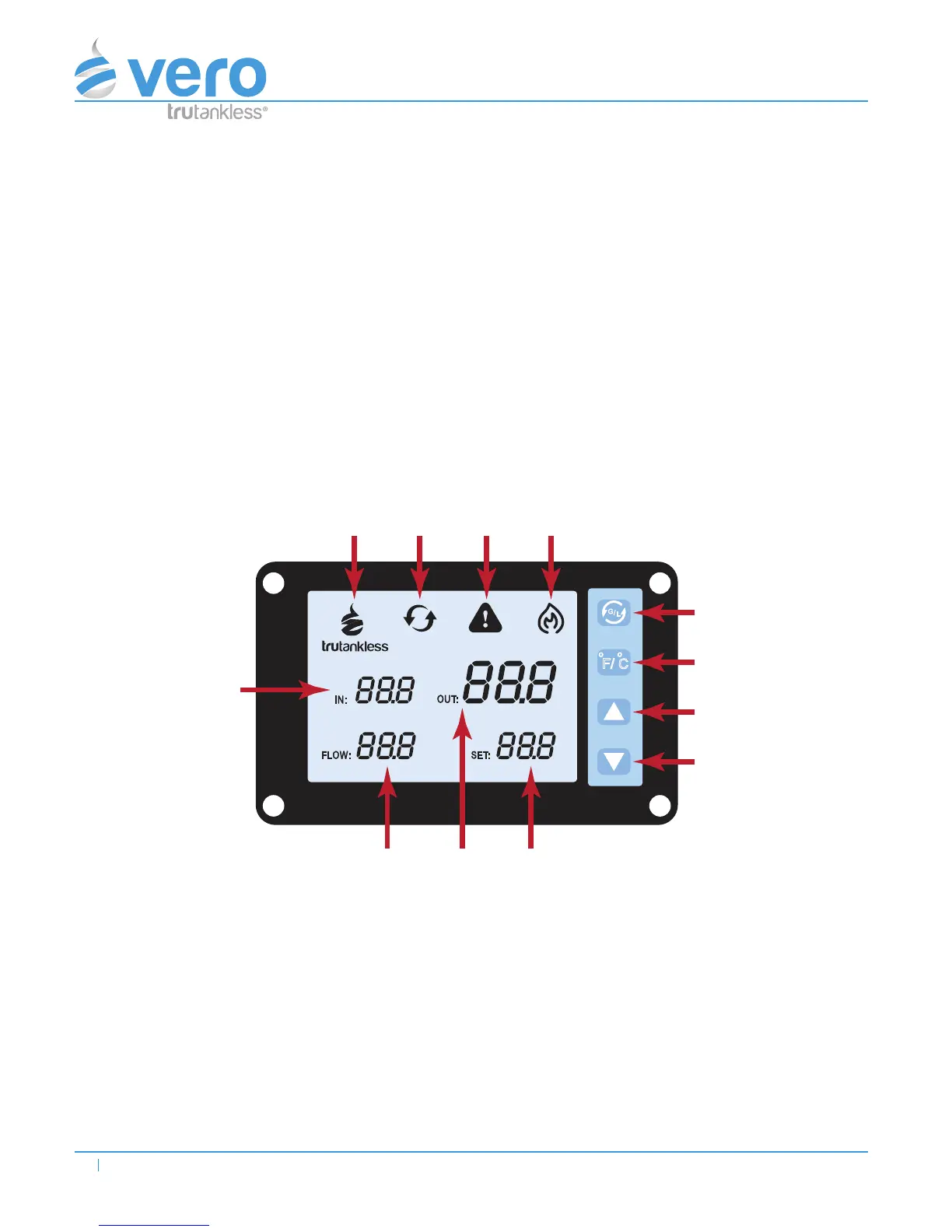
e LCD screen is the interface for all your programming needs.
DISPLAY INTERFACE DESCRIPTION
G
/
L
F/ C
O O
GPM
LPM
O
F
O
F
O
C
O
F
O
C
O
C
A B C D
E
H
F G
1
2
3
4
Indicator Button
A: LOGO 1: Upgrade & Flow Unit Conversion Button
B: Upgrade Indicator 2: Temperature Unit Conversion Button
Basic Version
C: Alert Indicator 3: Temperature Increase Button
D: Heating Indicator 4: Temperature Decrease Button
E: In Temperature
F: Out Temperature
G: Set Temperature
H: Water Flow


 To Next Page