TROUBLESHOOTING
5-3
VersaPulse Select Service Manual
0621-499-01 12/95
®
®
5.2 INTERIOR ACCESS & PART LOCATIONS
Interior access is gained through the front cover (door), which is hinged on the right side side. Once the front cover
is opened, the top cover can be removed. Once the top cover is removed the two side panels can be removed. There
is an electrical cable running between the left side panel and the console (for the key switch and emergency off
button). When removing this side cover, use caution to prevent stressing the cable. A connector allows the cable
to be disconnected to free the side cover completely (but the system will not turn on if this connection is broken).
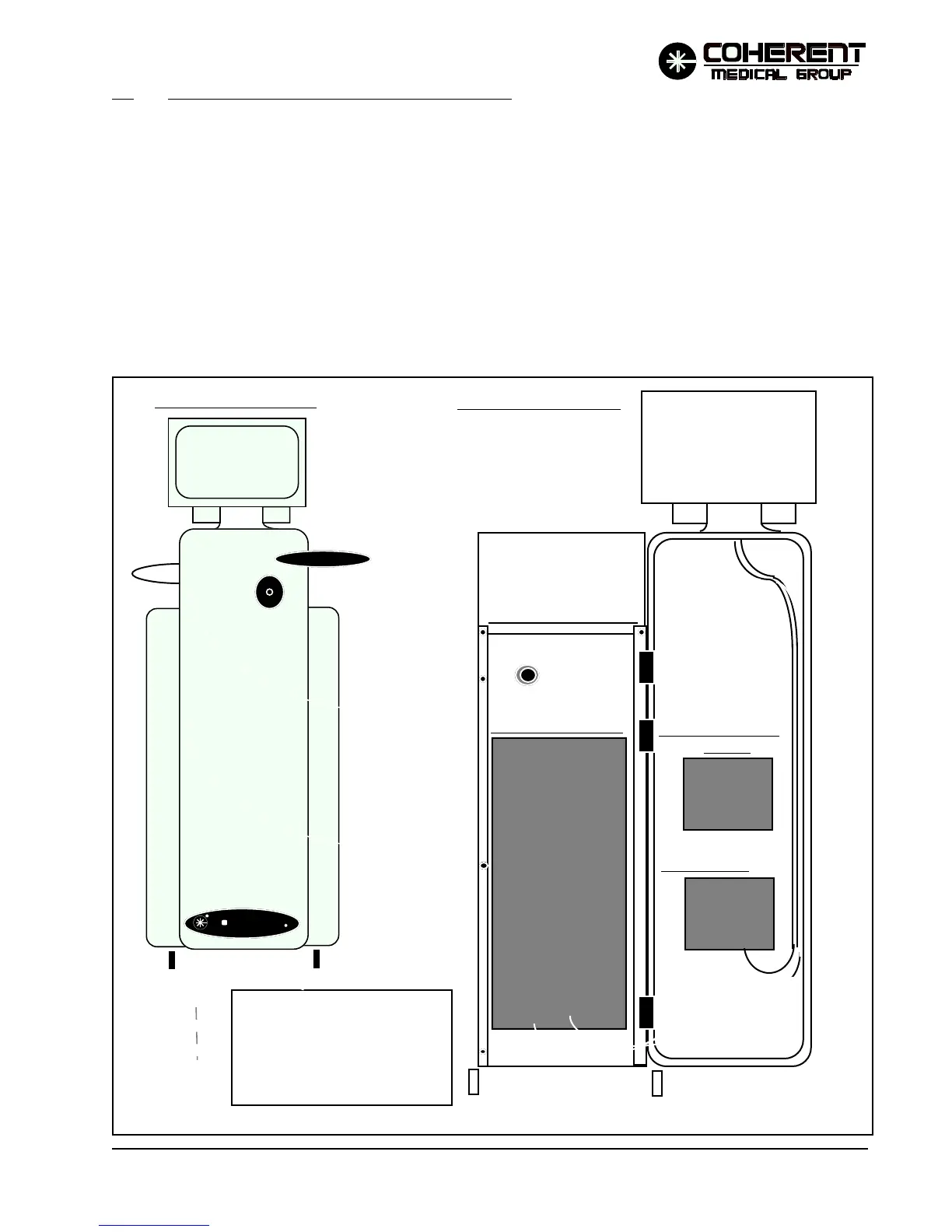
Open the front cover to access the two DC power supplies (mounted inside the door), to access the Controller PCB,
or to remove the top cover or either side cover.
To open the front cover, insert a small tool (such as a hex key) through the hole on the bottom left of the front cover.
Push up on the tab inside the hole to release the cover (it is hinged on the right side).
CONTROLLER PCB
DISPLAY P/S
DC P/S
FRONT DOOR CLOSED
FRONT DOOR OPENED
Insert a small tool (hex wrench)
through the hole on bottom left
of front door panel. Push up on
the tab inside the hole to release
the door. Door will swing open
towards the right.
FIGURE 5.1 FRONT VIEWS
R
R
LOW VOLTAGE


 To Next Page