19
Viessmann Commander
feedback module (a feedback module
seen from above). Touch the address- eld
and enter the address of the feedback
module. Touch the decoder-symbol and
select a decoder type. The top eld of the
selection list is designated for s88 feed-
back modules.
You can see the schematic diagram of
your selected decoder at the top edge and
the edge down below. Touch slightly the
decoder input you want. The respective
input will be illuminated in red. Assign now
the corresponding elds on the track dia-
gram to the activated input.
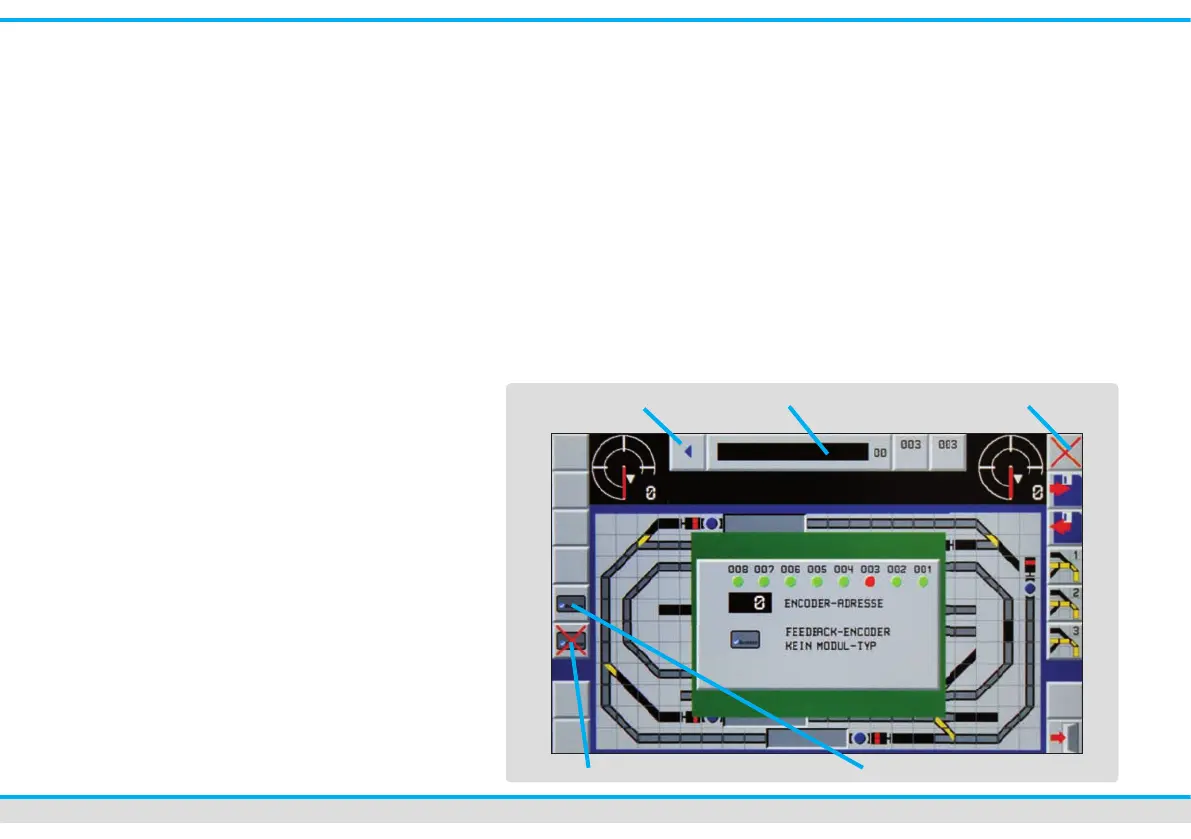
Assign track diagram elds:
• Press the touch eld
“fade out feedback decoder”.
• Touch the elds of the track diagram
you want to be indicated as occupied
track section by illumination in colour,
one after the other. The progress-bar
at the top in the middle of the picture
gures the enumeration of selected
elds.
• You can annul your last inputs with the
arrow key showing to the left, in case
that any input error occurred.
• Delete the respective elds by pressing
the “delete”-key.
• You can simulate the feedback with the
two switching elds on the right of the
counter bar.
• To nish, you press the key “fade in
feedback decoder”. The Commander
saves the entered elds and shows the
feedback menu again. Now, you can
assign the corresponding elds to the
next input of the feedback module.
• When all feedback sections are assi-
gned to the corresponding feedback
module inputs, don’t forget to save the
entered sections de nitely by pressing
the key “Save”.
• In order to close the menu, touch the
“Exit”-key in the bottom right-hand
corner.
Fade out feedback decoder Fade in feedback decoder
counter bar
annul
delete



 To Next Page