To hand over this locomotive to the
corresponding control panel you touch the
speci cation eld of the loco.
You have immediate access to up to 8
trains if you are in the displaying mode
“locos”. Just a ngertip on the speedo-
meter and you can switch over between
the locomotives.
Notice:
A locomotive controlled by a control
panel continuous to run with the
adjusted speed, even if it is no longer
shown on the display.
The new selected locomotive is taken
over with the previously adjusted speed.
The Commander adapts the neutral po-
sition of the speed control knob. So you
can turn back into the neutral position of
the speed control knob individually for
each locomotive.
Running a train:
If you have assigned a loco to one of the
control panels, you can run it immediately
including the access to all functions.
• Select the driving direction by pushing
the respective direction-pushbutton
• Turn the speed control knob slowly to
the right, till the trains reaches the pre-
determined speed. By turning the knob
to the left you reduce the speed.
• Press the knob and the just controlled
train will stop immediately (emergency
stop)
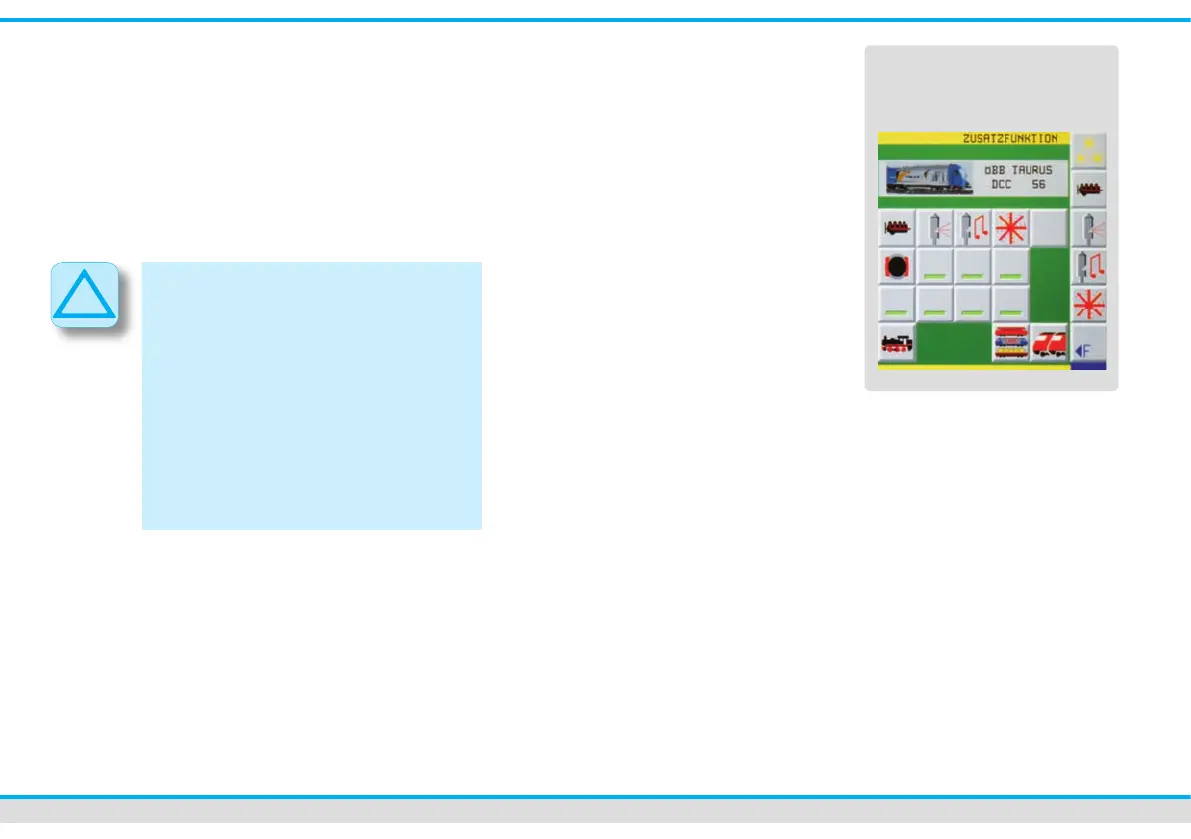
• You switch on or off the additional func-
tions like light, sound etc. by a touch of
the additional function-touch elds.
• Further additional functions are called
up by the touch eld “F►”.
To close the menu “additional functions”
you only have to touch any free place
on the track diagram.
Switching turnouts and signals
The track diagram offers you the most
comfortable possibility of switching turn-
outs and signals. Therefore you must draw
up the track diagram of your layout rst
(see chapter editors). Alternatively you can
use the direct mode to switch turnouts and
signals.
Switching functional models
on the track diagram:
• Touch the symbol of the functional
model you want to switch with your n-
ger. A choice of different options (turn-
out positions and signal aspects) will be
displayed on touch elds appearing bet-
ween the two locomotive control panels.
• You switch the turnout or signal directly
by a ngertip on the respective symbol.
The new position is displayed on the
track diagram.
additional functions
of a locomotive



 To Next Page