Survey of the Commander
Schematic overview of the
Commander and the touch elds
To start with, you will nd a schematic
overview of the Commander and the touch
elds on the left side.
On/Off and Emergency Stop
You switch the Commander on and off with
this pushbutton. Additionally you can
activate two different emergency stop
functions. The operating status of the
device is indicated by the illumination of
the pushbutton
Switching the Commander
on and off
Switching on:
Push the pushbutton until it´s blinking
green (approx. 1-2 seconds).
Switching off:
Hold down the pushbutton until the illumi-
nation is switched off (> 3 seconds).
The display gets darker until it goes com-
pletely out.
Emergency stop 1:
This emergency status stops automatically
all trains. The track power is still on.
• To activate the emergency stop 1, press
shortly the on/off emergency-push-
button. To deactivate the emergency
stop press the pushbutton shortly.
• Letting loose the pushbutton the emer-
gency stop is deactivated and the
illumination is green again.
Emergency stop 2:
This emergency status stops automatically
all trains and cuts off the track power.
• To activate the emergency stop 2, press
the on/off emergency-pushbutton till the
illumination is permanently red.
• To deactivate the emergency stop press
the pushbutton shortly again.
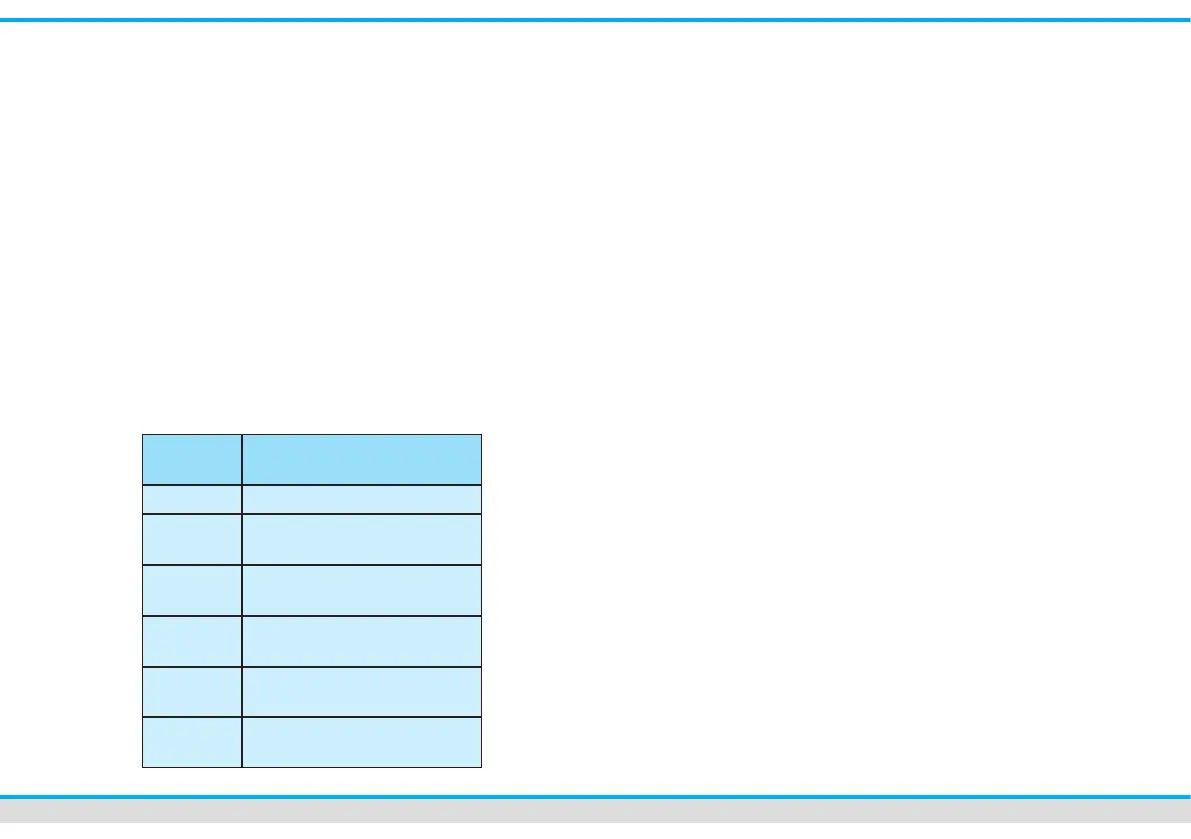
Button Function (explication)
Off Device is off
blinking
green
Device is starting
green Device switched on,
normal operating mode
blinking
red-green
Device switched on, emer-
gency stop, track power on
red Device switched on, emer-
gency stop, track power off
blinking
red
Shutdown



 To Next Page