using F1 key.
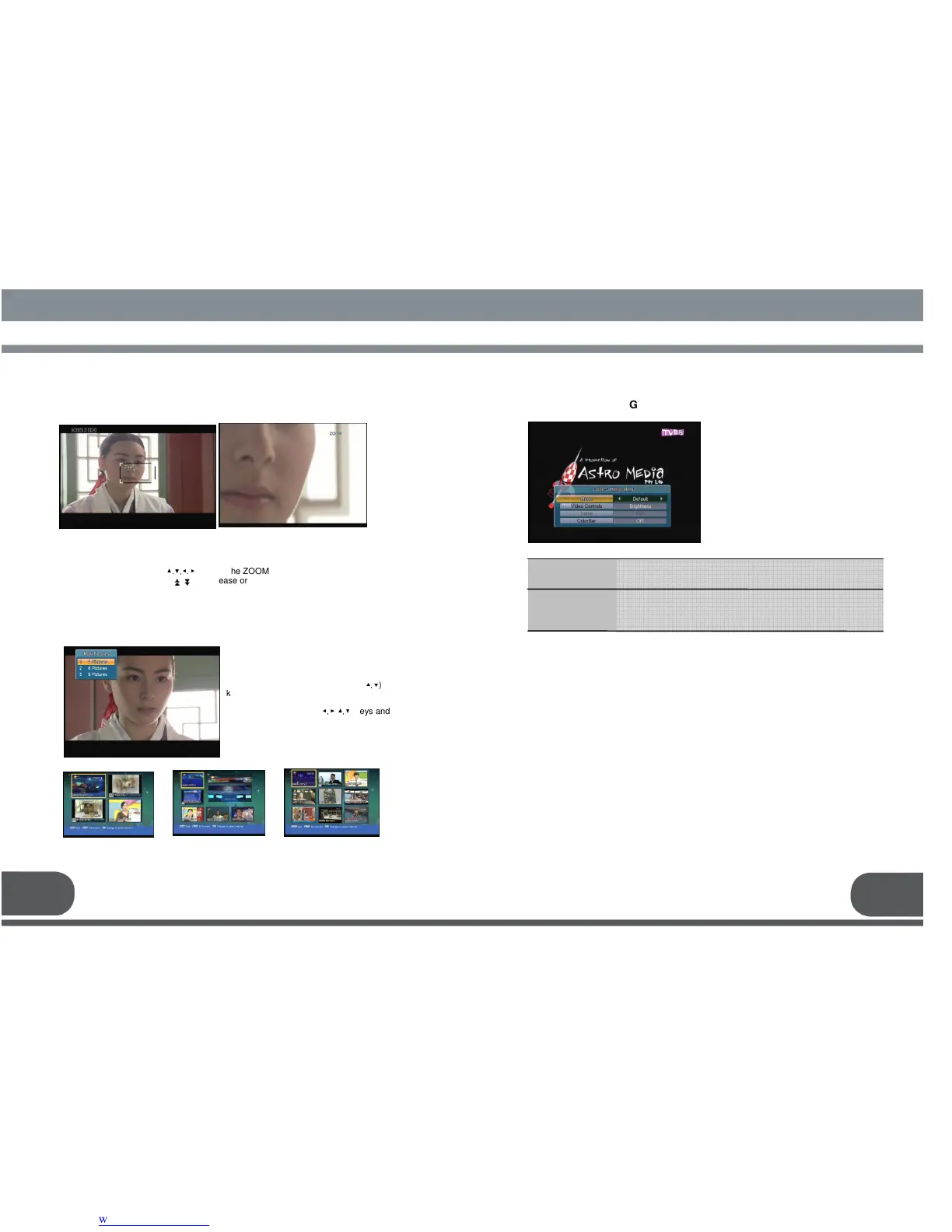
You can watch four, six or nine pictures at
the same time using this function. And
select the number of pictures using (
▲,▼
)
keys and press OK. After that, you can
see the Multi-Picture Screen. Also you can
select the channel using(
◀,▶ ▲,▼
) keys and
OK key in the Multi-picture Screen. The
channel of your selection is only live signal
when you selected one channel of the
several channels. The channels of which
is not selected are just the pictures.
On the live TV screen or paused TV screen, you can magnify some region of TV
screen. Press “Zoom Key” key and the ZOOM box will be display.
You can use following keys.
- Up/Down/Left/Right keys (
▲.▼,◀.▶
) : Move the ZOOM box
- Page Up/Page Down keys ( ) : Increase or decrease the ZOOM box
- OK key : Watch the ZOOM box to full screen or return to ZOOM box
- Exit key : Return to the live screen
You can adjust the color seting to take the
enhanced TV screen. Press F2 key then
below screen will display.
11. COLOR SETTING MENU
33 34
: You can select this to “Default” or “User” When “Mode” is “User” ,
you can change each color value.
: If your receiver connected to TV by using “VIDEO” or “S-VIDEO”
Connector , these items will change the color setting of TV
screen.
Mode
Brightness
Contrast
Saturation



 To Next Page