EasyManua.ls Logo

ViewSat 9000HD - System Setup Procedures; Automatic Channel Scanning; Manual Transponder Search

Default Icon
25 pages
Print Icon
To Next Page IconTo Next Page
To Previous Page IconTo Previous Page
Loading...
13 14
M
MM
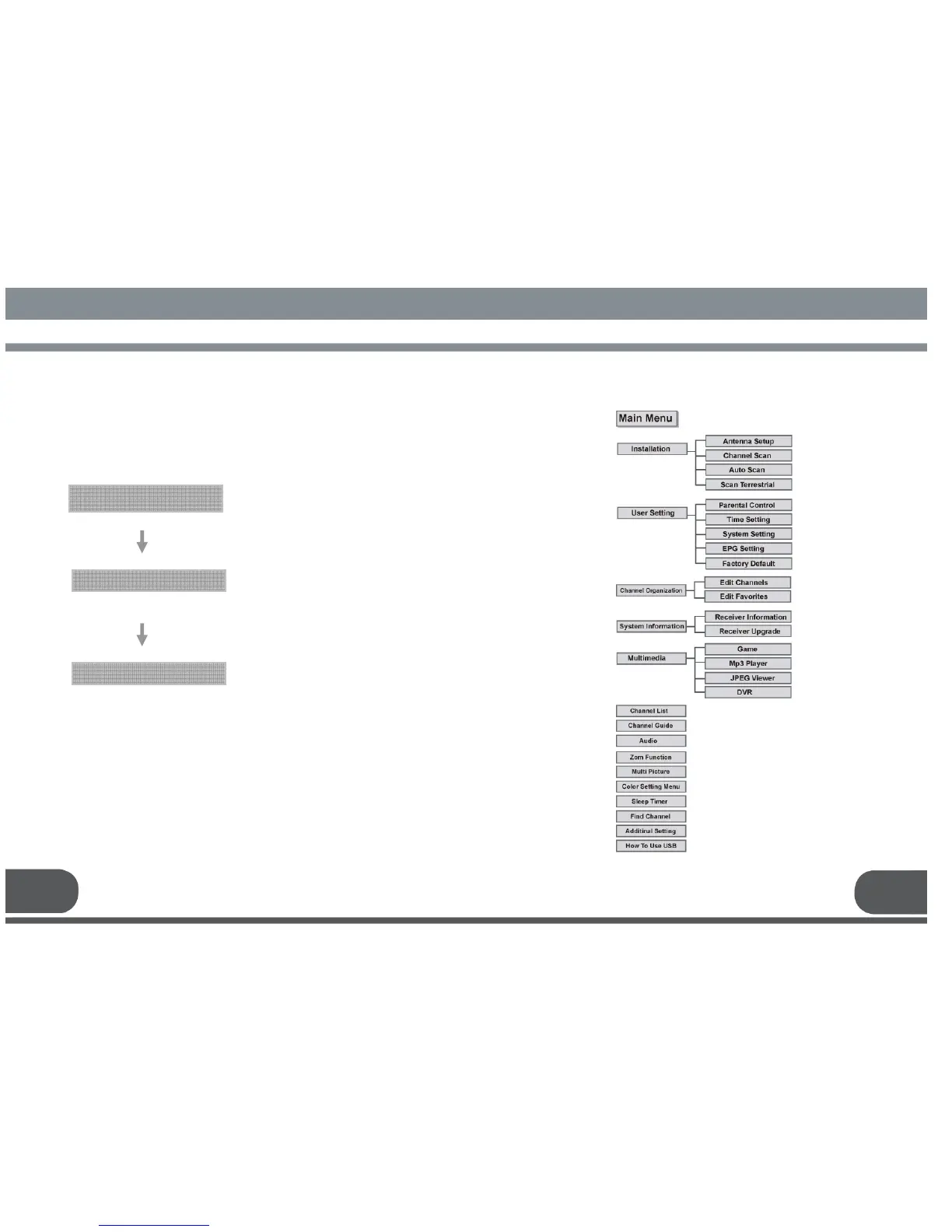
MENU STRUCTURE
ENU STRUCTUREENU STRUCTURE
ENU STRUCTURE
6
.
MENU STRUCTURE
5
.
2
. Manual
C
hannel
S
earch for
T
ransponder
You can automatically search and save all TV and radio channels of
a transponder as follows :
Select the satellite which you want to search.
Main Menu
/ Installation
/
Channel Scan
Antenna Configuration Setting
Select Menu / Installation / Channel Scan.
Insert all information of your antenna.
Manual Channel Search
Select the transponder from the transponder list
you want to search.
If you cannot find it from the transponder list,
insert all transponder information
(i.e., Channel no, Frequency, and Bandwidth).
Press the OK key, and the receiver will
automatically search for all channels of the
selected transponder.

Related product manuals