TECHNICAL SUPPORT 1 800 908 0884
8
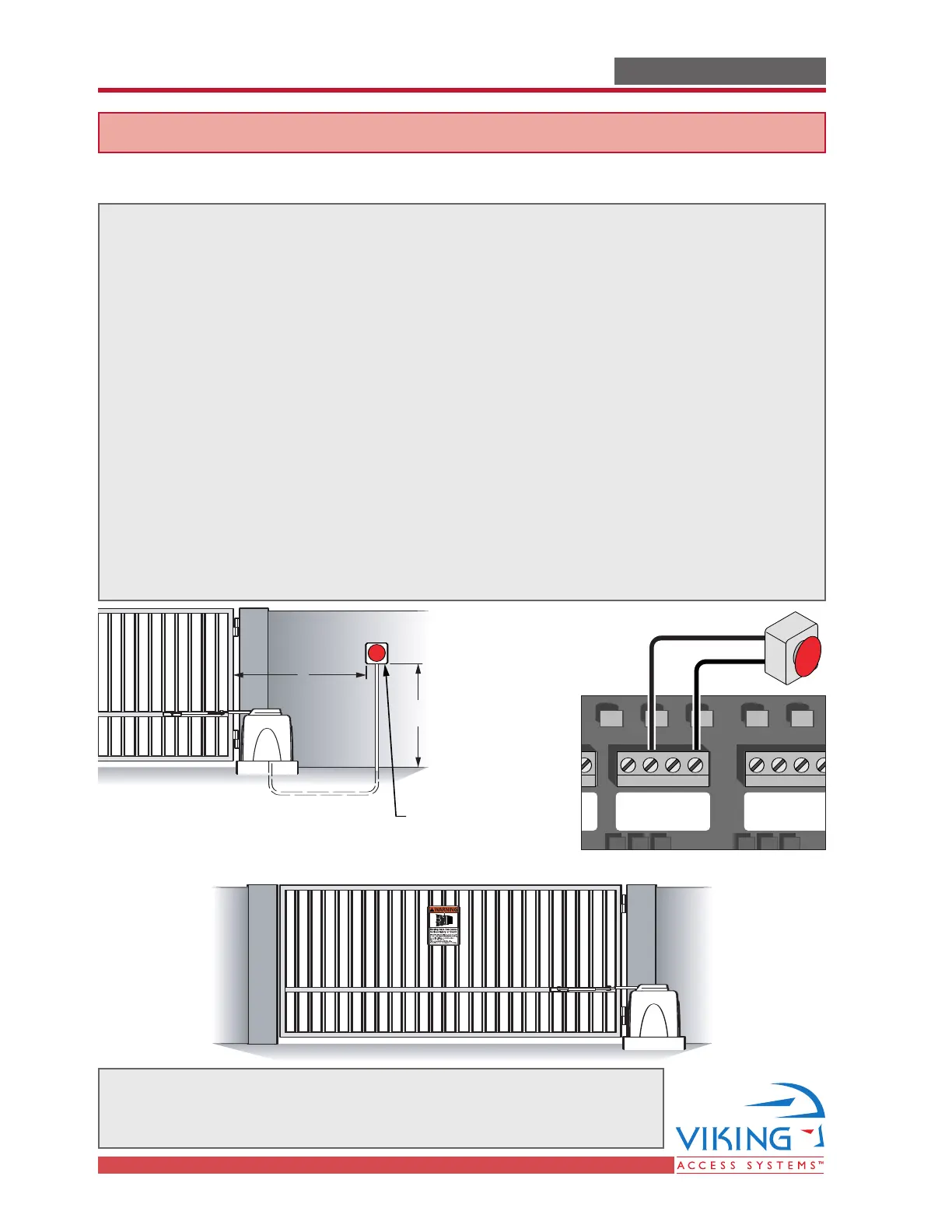
Audible Alarm Reset Switch Installation
Manual Reset for the Audible Alarm
UL325 standard requires an audible alarm to go off after two consecutive events
detected by the primary entrapment protection of the gate operator (obstruction sensor).
The audible alarm will continue to sound for 5 minutes or until a stop command
gets actuated.
The Stop command can be actuated in two different forms
1. Using the Built in Stop switch on the Control Box or
2. Using an External Stop button within the sight of the gate, away from moving
parts of the gate and out of reach of children.
3. Controls intended for user activation must be located at least six feet (6’) away
from any moving part of the gate and where the user is prevented from reaching
over, under, around or through the gate to operate the controls. Outdoor or easily
accessible controls shall have a security feature to prevent unauthorized use.
4. The Stop and/or Reset button must be located in the line-of-sight of the gate.
Activation of the reset control shall not cause the operator to start.
WARNING - Not following these instructions may cause severe injury or death to persons.
IMPORTANT SAFETY INFORMATIONIMPORTANT SAFETY INFORMATION
Warning Placard Installation
Manual Stop
Button
5'
Minimum
STOP
6'
All Warning Signs and Placards must be installed where visible in the area
of the gate. A minimum of two placards shall be installed. A placard is
to be installed in the area of each side of the gate and be visible.
Radio Station
Mag.
Lock
Mag. Lock
Safety ConnectorOpen CommandsGuard StationMaster/Slave
Brake
UL
Siren
Radio
Rec.
UL
Sensor
OPEN RIGHT
OPEN LEFT
Safety
Loop
Center
Loop
Obstruction
Sensor
Charger
Power
Low Battery
Motor Sensor
Hold Open
Timer
Stop
Overlap Delay
Close Open
Obstruction
Sensor
min.MAX
Overlap Delay
1.5
0
3
Radio Station
Loop Connector Open Commands Guard Station
Master/Slave
GND
Close
Stop
Open
GND
Close
Stop
Open
Gnd
Fire
Gnd
Strike
Gnd
Exit
Gnd
Center
Gnd
Reopen
Gnd
UL
Gnd
+28v
Gnd
Radio
Gnd
+28v
+28v
Mag.
Lock
Fail Safe/Secure
Mag. Lock
N.C.
COM
N.O.
Charger
Power
Low Battery
Motor Sensor
Hold Open
Timer
Stop
CloseOpen
LimitLimit
30sec
60secoff
1sec
Radio
Rec.
UL
Sensor
Safety
Loop
Center
Loop
Brake
UL
Siren
Obstruction
Sensor
min. MAX
Overlap
Delay
1.5
0
3
Mag.
Lock
Fail
Safe/Secure
Hold Open
Timer
Stop
Close
Open
30
60
Off
1
Radio
Rec.
UL
Sens
Safety
Loop
Center
Loop
Brake
Siren



 To Next Page