Installation & User Manual System CTB-100V
13
3.4 Power supply requirements
24VDC -10% + 33% (21,6 – 32VDC) Current consumption max. 4A
System power supply should be wired and fused independently from other systems.
1. 24V DC from ships 24V DC system.
2. 24V DC from power supply SPS-4 230V AC /.24V DC with automatic switch to 24V DC emergency power
supply.
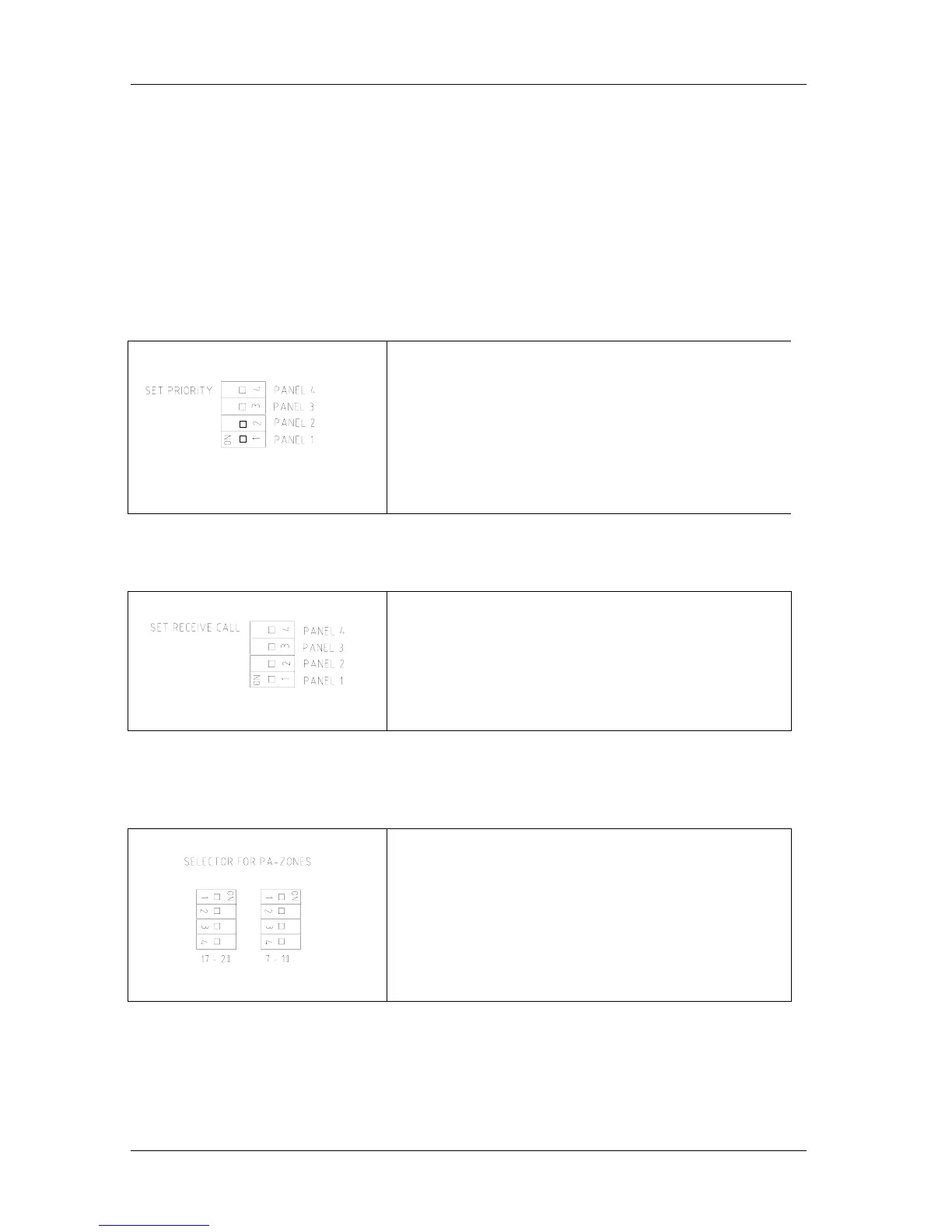
3.5 Set priority in CU-100 & CU-200
Ref. drawing CU-100_lo and CU-200_lo
DIP-switches in the central unit.
Priority is set by 4 dip-switches, corresponding to each operation
panel 1 to 4.
If all 4 dip-switches is set to off, the priority follows a hierarchy 1
to 4 giving panel 1 highest priority.
This is standard factory setting.
What ever DIP-switch set to 1 will have highest priority, still
following the hierarchy as explained above.
Example: If DIP switch 4 is set to ON, priority will be 4-1-2-3.
If both DIP switch 1 and 4 is set to ON, priority will be 1-4-2-3.
3.6 Set receive-call from substation.
Ref. drawing CU-100_lo and CU-200_lo
Receive call from substation is set by 4 DIP-switches,
corresponding to each operation panel 1 to 4.
DIP-switch set to ON, permits the panels to receive a call from
substations.
DIP-switch 1 is set to ON for panel 1 is standard factory setting.
Example: If both DIP switch 1 and 4 is set to ON,
both panel 1 and 4 will receive a call.
3.7 Set public address zones SPA
Ref. drawing CU-100_lo and CU-200_l
Four line push buttons on the operation panel can be set to access 1
up to 4 public address zones.
PA is set by 4 DIP-switches corresponding to each push button.
DIP-switch marked 7-10 for line 7 – 10
(CTB-10 & CTB-10W_V01)
DIP-switch marked 17-20 for line 17 – 20
(CTB-20 & CTB-20W_V01)
Standard factory setting is to OFF.


 To Next Page