Installation & User Manual System CTB-100V
16
4. USER INSTRUCTIONS
4.1 Operation from the operation panel.
Up to 4 operation panels can be connected. Calls can be made from any operation panel to substations.
And calls can be made from any operation panel to another by pressing respective line button.
In this stage the called operation panel act as a substation. Calls from one operation panel will be indicated in
other operation panels. One operation panel is always decided to be a master station with highest priority and can
override operation panels with lower priority.
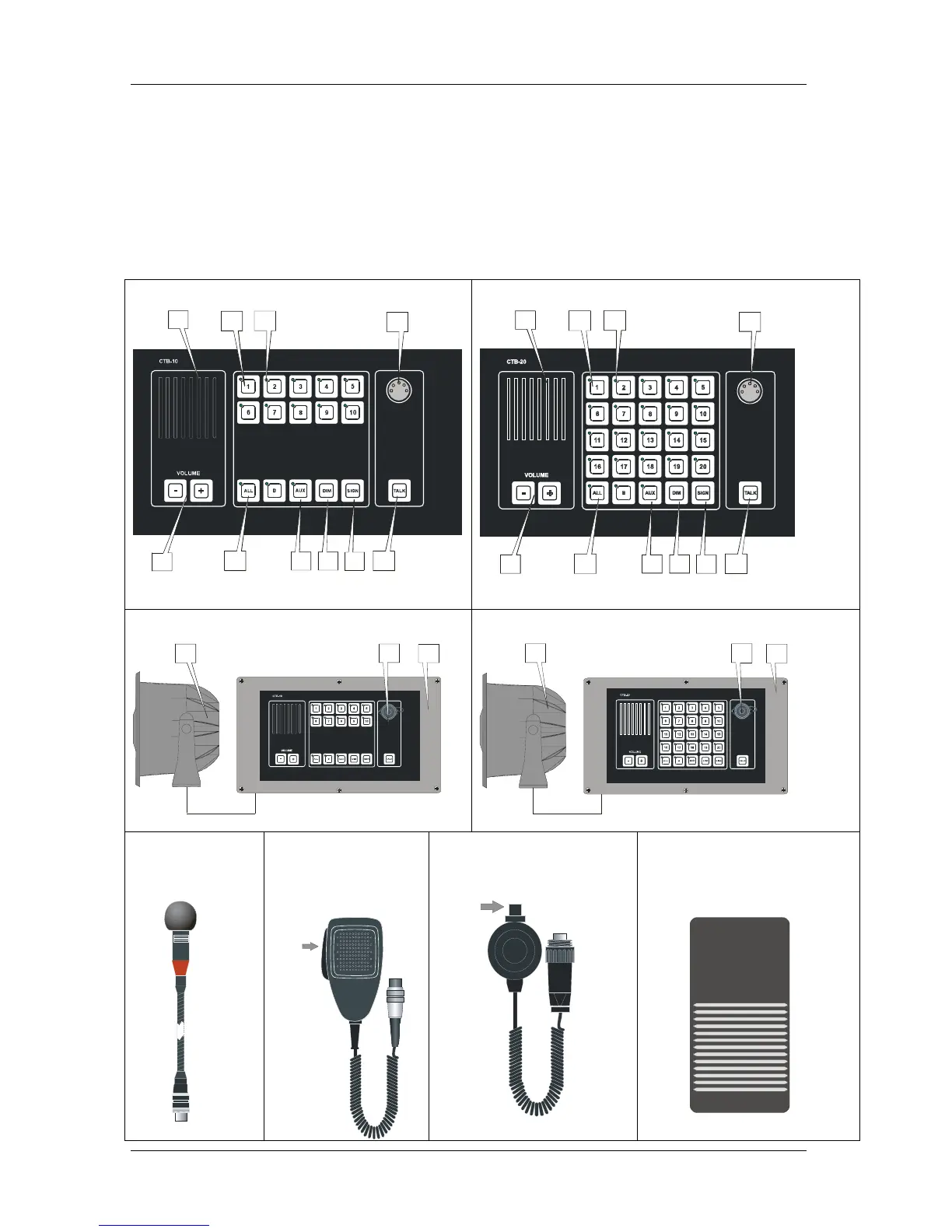
Figure 1 Operation panel CTB-10
1
2
34
11
2
34
1
4
4
2
1
2
1
10
9
8
7
6
5
Figure 2 Operation panel CTB-20
1
2
34
11
2
34
1
5
6
7
8
9
10
Figure 3 Operation panel CTB-10W_V01
11
13
12
Figure 4 Operation panel CTB-20W_V01
11
12
13
Figure 5
Gooseneck
microphone
MB-30G
Figure 6
Handheld Microphone
with switch
ETC-1-TB
PTT SWITCH
Figure 7
Handheld Microphone WP
with switch P-66
PTT SWITCH
Figure 8
Footswitch U2410


 To Next Page