20
© 2013 Directed. All rights reserved.
plained.
7. Press and hold the
button for one second, three transmit LED
flashes and three beeps indicate remote is ready to pair.
8. Press the
button.
9. Wait several seconds as the remote generates a security encryp-
tion and sends it to the Control Center. The siren chirps and the
LE 2-way remote control emits several tones to indicate Pairing is
complete (there is no audible confirmation with the 1-way).
If pairing is not successful press and release the
button once
and then repeat steps 7 and 8.
Pairing will exit if:
s Step 7 is not completed within 60 seconds
s The doors are closed
s The ignition is turned off.
Remote Features
Enter programming to access the main menu as previously explained,
then press and hold the
button to access the remote operation
features, two transmit LED flashes and two beeps indicate the remote
features menu is accessed. Press the buttons indicated in the tables
below to set the feature option.
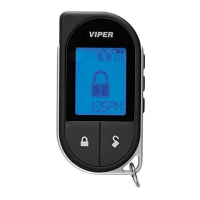
Responder LE
The confirmation LED’s next to the button indicate the feature settings.
Feature Button
Press
LED on LED off LED Flash LED Double
Flash
Keypad Lock
Auto Off
Remote Beeps
Beeps On Beeps Off Triggers
only



 To Next Page