INSTRUCTION FOR USE ENGLISH
10
OPERATING GUIDE
WARNING!
On some points of the machine there are some adhesive plates indicating:
– DANGER!
– WARNING!
– CAUTION!
– CONSULTATION
While reading this Manual, the operator must pay particular attention to the symbols shown on the plates. Do not cover these
plates for any reason and immediately replace them if damaged.
BRUSH/PAD-HOLDER INSTALLATION AND REMOVAL
NOTE
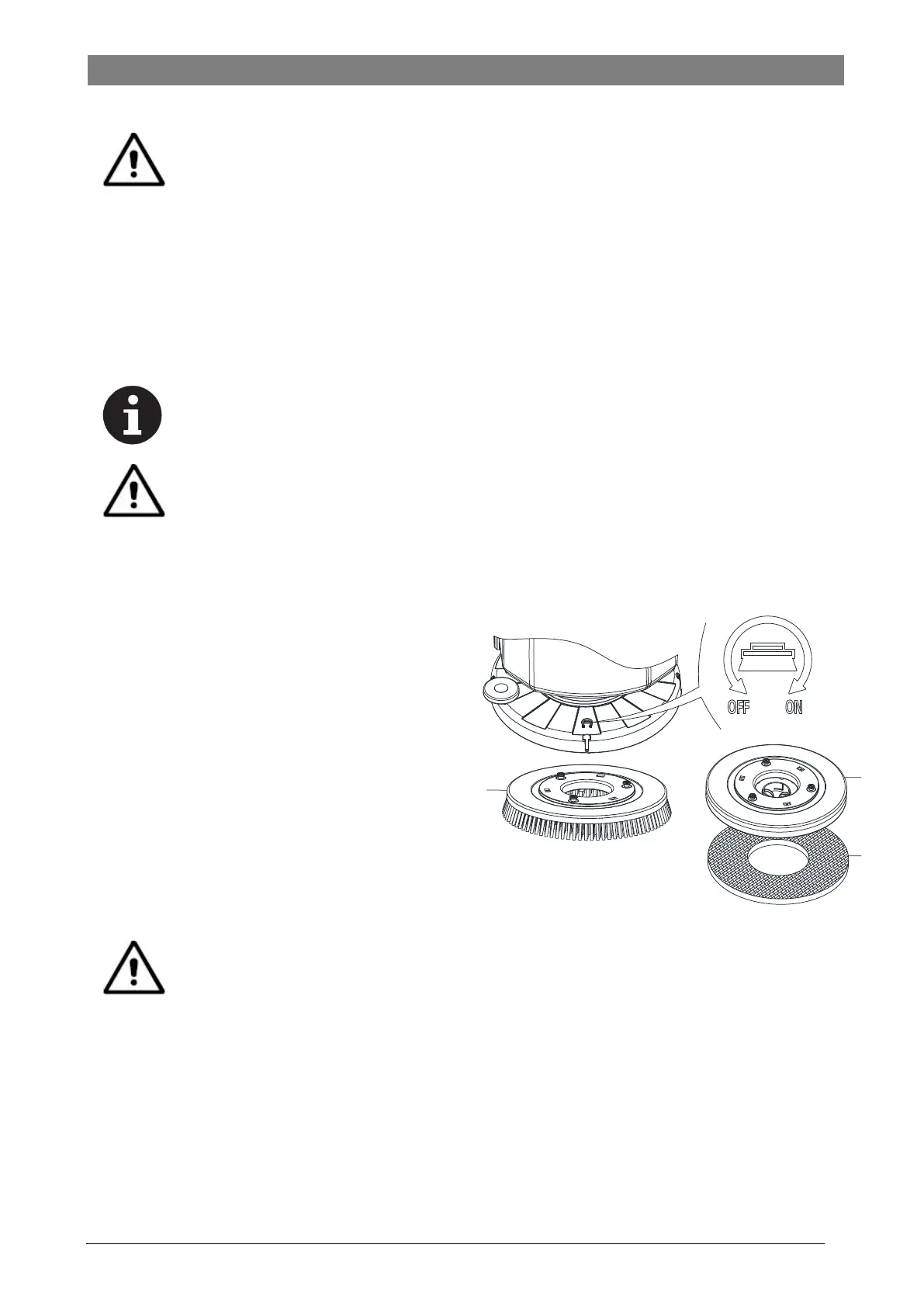
Install either the brush (A, Figure 3) or pad-holder (B and C, Figure3) according to the type of floor to be
cleaned.
CAUTION!
Before installation or removal of brush or pad-holder, make sure all the switches on machine are in off position
and lifting up the squeegee and the brush/pad-holder deck from the floor. The operator must be equipped with
suitable personnel protection devices such as gloves to reduce the risk of accidents.
Proceed as following:
1. Shut off the power switch (39, Figure 2).
2. Lift the deck by pressing the pedal (36, Figure 1).
3. Place the brushes (A, Figure 3) or the pad-holder (B, Figure
3) under the deck (12, Figure 1).
4. Lower the deck on the brushes/pad-holders by pressing the
pedal (36, Figure 1).
5. Press the start switch (39, Figure 2).
6. Press one of the Brush/forward gear safety switch lever (2,
Figure 1) to engage the brush/pad-holder, then release it. If
necessary, repeat the procedure until the brushes/pad-
holders are engaged.
7. If Step No.6 above proves to be difficult, use the manual
method by turning the brush/pad-holder in the direction
opposite to the normal turning direction (ON) to install the
brush/pad-holder. (as shown in Figure 3)
Figure 3
A
B
C
WARNING!
To engage the brush/pad-holder press the safety switch lever (2, Figure 1) which turns on the brush/pad-holder
motor.
8. To remove the brush/pad-holder lift the deck by pressing the pedal (36, Figure 1), then manual method by turning the brush/pad-
holders in the opposite direction (OFF), the brush/pad-holder will be removed.
Figure 3


 To Next Page