INSTRUCTION FOR USE ENGLISH
13
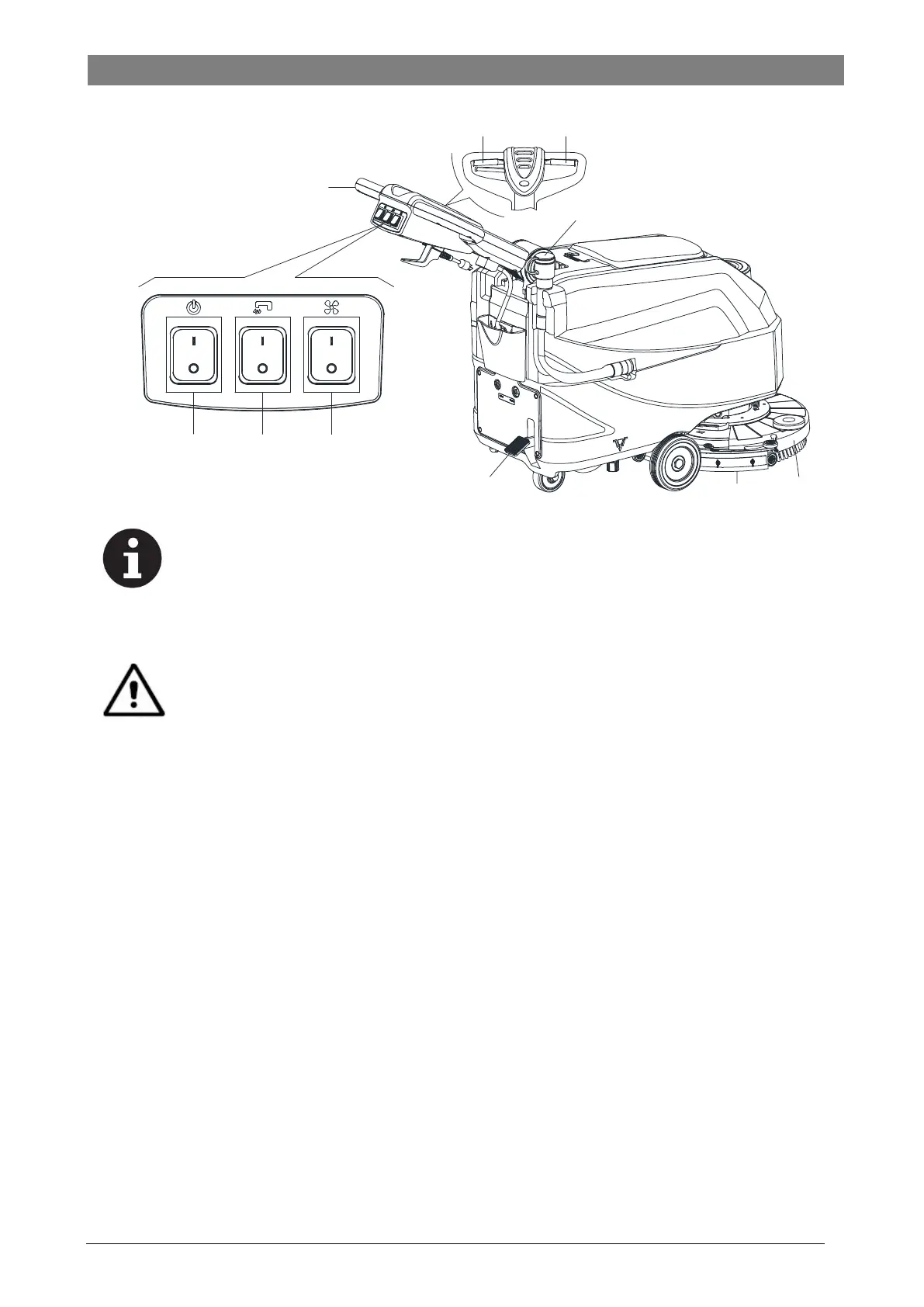
Figure 7
A B
C
D
F
G
H
I
NOTE
To move the machine forward, press either the left or right safety switch lever (E, Figure 7) or both.
8. If necessary, press the handlebar adjusting lever (3, Figure 1) to adjusting the handlebar height.
9. If necessary, trun off the machine, and adjust the solution flow with the ball valve handle. (Refer to the steps for adjusting solution
flow.)
CAUTION!
In order to avoid damaging the floor, when the machine stays in one place without moving, remove hands from
switches & turn off the main power switch (A).
Stopping the machine
10. Stop the machine by using the handlebar (D, Figure 7).
11. When you have finished using the machine, release the safety switch lever (E) to rurn off the brush/pad-holder and solenoid valve.
12. Press the solution control switch (B) to the “OFF" position to completely turn off the solution flow.
13. Press the Vacuum switch (C) to the “OFF” position. The vacuum system stops after a few seconds.
14. Press the power switch (A) to the “OFF” position. And disconnecting the power cord (30, Figure 1) from the power supply.
15. Lift the brush/pad-holder deck (I, Figure 7) and the squeegee (H) by pressing the pedal (G).
16. Make sure that the machine cannot move independently.
MACHINE OPERATION (SCRUBBING AND DRYING)
1. Start the machine as shown in previous paragraphs.
2. While keeping both hands on the handlebar press the safety switch lever (E, Figure 7), then maneuver the machine and start
scrubbing/drying the floor.
3. If necessary, trun off the machine, and adjust the solution flow with the ball valve handle. (Refer to the steps for adjusting solution
flow.)
Figure 7


 To Next Page