21
Viscount Physis OrgansReference Manual
N.B.
- For further information about the MIDI interface, read chapters 10.5, 14.5 and 14.6.
- For further information about the USB devices and internal memory, read chapter 11.
21. General organ controls.
These are the controls that are not dedicated to a single section, but affect the whole instrument.
- [MEM. BANK +] and [MEM. BANK - ]: select the memory bank shown on the additional display
[MEM. BANK] (point 13).
- [ENC]: when the Enclosed function is active, the main volume can be controlled through the expression
pedal [MAN.III] (for three- and four-manual models), or [MAN.II] (for two-manual models).
- [A.P.]: activates the Automatic Pedal or the Pedal Automatic Piano functions. Select the mode of the
piston among the PROGRAMMABLE FUNCTIONS under the SET-UP menu (see par. 9.5).
- [T] or [TUTTI]: piston or toe piston (where available) that recalls Tutti. The Tutti can be modified,
for further information read point 20.
- [C]: cancel piston. Turns off all stops, tremolos, couplers, MIDI controls, and other pistons on the
manuals (except when differently set through the PROGRAMMABLE FUNCTIONS, described in
par. 9.5), then deletes and reboots the general and division HR .
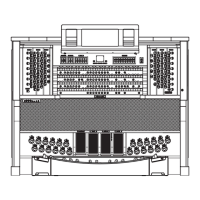
22. Forward connection panel.
In this panel you can find the most frequently used connections and controls.
- [MASTER VOLUME]: regulates the main volume.
- [REVERB VOLUME] regulates the volume of the reverb effect.
- MIDI [IN]: MIDI input port.
- MIDI [OUT]: MIDI output port.
- MIDI [THRU]: sends out the MIDI data received from the [IN] port to additional MIDI units.
- [USB]: two USB ports. The right port links the organ to a computer, in order to run the computer
program “Physis – The Editor”. The left port is dedicated to USB pen drive (not included with
theorgan) to use as memory disk, instead of the internal memory.
- [PHONES]: plug for a headphone set.
23. Roll top lock.
24. Coupler controls.
Pistons, tabs and stops to enable and disable the couplers.
25. Reverse Pistons.
Each of these pistons, when active, deactivates several functions and stops, without acting on the normal
pistons dedicated to these functions and stops. Thanks to the reverse pistons it is possible to switch on/
off several stops and functions quickly and at the same time. When the reverse pistons are deactivated,
the functions will be re-activated.
- [MIDI REVERS.]: turns off all the MIDI controls (see points 10 or 1, 2, 3, 4, 5).
However, even when MIDI REVERS. is active, it is still possible to program the MIDI controls.
- [32’ FLUTE REVERS.]: deactivates all 32’ flutes.
- [32’ REED REVERS.]: deactivates all 32’ reeds.
26. [CRESCENDO] pedal.
With this pedal you can select the Crescendo level. These levels activate a fixed set of stops, linked with
an equal number of loudness, from pianissimo to for tissimo. The current level is shown on the additional
[CRESCENDO] display (see point 13). The Crescendo controls all the registers, and modifies the stops
configuration. Each level of the crescendo can be programmed. To save the Crescendo configuration,


 To Next Page