80
Viscount Physis Organs Reference Manual
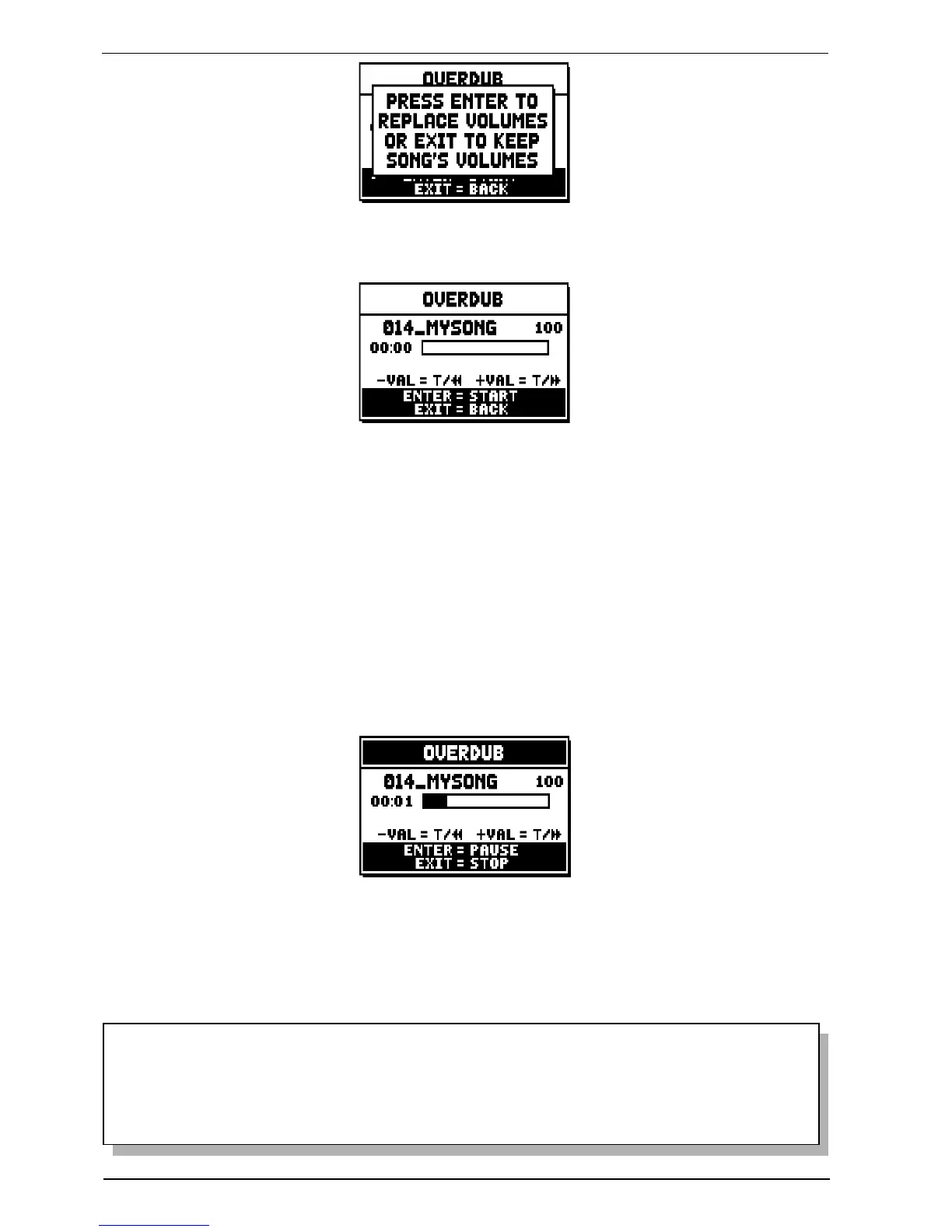
Now the sequencer is ready to overdub:
The screen carries information about the functions of the buttons:
- [ENTER]: start recording.
- [EXIT]: leave the sequencer.
- [VALUE -]:(press once): decrease play /recording speed. It can be seen on top left as percentage (100 in
the picture above).
- [VALUE +] :(press once): increase play / recording speed. It can be seen on top left as percentage (100
in the picture above).
- [VALUE -]: (press and hold): rewind.
- [VALUE +]: (press and hold): fast forward.
As the recording begins, the controls change again:
- [ENTER]: pause / start recording.
- [EXIT]: stop recording.
[VALUE +] and [VALUE -] maintain the functions described above.
NOTES
- When overdubbing tracks with changing tempo, it is impossible to rewind or Fast Forward
while recording. However, it can be done when paused.
- After the overdubbing has been started, it is impossible to change the play speed. However, it
can be done when paused or stopped.


 To Next Page