81
Viscount Physis OrgansReference Manual
ORIGINAL
05:20
OVERDUB
03:10
NEW
05:20
ORIGINAL
05:20
OVERDUB
03:10
NEW
03:10
ACCEPT TRIM AND ACCEPT
ORIGINAL
05:20
OVERDUB
06:00
NEW
06:00
ORIGINAL
05:20
OVERDUB
06:00
NEW
06:00
1 1
2 2
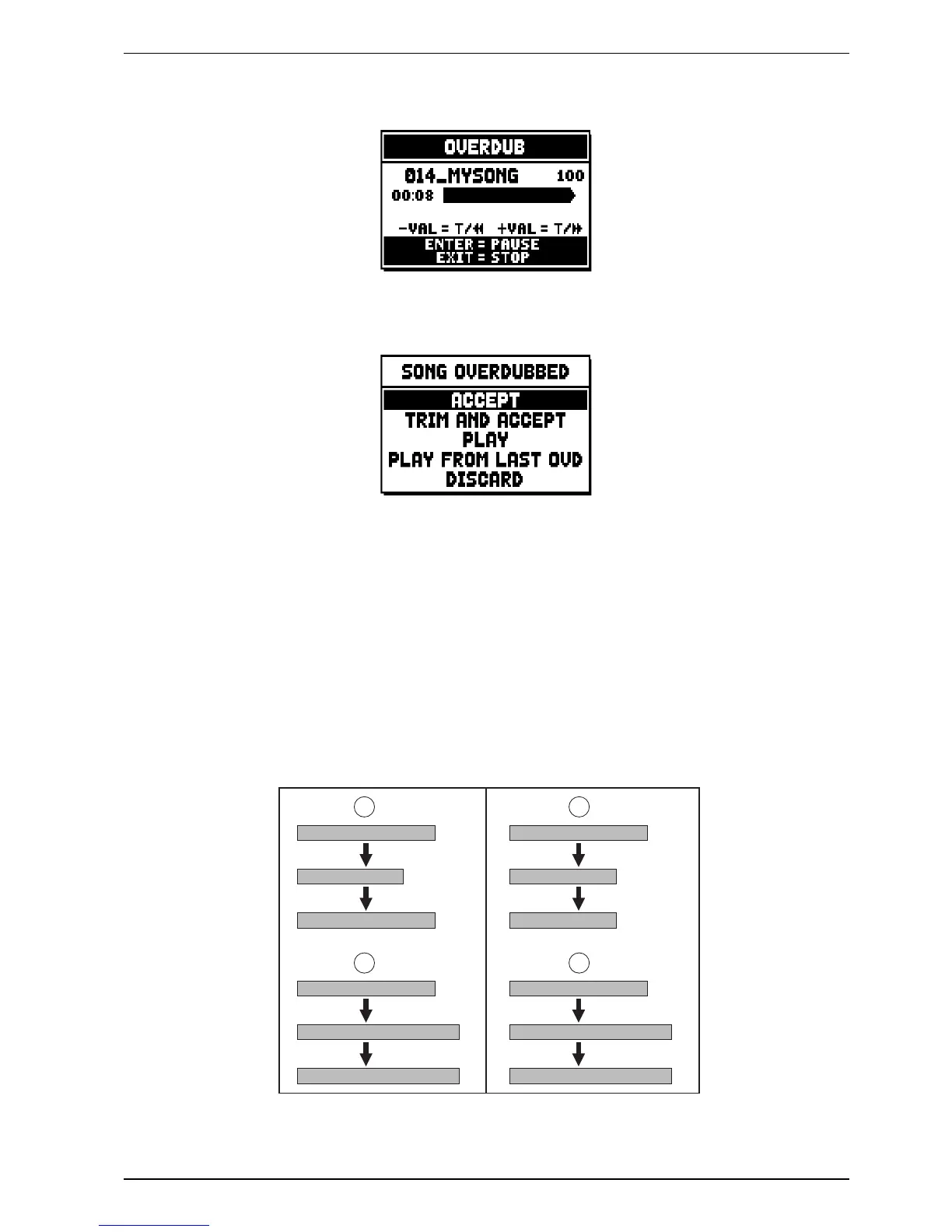
Note that when the original piece ends, the overdubbing does not stop. To warn you of this, the advancement
bar changes to:
Press [EXIT] to quit the recording. The system will ask you to accept the overdubbing:
You can choose one of the following options:
o ACCEPT: accept the overdubbing. In case the overdub track is shorter than the original piece, it will not
be shortened.
o TRIM AND ACCEPT: accept the overdubbing. If the overdub track is shorther than the original piece,
this will be trimmed to end together with the overdubbing.
o PLAY: play the piece with the overdubbing, so as to assess the track. The changes will not be saved yet.
o PLAY FROM LAST OVD (overdub): plays the piece, starting from the first event of last overdubbing,
so as to assess the track. The changes will not be saved yet.
o DISCARD: discards the overdubbing.


 To Next Page