13
SCHEDULE SETUP
SCHEDULE SETUP
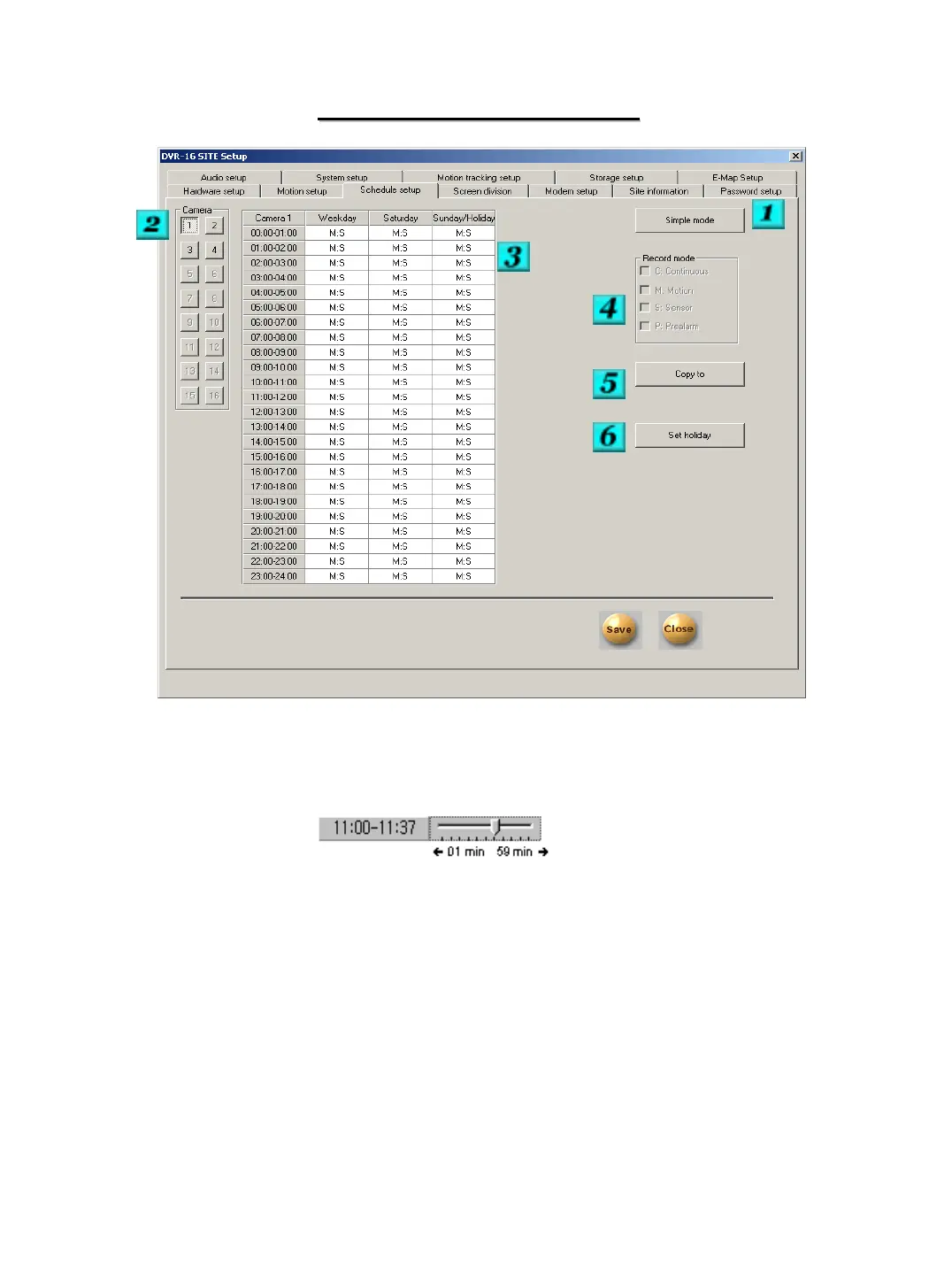
# 1 – Mode – Clicking here will allow you to select the mode of the schedule.
Simple Mode will allow you to select the recording mode based on the hour of the day.
Advanced mode will allow you to select the recording mode more precisely. You can
modify the time by clicking on the time box and adjusting the slide bar.
# 2 – Camera – Choose the camera that you would like to modify the schedule of.
# 3 – Schedule Range – Select the ranges that you would like to modify.
# 4 – Record Mode – Select the recording method for the range that you have selected. You
can choose from Continuous; Motion; Motion with Sensor; Motion with Sensor and Pre-Alarm;
Sensor; Sensor and Pre-Alarm; and None.
# 5 – Copy To – You can choose to copy the schedule from the selected camera to other
available cameras and even to all the other cameras.
# 6 – Set Holiday – Clicking on this button will allow you to enter Holidays for the system. On
the Holidays you assign the system will use the Sunday/Holiday recording method list.


 To Next Page