22
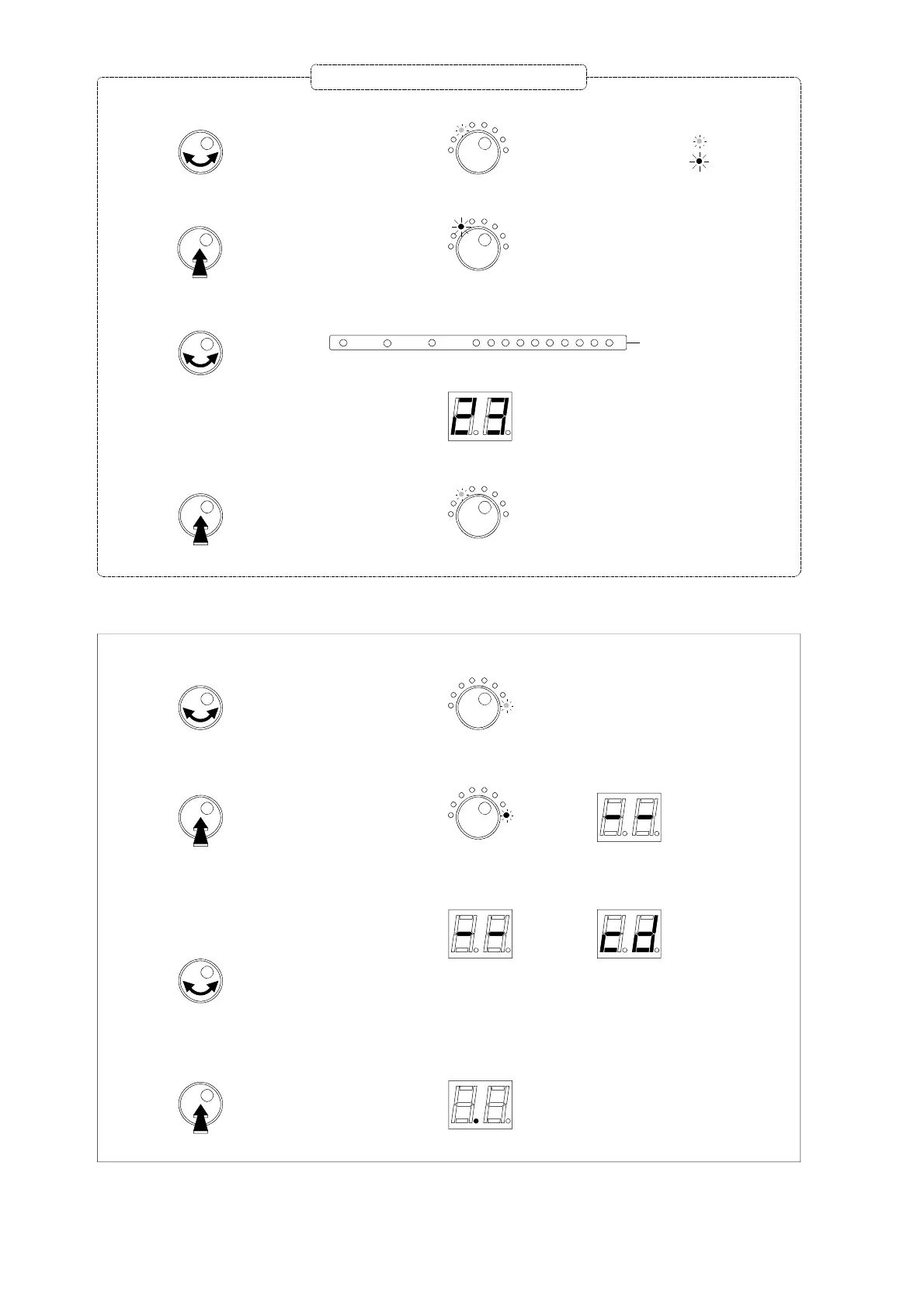
- Turn the button to select
Exit
mode.
Exit
- Push the button more than 3 seconds to confirm.
Note :
The amplifier will go in "stand-by" and will display a dot after 1 minute if the rotary / push button is not activated.
Exit programming mode
The LED is green.
Exit
The LED is red and 2 dashes are displayed
- Turn the button to select
or
Free access
to progamming
mode
Access to
progamming mode
with security code "50"
- Push the button to confirm.
A dot is displayed
- Turn the button to select the desired mode.
- Push the rotary button to enter the selected mode.
- Inside the mode, turn the button to select the parameter (input, cluster, channels, level...)
- Push the button to confirm the parameter setting.
Mode is indicated with
a GREEN colored LED.
The LED is now RED colored.
Display
LED returns to a GREEN color.
= green LED
= red LED
Repeat this section to set all parameters
3sec.
1
2
3
4
5
6
7
8
9
10
UHF Clusters
I-II
III
VHF-UHF
Input and Cluster LEDs


 To Next Page