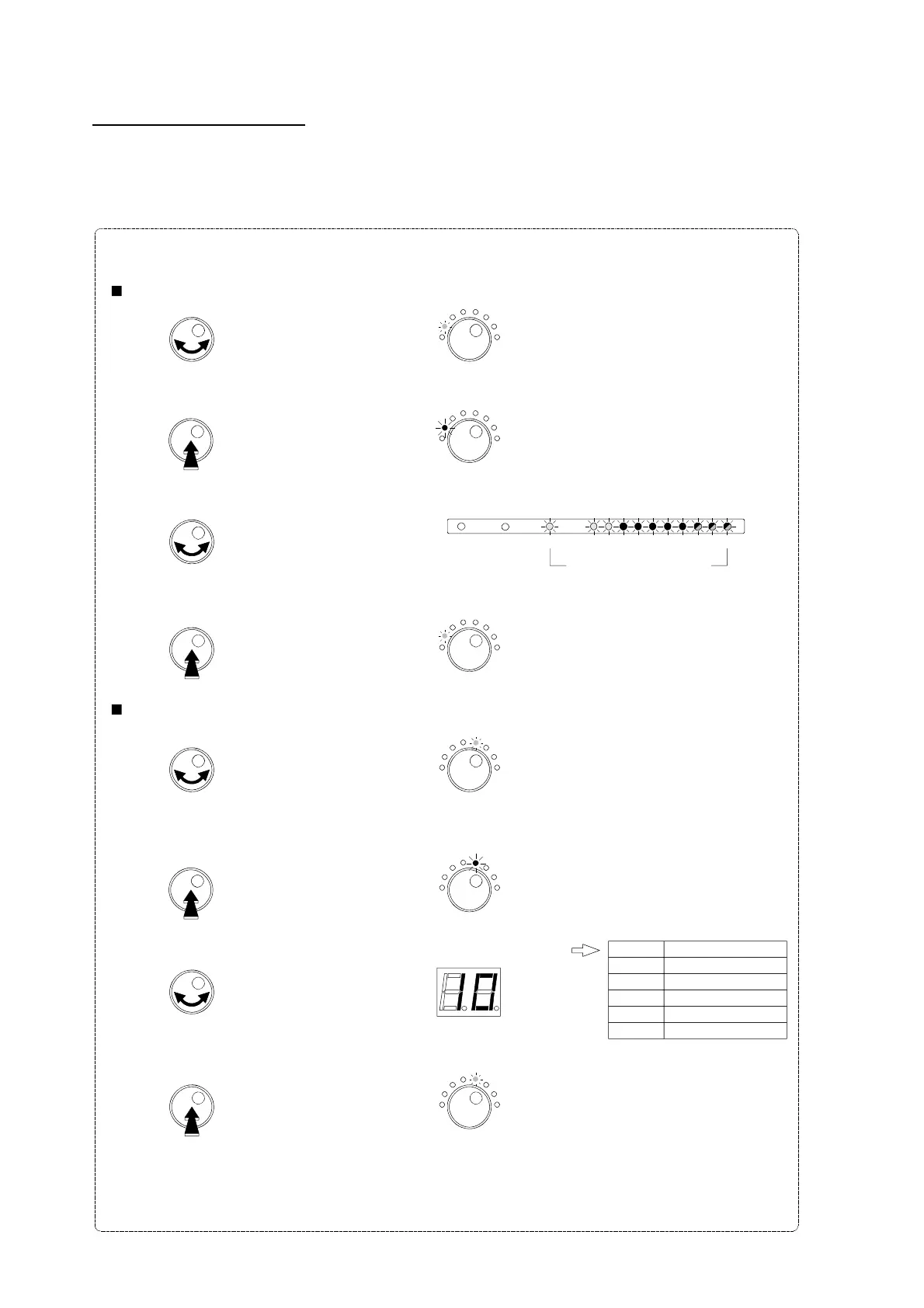
General UHF output level setting
After automatic level setting procedure, the general level of the UHF signals (clusters and the UHF part of the
VHF-UHF input) can be adjusted from +10 dB to -9 dB in steps of 1 dB.
- Select all the clusters and VHF-UHF.
- Turn the button to choose the
Select Filter
mode.
- Push the rotary button to enter the selected mode.
The LED is now RED colored.
Select Filter
The LED is green.
- Turn the button to select all UHF.
1
2
3
4
5
6
7
8
9
10
UHF Clusters
I-II
III
VHF-UHF
All LEDs are activated
- Push the button to confirm.
The LED is green.
- Turn the button to select the
Manual Level
mode.
- Push the rotary button to enter the selected mode.
The LED is now RED colored.
Manual Level
The LED is green.
Manual Level
- Turn the button to set the general level, variable from +10 dB to -9 dB.
- Push the button to confirm.
The LED is green.
Manual Level
Select Filter
Select Filter
29
Value
0
+5
+10
-5
-9
Output level
100 dBµV
105 dBµV
110 dBµV
95 dBµV
91 dBµV


 To Next Page