20 DE5467IP
OK
NEXT
X-10 GENERAL DEFDEFINE INT/STRB
OK
NEXT
X-10 UNIT DEFINE
NEXT
OK
OK
SET HOUSE CODE
OK
device No. - -
OK
D- -: TYPE/FEATURE
NEXT
OK
OK
internal siren
strobe
OK
DEFINE PGM
(enter device No.)
house code =A
house code =B
house code =P
OK
OK
OK
NEXT
OK
OK
OK
OK
OK
OK
OK
OK
OK
(*)
PGM
NEXT
OK
(*)
PGM
NEXT
disable
turn on
pulse active
turn off
Dxx: BY DELAY
disable
turn on
pulse active
turn off
disable
turn on
pulse active
turn off
toggle
Dxx: BY KEYFOB
disable
turn on
pulse active
turn off
disable
turn on
pulse active
turn off
disable
turn on
pulse active
turn off
OK
OK
OK
OK
(*)
(**)
PGM
Dxx: BY ZONES
x - zone Z: _ _
(ENTER ZONE NUMBERS)
disable
turn on
pulse active
turn off
toggle
(SELECT BY “NEXT” OR ”BACK”)
a - zone
c - zone b - zone
OK
OK
OK
Note:PGM BY LINE FAIL function is
applicable for PGM only - not for X-10.
by line fail no
by line fail yes
PGM: BY LINE FAIL
NEXT
(*)
PGM
Dxx: BY DISARM
NEXT
(*)
PGM
NEXT
(*)
PGM
NEXT
(*)
PGM
NEXT
Dxx: BY ARM AWAY Dxx: BY ARM HOME Dxx: BY MEMORY
NEXT
OK
OK
pulse time 2s
pulse time 30s
pulse time 4m
pulse time 2m
Dxx: PULSE TIME
(*)
PGM
OK
(First display is READY
or NOT READY)
READY 00:00
NORMAL MODE
NEXT
USER SETTINGS
NEXT
NEXT
ENTER CODE
1. NEW INSTL CODE
NEXT
2. ENROLLING
4. DEFINE PANEL
[installer code]
INSTALLER MODE
NEXT
NEXT
NEXT
OK
3. DEFINE ZONES
5. DEFINE COMM
NEXT
INSTALLER MODE
Dxx: LOCATION
NEXT
OK
See detail “A”
(next page)
OK
attic
back door
basement
bathroom
OK
custom 5
(***)
OK
PLEASE WAIT
if already enrolled
(Turn X-10 to Learn mode)
Enter learn Mode
ONE WAY UNIT
OK
TWO WAY UNIT
OK
<OK> to Enroll
OK
test fail
enroll OKenroll fail
NEXT
test OK
Enroll FAIL
(Exit X-10 Learn mode)
OK
OK
Exit Learn Mode
PLEASE WAIT
<OK> to test
OK
HOME
<OFF> to Delete
8. DEFINE OUTPUTS
9. RECORD SPEECH
NEXT
NEXT
<OK> TO EXIT
6. DEFINE GSM
NEXT
7. DEFINE PWRLNK
NEXT
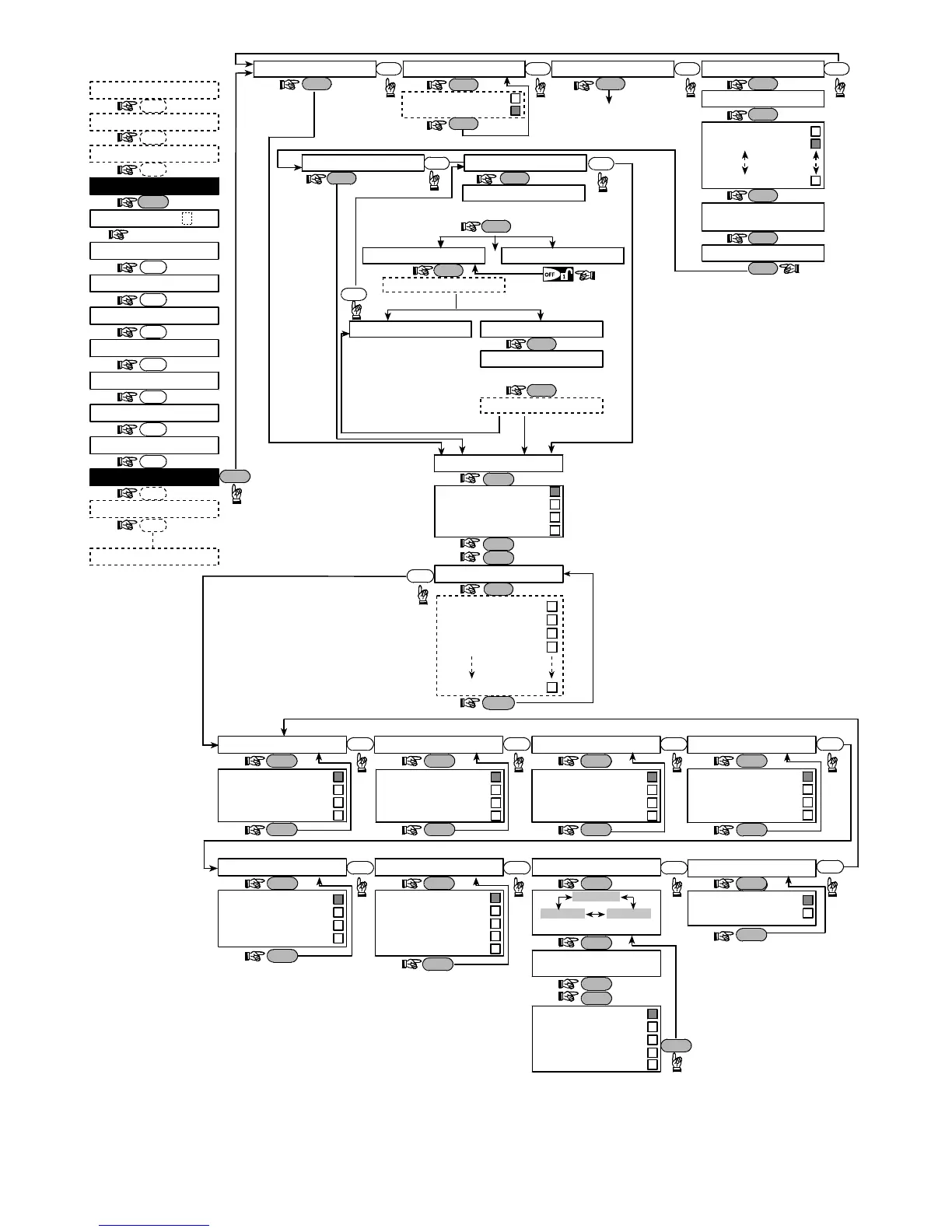
Figure 4.8 - Define Outputs Flow Chart
*
**
If PGM is selected, the letters "PGM" will be displayed instead of "Dxx".
Upon selecting any one of the 3 options (zone a, b and c) you may enter a zone number and then select "disable", "turn on",
"turn off", "pulse active" or "toggle".



 To Next Page