D
D
D
L
L
L
P
P
P
P
P
P
r
r
r
o
o
o
j
j
j
e
e
e
c
c
c
t
t
t
o
o
o
r
r
r
–
–
–
U
U
U
s
s
s
e
e
e
r
r
r
’
’
’
s
s
s
M
M
M
a
a
a
n
n
n
u
u
u
a
a
a
l
l
l
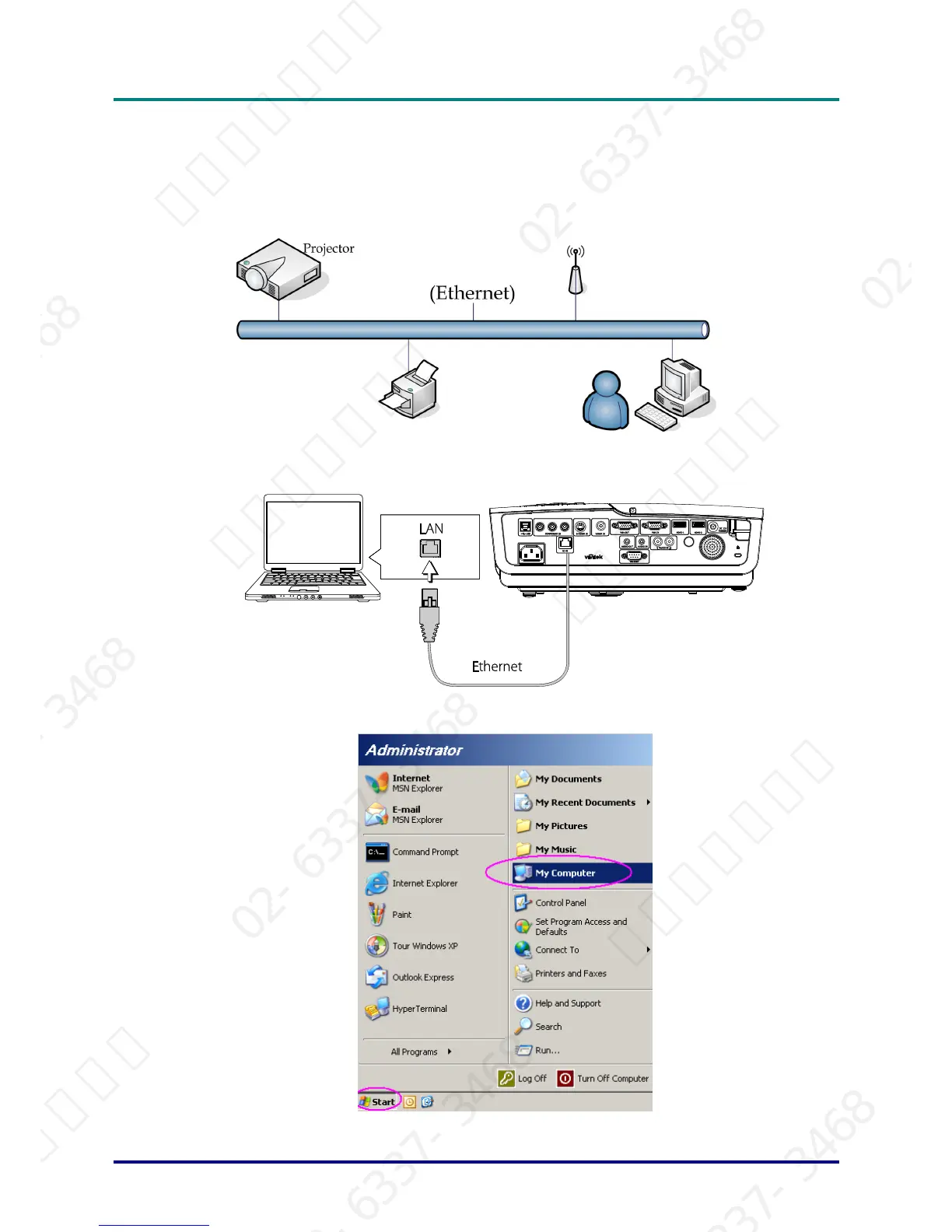
For simplicity and ease of operation, the projector provides diverse networking and remote manage-
ment features.
The LAN/RJ45 function of the projector through a network, such as remotely manage: Power On/Off,
Brightness and Contrast settings. Also, projector status information, such as: Video-Source, Sound-
Mute, etc.
1. Connect an RJ45 cable to RJ45 ports on the projector and the PC (Laptop).
2. On the PC (Laptop), select Start ´ Control Panel ´ Network Connections.
– 27 –
서울미디어테크 02-6337-3468 서울미디어테크 02-6337-3468 서울미디어테크 02-6337-3468 서울미디어테크 02-6337-3468 서울미디어테크 02-6337-3468 서울미디어테크 02-6337-3468
02-6337-3468 서울미디어테크 02-6337-3468 서울미디어테크 02-6337-3468 서울미디어테크 02-6337-3468 서울미디어테크 02-6337-3468 서울미디어테크 02-6337-3468
서울미디어테크 02-6337-3468 서울미디어테크 02-6337-3468 서울미디어테크 02-6337-3468 서울미디어테크 02-6337-3468 서울미디어테크 02-6337-3468 서울미디어테크 02-6337-3468
02-6337-3468 서울미디어테크 02-6337-3468 서울미디어테크 02-6337-3468 서울미디어테크 02-6337-3468 서울미디어테크 02-6337-3468 서울미디어테크 02-6337-3468
서울미디어테크 02-6337-3468 서울미디어테크 02-6337-3468 서울미디어테크 02-6337-3468 서울미디어테크 02-6337-3468 서울미디어테크



 To Next Page