VIVOTEK - Built with Reliability
150 - User's Manual
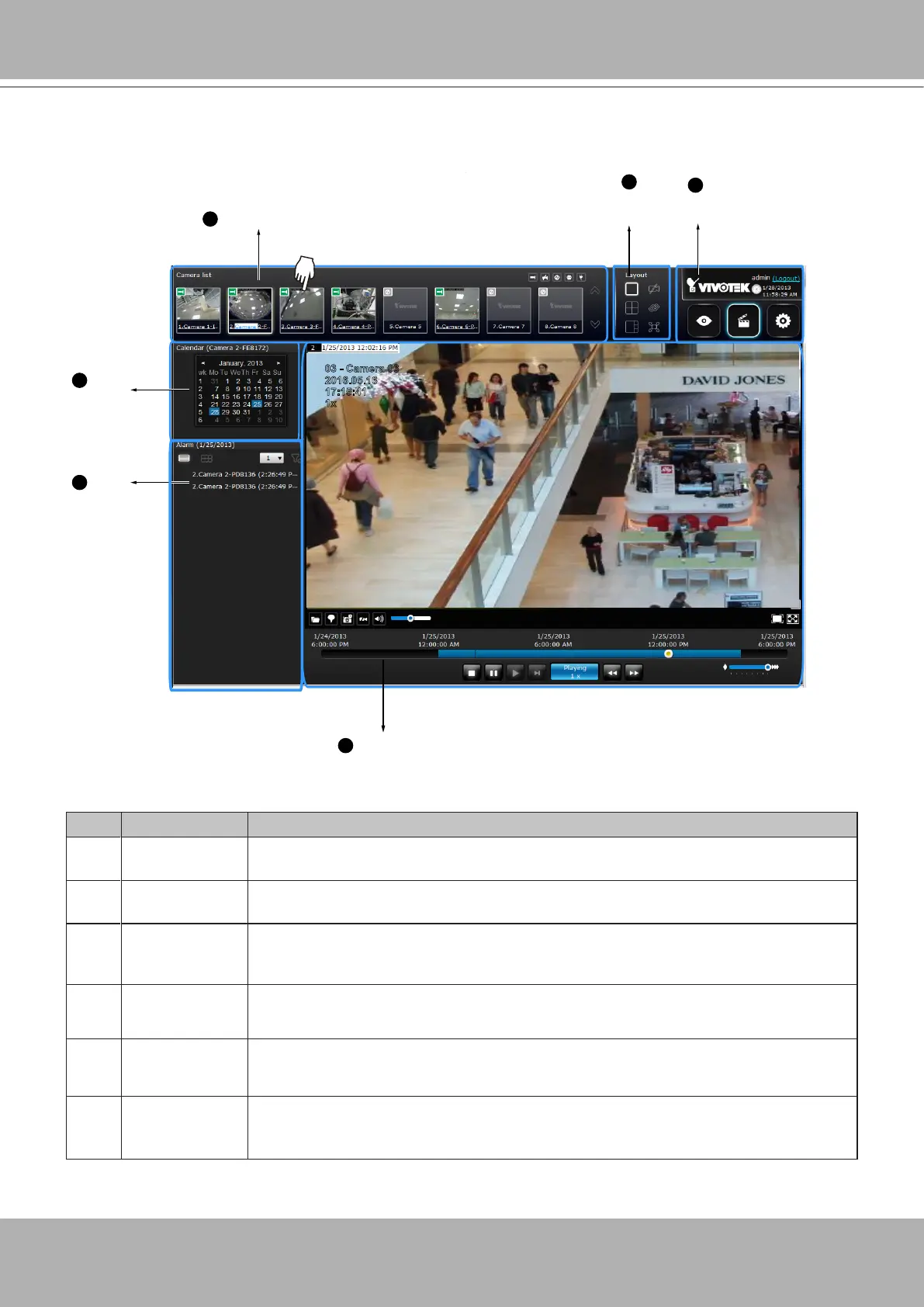
4-3. Graphical Layout and Screen Elements - Search recording
clips
Camera list
Layout
contents
Logo & Menu
Playback panel
Alarm
panel
Calendar
1
2
3
4
5
6
2016.05.16
03 - Camera 03
17:15:41
1x
The screen elements of the
Playback
window are described as follows:
Item Name Description
1
Camera List Provides a glimpse of all cameras that have recorded data. Basic information is
also provided along with a screenshot.
2
Layout contents Provides functions to extend, rotate, redo the layout, and the synchronous
playback.
3
Logo & Menu Provides access to the
Playback
and System
Settings
utilities, as well as
system time and logout function.
4
Playback panel Displays the playback functions. Snapshot, bookmark, and export functions are
also available on individual view cells.
5
Alarm panel Reports alarms transmitted via cameras' DI connections or those by the Motion
Detection, etc.
6
Calendar Shows when the recording took place, and thus enables users to quickly locate
a specic part of recording in history.



 To Next Page