6
25
E322MV
Adjusting the Audio Settings
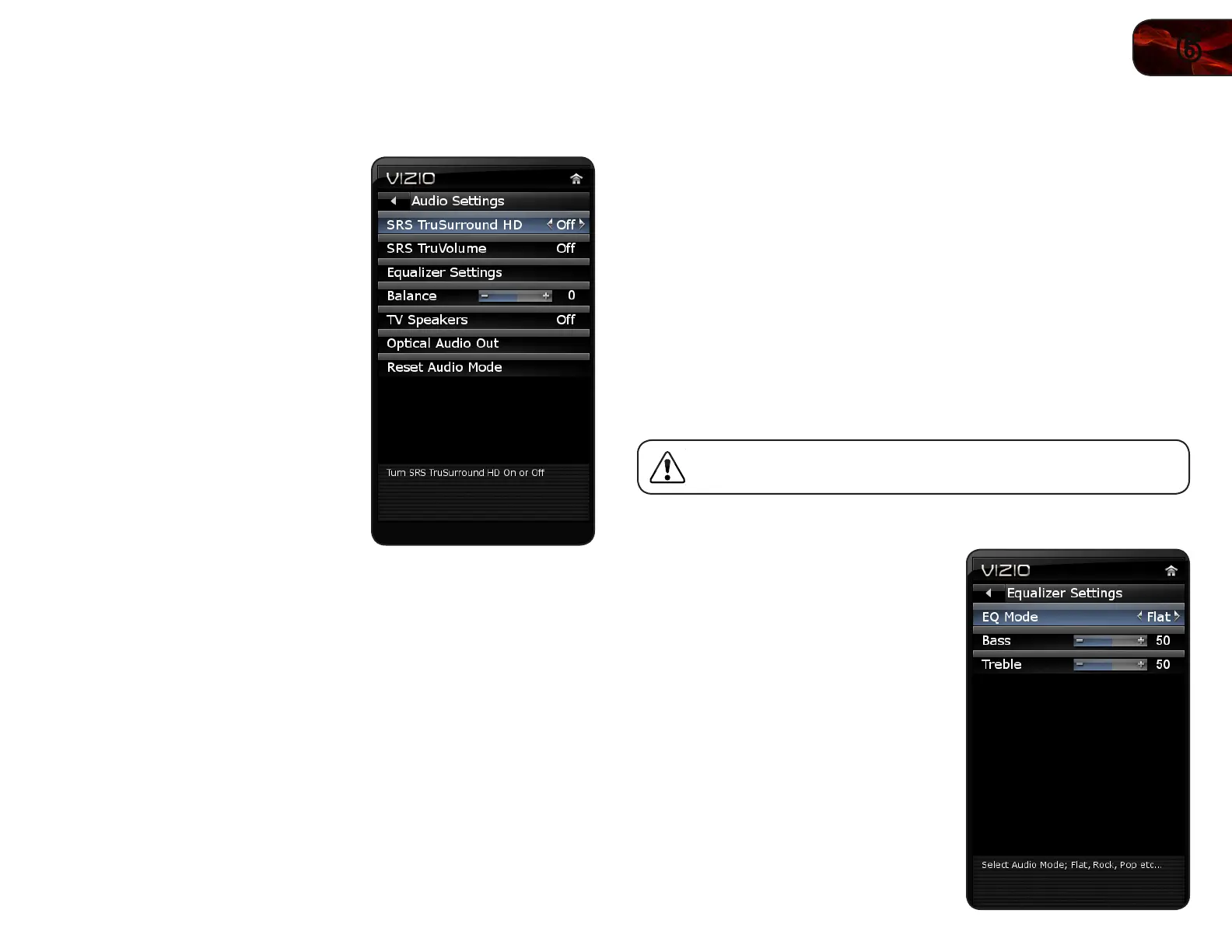
Using the Audio Settings menu, you can adjust the following:
• Enableordisable
SRSTruSurroundHD
™
• EnableordisableSRSTruVolume
™
• Adjusttheequalizersettings
• Adjustbassandtreblelevels
• Adjustspeakerbalance
• Enableordisablethebuilt-in
speakers
• Selectthedigitalaudiooutput
mode
• Resettheaudiosettings
Enabling or Disabling SRS TruSurround HD
TruSurround HD is a robust multichannel virtualization technology developed
by SRS Labs that provides an enhanced listening experience unlike any other
technology offered for a two speaker playback environment.
To enable or disable SRS TruSurround HD:
1. Press the OK button on the remote. The on-screen menu is displayed.
2. Use the Arrow buttons to highlight Audio and press OK.
3. Use the Arrow buttons to highlight SRS TruSurround HD.
4. Press the Right/Left Arrow buttons to select On or Off and press EXIT.
Enabling or Disabling SRS TruVolume
SRS TruVolume intelligently normalizes volume fluctuations due to television
commercials or channel changes.
To enable or disable SRS TruVolume:
1. Press the OK button on the remote. The on-screen menu is displayed.
2. Use the Arrow buttons to highlight Audio and press OK.
3. Use the Arrow buttons to highlight SRS TruVolume.
4. Press the Right/Left Arrow buttons to select On or Off and press EXIT.
Adjusting the Equalizer Settings
Your TV features six preset equalizer settings. These settings allow you to
customize your TV’s sound to match the type of programming you most often
enjoy.
To adjust the equalizer settings menu, SRS TruSurround HD must
be set to Off.
To adjust the equalizer settings:
1. Press the OK button on the remote.
The on-screen menu is displayed.
2. Use the Arrow buttons to highlight
Audio and press OK.
3. Use the Arrow buttons to highlight
Equalizer Settings and press OK.
4. Use the Arrow buttons to highlight one
of the following settings and press OK:
• Classical
• Disco
• Flat
• Jazz
• Pop
• Rock
5. Press EXIT.



 To Next Page