VIZIO VA220E User’s Manual
Version 12/12/2008 18
www.VIZIO.com
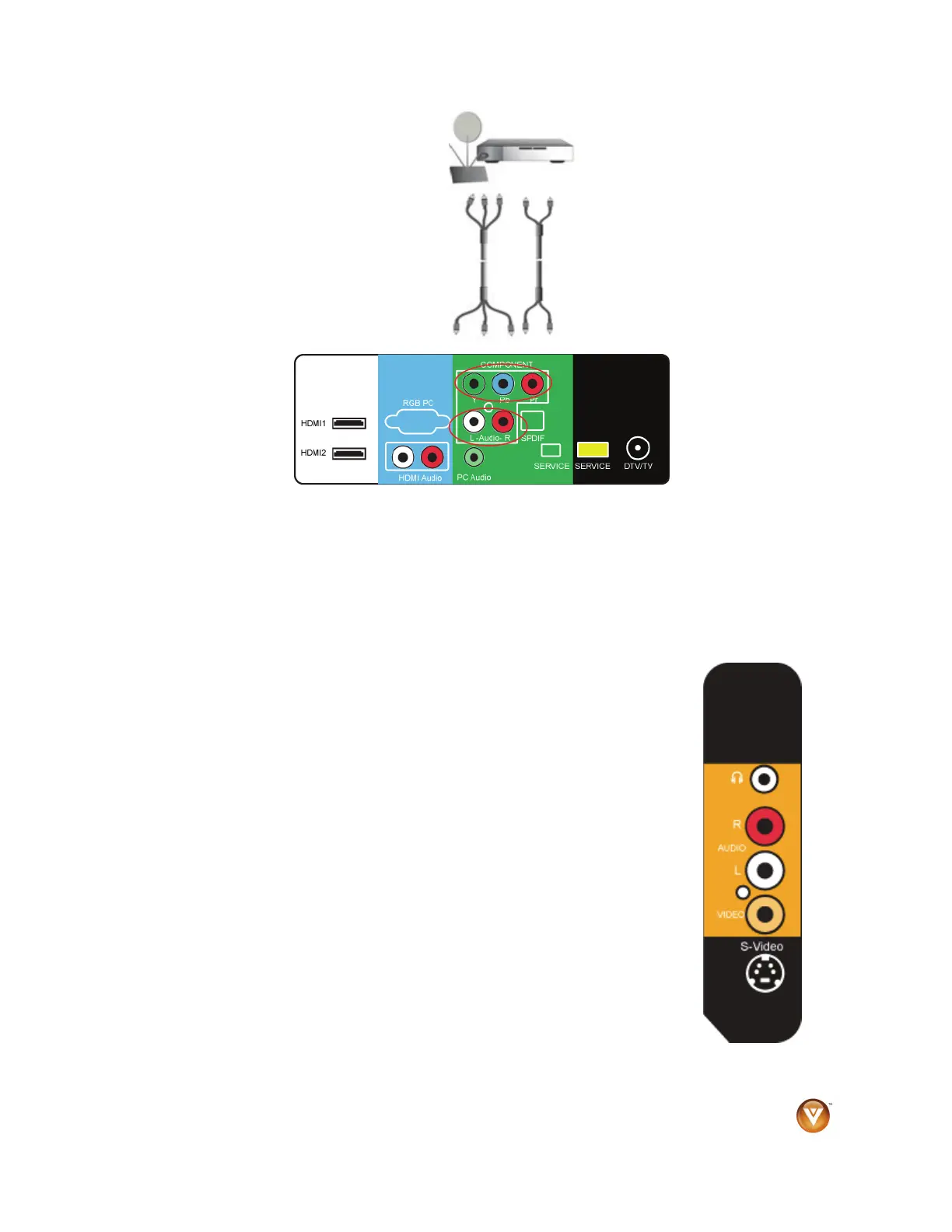
Using Component Video (Better)
1. Turn off your HDTV and set-top box.
2. Connect the component cables (green, blue, and red) from your set-top box to an available set of
COMPONENT jacks on the back of your HDTV.
3. Connect the audio cables (white and red) from your set-top box to the adjacent COMPONENT L
and R Audio jacks on the back or side of your HDTV.
4. Turn on your HDTV and set-top box.
5. Press COMPONENT on the remote control to view the content. You can also press INPUT on the
remote control.
Using S-Video (Better)
1. Turn off your HDTV and set-top box.
2. Connect the S-VIDEO cable from your set-top box to the S-VIDEO jack on
the side of your HDTV.
3. Connect the audio cables (white and red) on your set-top box to the
corresponding L and R AUDIO jacks on the side of your HDTV.
4. Turn on your HDTV and set-top box.
5. Press AV on the remote control to view the content. You can also press
INPUT on the remote control.



 To Next Page