VIZIO VA220E User’s Manual
Version 12/12/2008 30
www.VIZIO.com
Using the Program Guide
1. Press GUIDE on the remote to display program information for the channel you are watching. The
live program content is displayed in a small window in the lower left corner.
2. Press GUIDE twice to display the Electronic Programming Guide.
3. Press ◄ or ► to scroll up or down the channels.
4. Each time you pause at a channel, the program list updates with the program schedule for the
channel and the window shows the live program for that channel.
5. Press GUIDE to exit the Electronic Programming Guide or wait for it to disappear automatically.
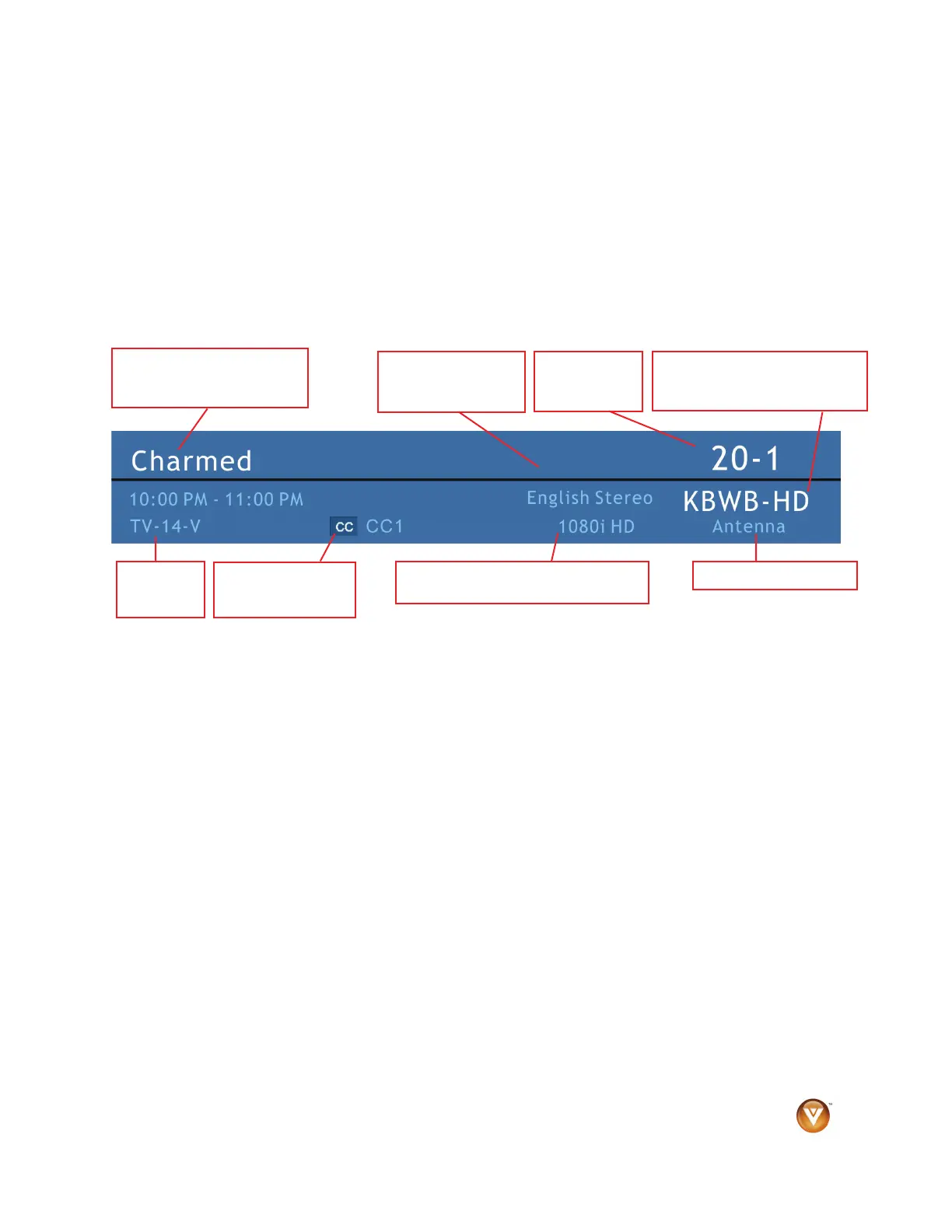
Displaying the Information Banner
When you change channels or inputs, an information banner displays the status of your HDTV.
Channel
Number
Program
Rating
Closed Caption
is CC1
1080i HDTV (High Definition TV)
Audio is English /
Stereo
Program Information:
Provided by Broadcaster
Station Name: Provided by
Broadcaster
Source is Antenna



 To Next Page