VIZIO VA220E User’s Manual
Version 12/12/2008 31
www.VIZIO.com
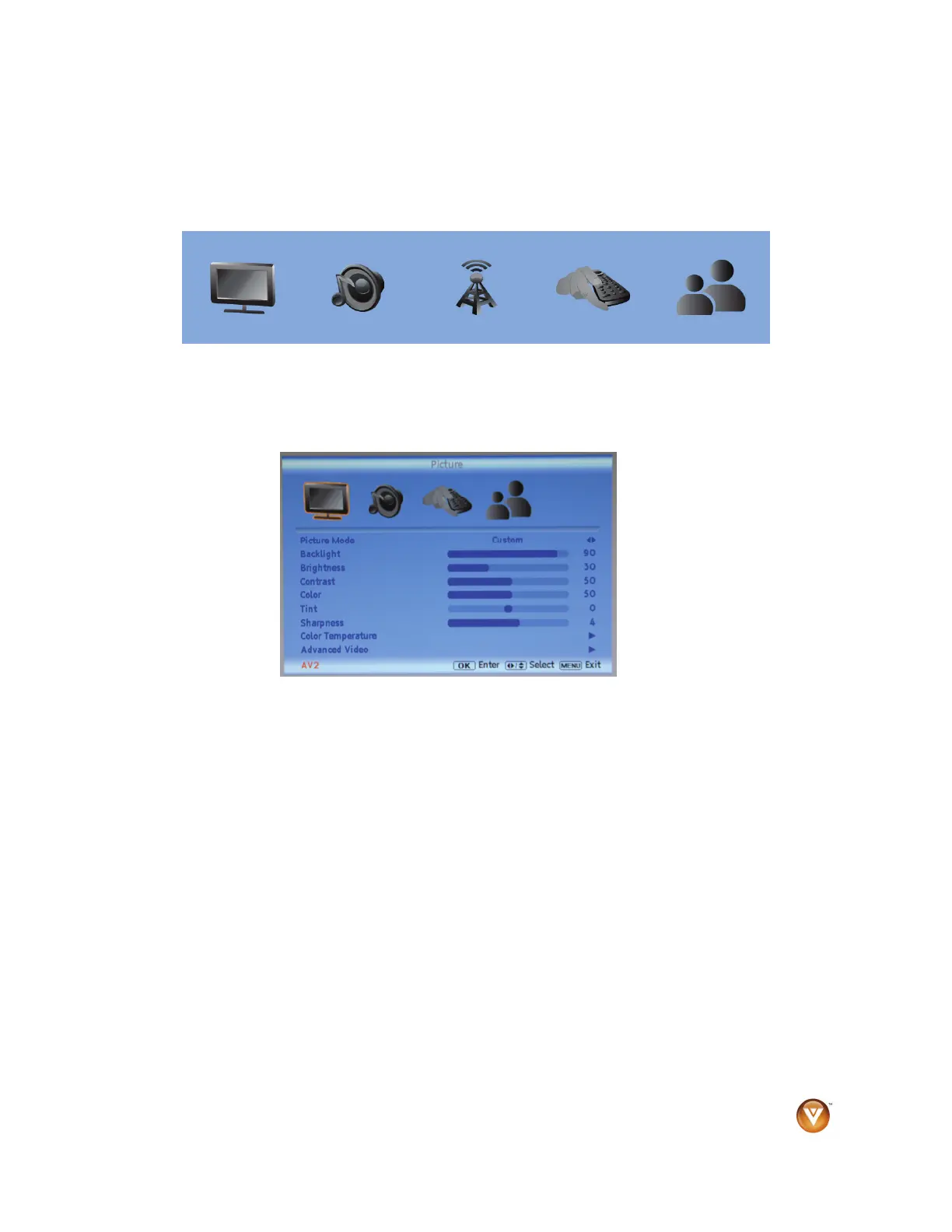
Using the On-Screen Display (OSD)
The remote control or the control buttons on the side of your HDTV control the function settings. The On-
Screen Display (OSD) lets you adjust the contrast, brightness, and other settings. Changes are saved
even when you turn off your HDTV. The OSD consists of these menu options:
Picture Audio TV Setup
Parental
Control
NOTE: The main menu options may vary depending on the selected input source.
1. Press MENU on the remote control or the side of your HDTV. The menu opens.
2. Press ◄ or ► on the remote control or VOL + or VOL – on the side of your HDTV to select an
option.
3. Press ▲ or ▼ on the remote control or CH + or CH – on the side of your HDTV to select a sub-
menu option.
4. Press ► on the remote control or VOL – on the side of your HDTV to adjust the item.
5. Press OK when finished making adjustments.
6. Press MENU to return to the previous screen or repeatedly to exit the OSD.
NOTE: Menu items that are not available for adjustment are shown with a box with a red X symbol.



 To Next Page