VIZIO VA26L HDTV10T User Manual
Version 6/5/2008 35
www.VIZIO.com
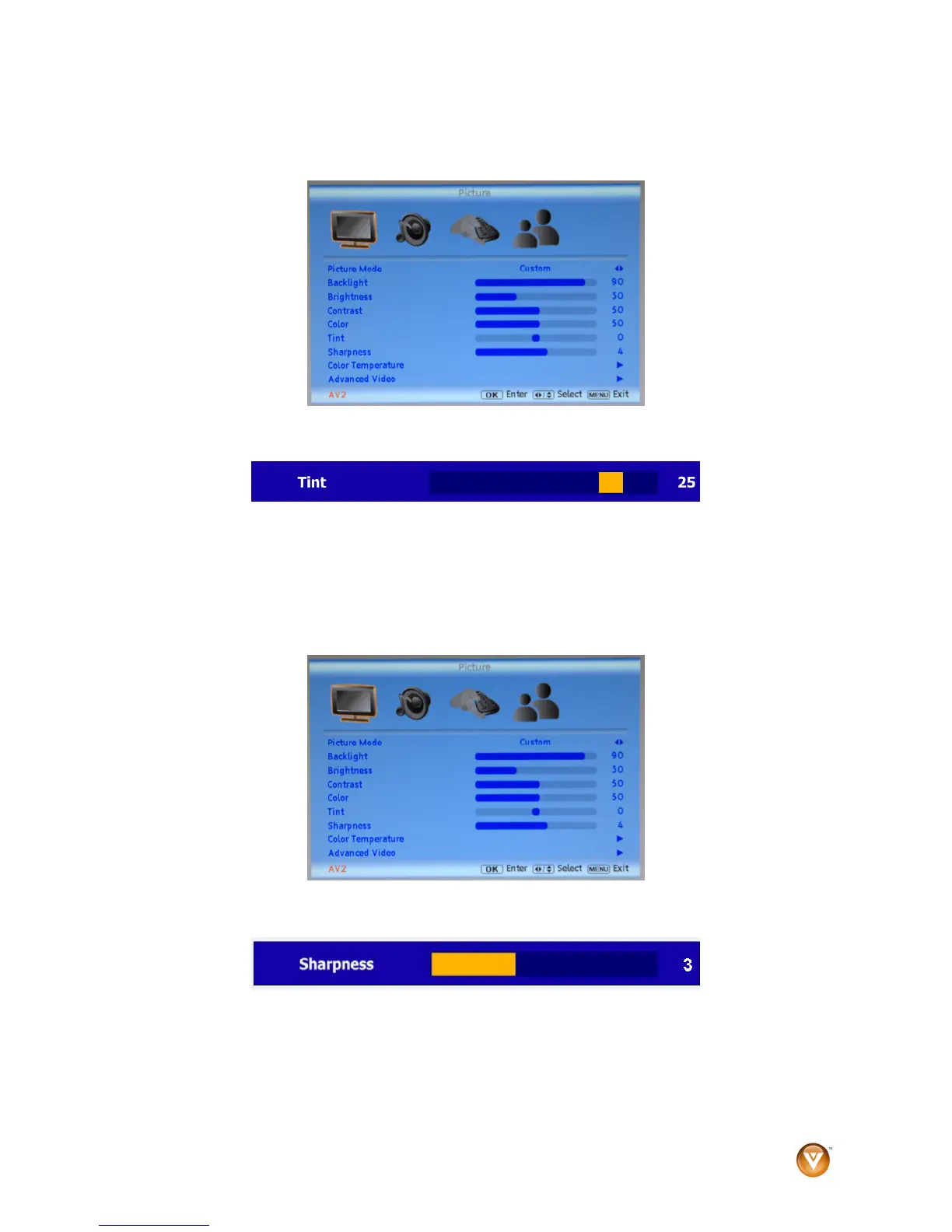
Tint
1. Press MENU on the remote control or the side of your HDTV. The Picture menu opens.
2. Press ▲or ▼ to select Tint.
3. Press ► to start adjusting Tint. The menu page disappears and is replaced by a Tint Indicator
Bar.
4. Press ◄ or ► to adjust the level.
5. Press EXIT to exit the OSD.
Sharpness
The Sharpness setting adjusts the sharpness of the picture.
1. Press MENU on the remote control or the side of your HDTV. The Picture menu opens.
2. Press ▲or ▼ to select Sharpness.
3. Press ► to start adjusting Sharpness. The menu page disappears and is replaced by a
Sharpness Indicator Bar.
4. Press ◄ or ► to adjust the level.
5. Press EXIT to exit the OSD.



 To Next Page
 Loading...