VIZIO VA26L HDTV10T User Manual
Version 6/5/2008 53
www.VIZIO.com
TV Rating
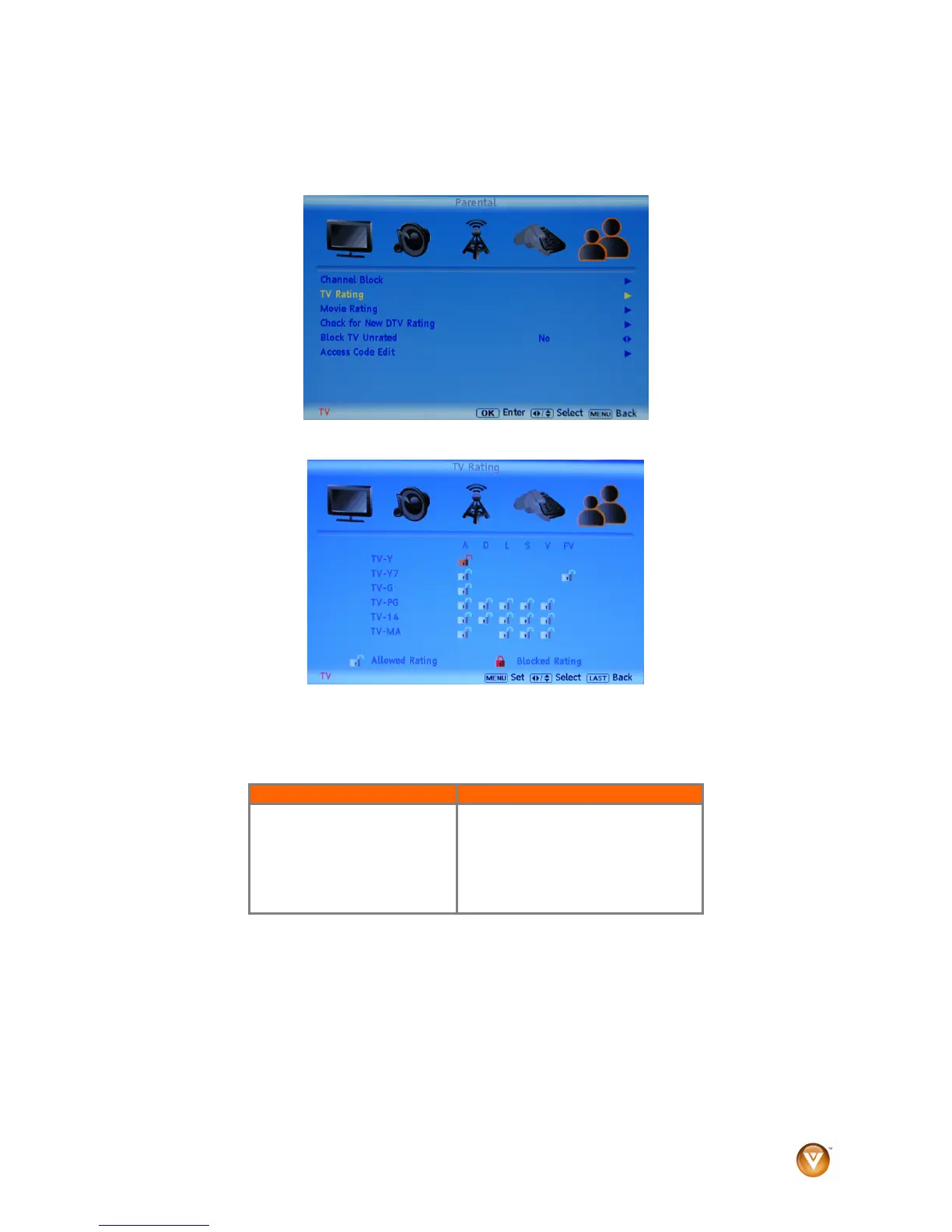
1. Press MENU on the remote control or the side of your HDTV, then press ► repeatedly until the
Parental Control menu opens.
2. Press ▲or ▼ to select TV Rating, then press ►. The TV Rating menu opens.
3. Press ▲ or ▼ and ◄ or ► to navigate through the TV rating options. See the table below for TV
Rating definitions.
4. Press OK to block (locked) or unblock (unlocked).
5. Press EXIT to exit the OSD.
TV Rating Definitions: TV Rating Content Definitions
Y – All children
Y7 – Older children
G – General audience
PG – Guidance suggested
14 – Strongly cautioned
MA – Mature audience
A – All subratings
D – Sexual dialog
L – Adult language
S – Sexual situations
V - Violence
FV – Fantasy violence



 To Next Page
 Loading...