11
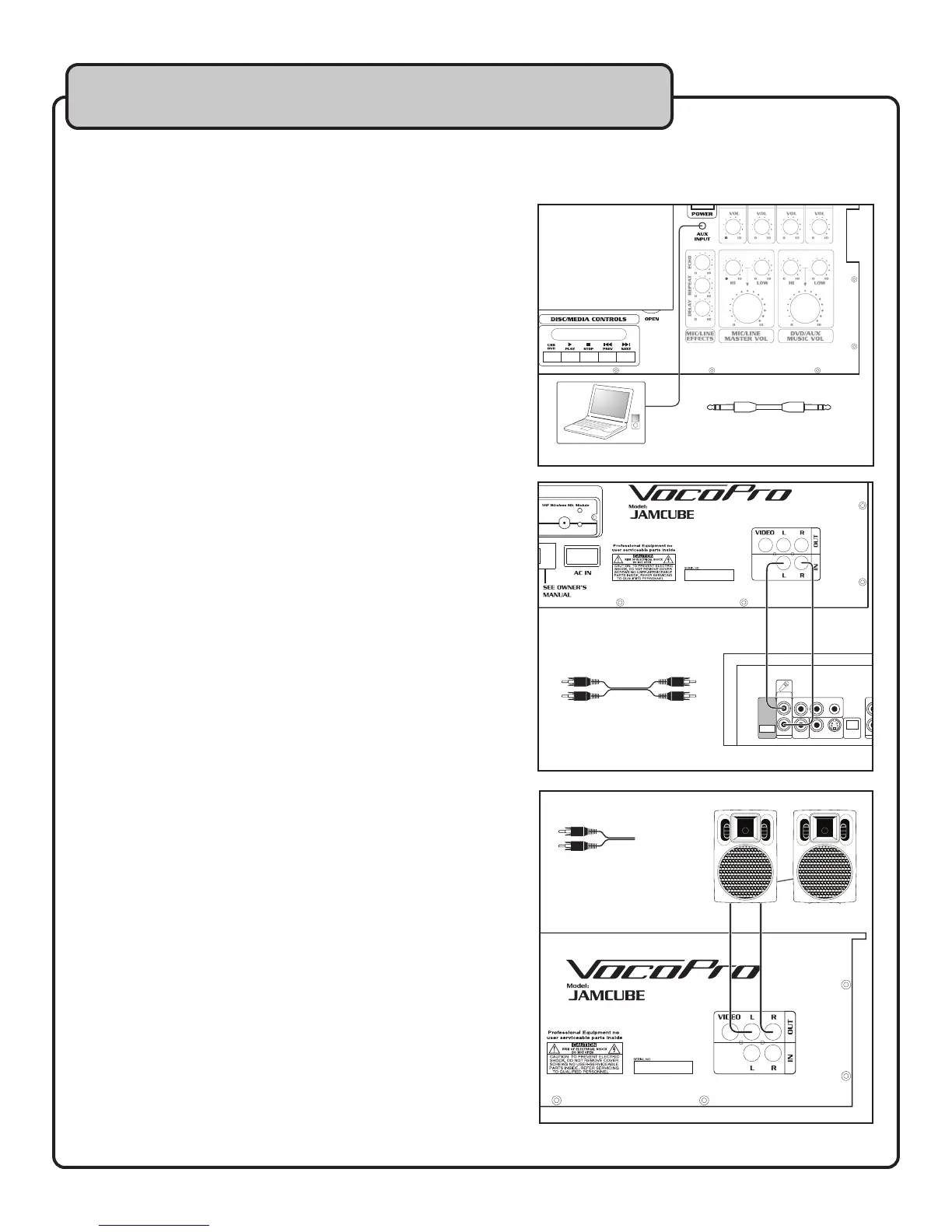
Connecting to an MP3 player (or other device)
to the JAMCUBE
You can use the JAMCUBE as an amplifier for your MP3 player,
laptop or other audio device with an 1/8” output.
What you will need:
• 1/8” cable
• MP3 player (or other device, laptop etc. with a 1/8” output)
To connect an MP3 player to the JAMCUBE:
1. Connect one end of the 1/8” cable to the output
on the MP3 player or audio device.
2. Connect the other end of the 1/8” cable to the
1/8” AUX input on the top panel of the
JAMCUBE.
3. Set the INPUT (DVD/AUX) BUTTON on the top
panel of the JAMCUBE to AUX (out position).
Connecting an External Player to the JAMCUBE
You can use an external CD/DVD player or other audio device with
RCA outputs to play back through the JAMCUBE.
What you will need:
• Stereo RCA cable
• External player or other audio device with RCA outputs
To connect an external audio player to the JAMCUBE:
1. Connect one end of the RCA cable to the L/R output
on the external player or audio devic e.
2. Connect the other end of the RCA cable to the L/R
IN jacks on the rear panel of the JAMCUBE.
3. Set the INPUT (DVD/AUX) BUTTON on the top
panel of the JAMCUME to AUX (out position).
Connecting to an External Powered Speakers
The JAMCUBE has built-in speakers, and does not need to be
connected to external speakers. However, if you want to connect
powered speakers to add an extra boost to your performance, you
can do so using the MIXED OUTPUT.
What you will need:
• Stereo RCA cable
• Powered speakers with RCA inputs
To connect to powered speakers:
1. Connect the ends of the RCA cable to the L/R
AUDIO OUT jacks on the rear panel of the JAMCUBE.
2. Connect the other ends of the RCA cable to the Left
and Right inputs of your powered speakers.
Getting Connected
Audio Output
1/8” - 1/8”
Stereo Cable
Player Output
L Y Pb/Cb Pr/Cr
R
Mixed Out
Mic + Music
Out
COAXIAL HDMI VIDEO S-VIDEO OPTICAL
L Y Pb/Cb
FL CENTER SL
5.1 CH Audio Output
FR SW SR
FL CENTER
100~240V 50-60Hz
DOUBLE INSULATION. WHEN SERVICING
USE ONLY IDENTICAL REPLACEMENT PARTS.
SL
Pr/Cr
R
Mixed Out
Mic + Music
Out
COAXIAL HDMI VIDEO S-VIDEO OPTICAL
SCART OUTPUT
FR SW SR
Model Number: DVX-890K
AC Power: 100~240V 50/60Hz
Power Consumption: 12W
Manufactured under License from Dolby
Laboratories. DOLBY, PRO Logic and the
double-D symbol are trademarks of
Dolby Laboratories. Confidential unpubl-
ished works. © 1992-1997 Dolby
Laboratories Inc. All Rights Reserved.
WARNING: SHOCK HAZARD. DO NOT OPEN!
RISK OF ELECTRIC SHOCK.
DO NOT OPEN!
CAUTION!
WARNING:
To Reduce The Risk of Fire or Electric Shock, Do
Not Expose This Apparatus to Rain or Moisture.
RCA - RCA
Stereo Audio Cable
Powered Speakers
RCA - RCA/ 1/4”
Stereo Audio Cable
(VARIES)


 To Next Page