10
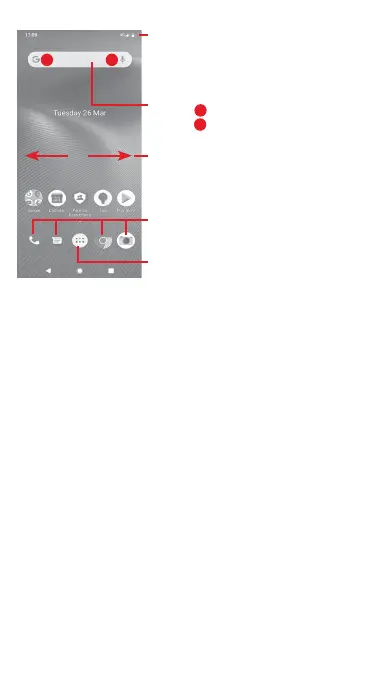
Status bar
• Status/Notification indicators
• Touch and drag down to open the
Notification panel
Application tab
• Touch to open All apps
Slide left or right to view other panels
on the Home screen
Google Search bar
• Touch
a
to enter text search screen
• Touch
b
to enter voice search screen
Favourite tray apps
• Touch to enter the app
• Long press to move or access to more
options for apps
a b
The Home screen extends on either side of the screen to allow
more space for adding apps, shortcuts, etc. Slide the Home
screen horizontally left and right to get a complete view of the
Home screen.
In the standard Home screen, you can slide right to access your
favourite Google app. You can enable/disable this function from
Settings > Display > Display Google app.



 To Next Page