5
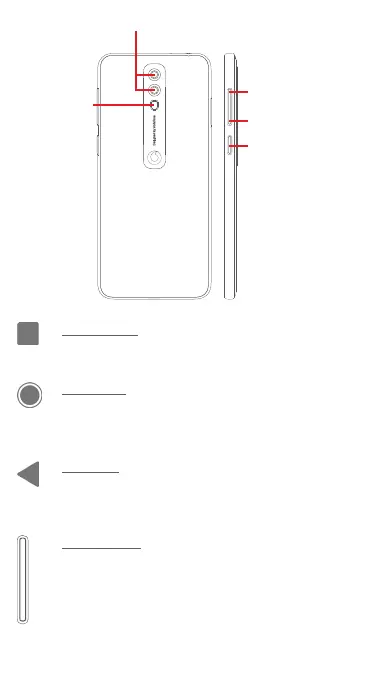
Volume up
Volume down
Power key
Cameras
Flash
Recents icon
• Touch: this shows your recently-used apps. Touch an
app to open it, or swipe it up to remove it from the list.
Home icon
• While on any app or screen, touch the Home icon to
return to the main Home screen.
• Long press this icon to access Google Assistant Go.
Back icon
• Touch to go back to the previous screen, or to close
a dialogue box, options menu, the Notification panel,
etc.
Volume keys
• During a call, these keys serve to adjust the volume of
the earpiece or headset.
• In Music/Video/Streaming mode, these keys serve to
adjust the media volume.
• These keys also serve to adjust the ringtone volume.



 To Next Page