3.Quick Start
probe hook tip is used, ensure that it keeps in close touch with the probe.
Connect the probe tip with the signal connector of the probe compensator
and connect the reference wire clamp with the ground wire connector of
the probe connector, and then push the Autoset button on the front panel.
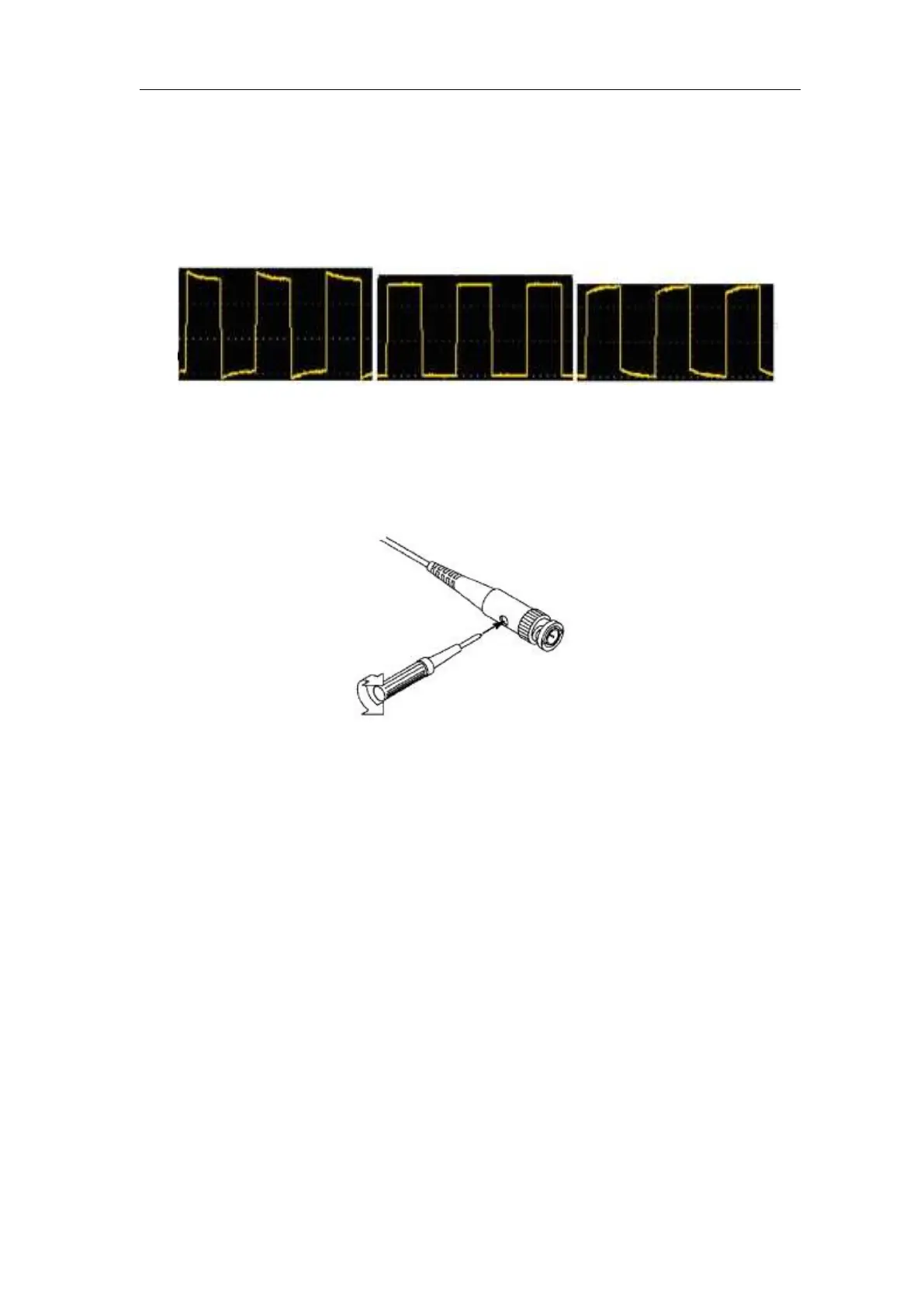
2. Check the displayed waveforms and regulate the probe till a correct
compensation is achieved (see Figure 3- 6 and Figure 3- 7).
Overcompensated Compensated correctly Under
compensated
Figure 3- 6 Displayed Waveforms of the Probe Compensation
3. Repeat the steps mentioned if needed.
Figure 3- 7 Adjust Probe
How to Set the Probe Attenuation Coefficient
The probe has several attenuation coefficients, which will influence the vertical
scale factor of the oscilloscope.
To change or check the probe attenuation coefficient in the menu of
oscilloscope:
(1) Push the function menu button of the used channels (CH1 - CH4 button).
(2) Select Probe in the right menu; turn the M knob to select the proper value
in the left menu corresponding to the probe.
This setting will be valid all the time before it is changed again.












 To Next Page