4.Advanced User Guidebook
How to Measure with Cursors
Push the Cursor button to turn cursors on and display the cursor menu. Push it
again to turn cursors off.
The Cursor Measurement for normal mode:
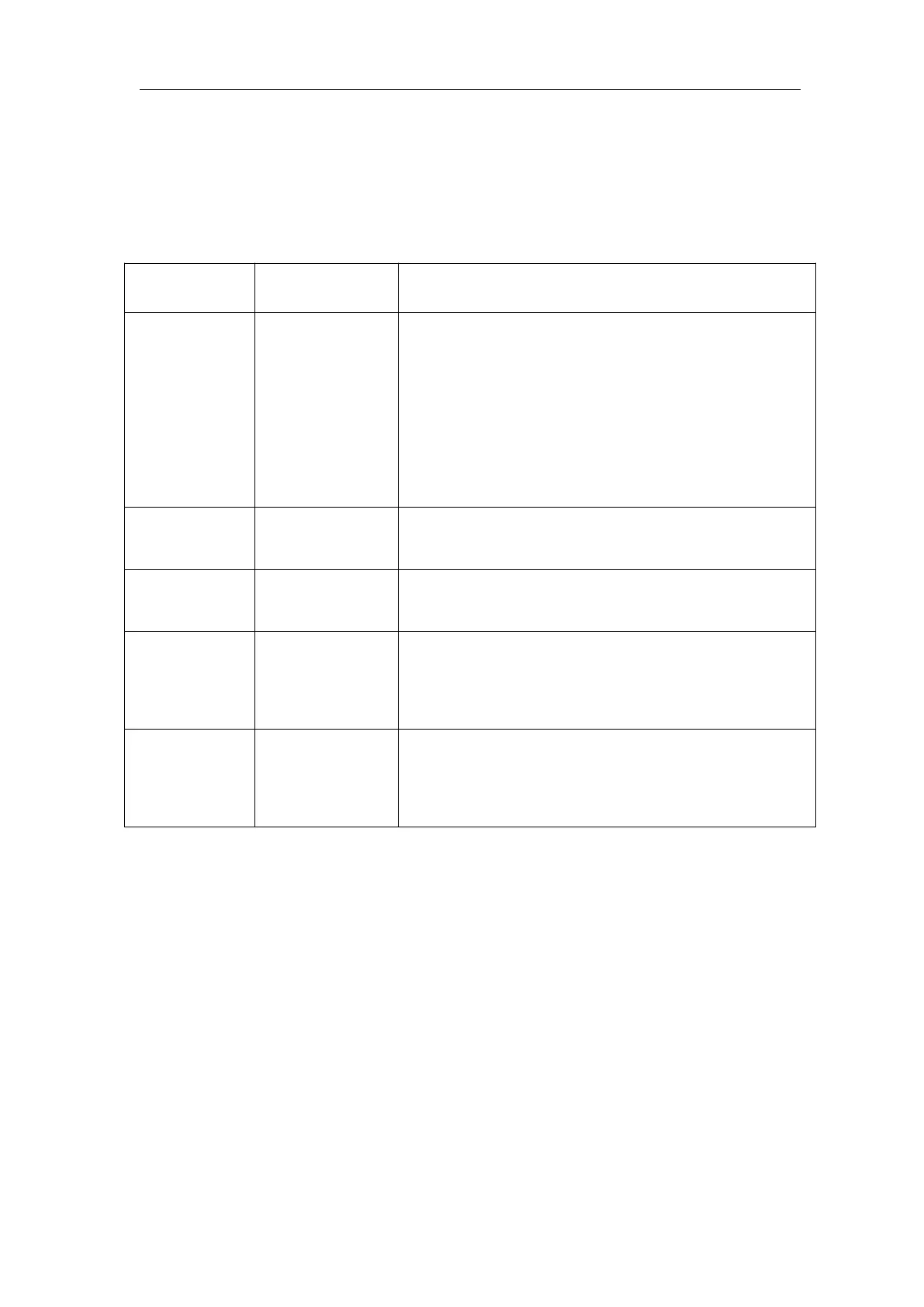
The description of the cursor menu is shown as the following table:
Voltage
Time
Time&Voltage
AutoCursr
Display the voltage measurement cursor and
menu.
Display the time measurement cursor and menu.
Display the time and voltage measurement
cursor and menu.
The horizontal cursors are set as the
intersections of the vertical cursors and the
waveform
Line Type
(Time&Voltage
type)
Makes the vertical cursors active.
Makes the horizontal cursors active.
Measure in the main window.
Measure in the extension window.
Turn the M knob to move line a.
Turn the M knob to move line b.
Two cursors are linked. Turn the M knob to move
the pair of cursors.
Display the channel to which the cursor
measurement will be applied.
Perform the following operation steps for the time and voltage cursor
measurement of the channel CH1:
1. Push Cursor to display the cursor menu.
2. In the right menu, select Source as CH1.
3. Press the first menu item in the right menu, select Time&Voltage for Type,
two blue dotted lines displayed along the horizontal direction of the screen,
two blue dotted lines displayed along the vertical direction of the screen.
Cursor measure window at the left bottom of the screen shows the cursor
readout.
4. In the right menu, select Line Type as Time to make the vertical cursors
active. If the Line in the right menu is select as a, turn the M knob to move
line a to the right or left. If b is selected, turn the M knob to move line b.
5. In the right menu, select Line Type as Voltage to make the horizontal












 To Next Page