8. Operation
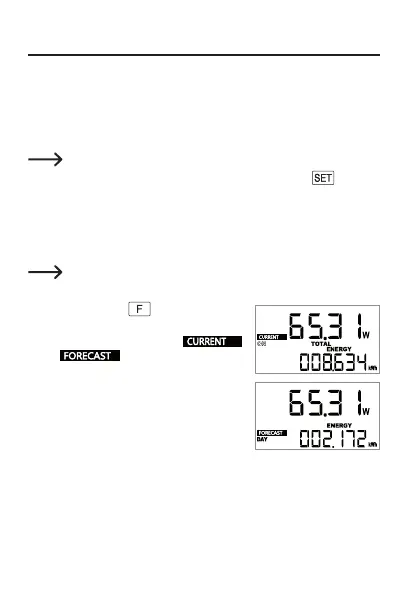
a) Switching between “CURRENT” and “FORECAST” mode
“CURRENT” mode is the normal operating mode in which the power consumption
of the connected load is measured and displayed. In addition, the energy costs
are calculated and displayed on the basis of the electricity prices entered. After
start-up, this mode is automatically preselected.
Important:
Setup mode can only be called with a long press of the
button (3)
in “CURRENT” mode (see Chapter 8. c)!
“FORECAST” mode is intended to produce a forecast of energy consumption,
costs and CO
2
values on the basis of the saved measured data. Forecasts can be
produced for one day, one week, one month and one year. For example, you can
estimate what operation of an electrical load will cost.
For more information on “FORECAST” mode, see Chapter 9.
Switch mode as follows:
• Press and hold the
button (4) for 3 sec-
onds.
• The display switches between
and .
47








 To Next Page