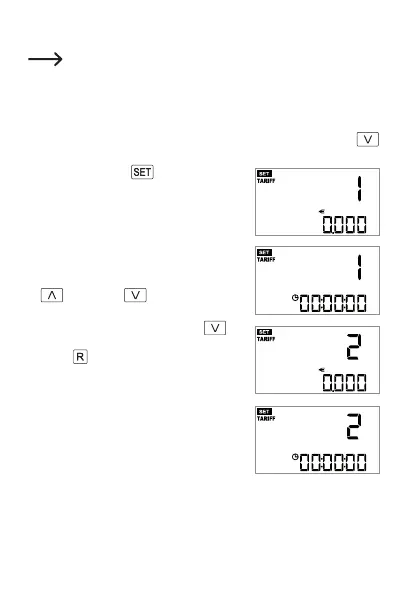
e) Setting electricity tariff 1 and 2
Two different electricity tariffs can be set for cost calculation (e.g. for
day/night-time electricity). If you only have one electricity tariff, set the
same price for both tariffs and leave the start time at “00:00:00”.
• If you have set the 12h/24h format and the time (see Chapter 8. d) before set-
ting the electricity tariff, you can proceed directly to the next step.
Otherwise, setup mode must be started, see Chapter 8. c). Press the
button(7)togotosettingoftherstelectricitytariff,seethenextstep.
• Briey pressingthe
button (3) switches
successively between the currency, electric-
ity price input and start time settings for both
electricity tariffs.
Special times for switching between day-time
and night-time electricity (weekends, public
holidays) cannot be taken into account.
• Change therespectiveashingvaluewiththe
button (6) or button (7).
• Ifnoindicatorisashing,youcanjumptothe
next setting by briey pressing the
(7)
buttonorexitthesetupmenubybrieypress-
ing the button (2).
53










 To Next Page