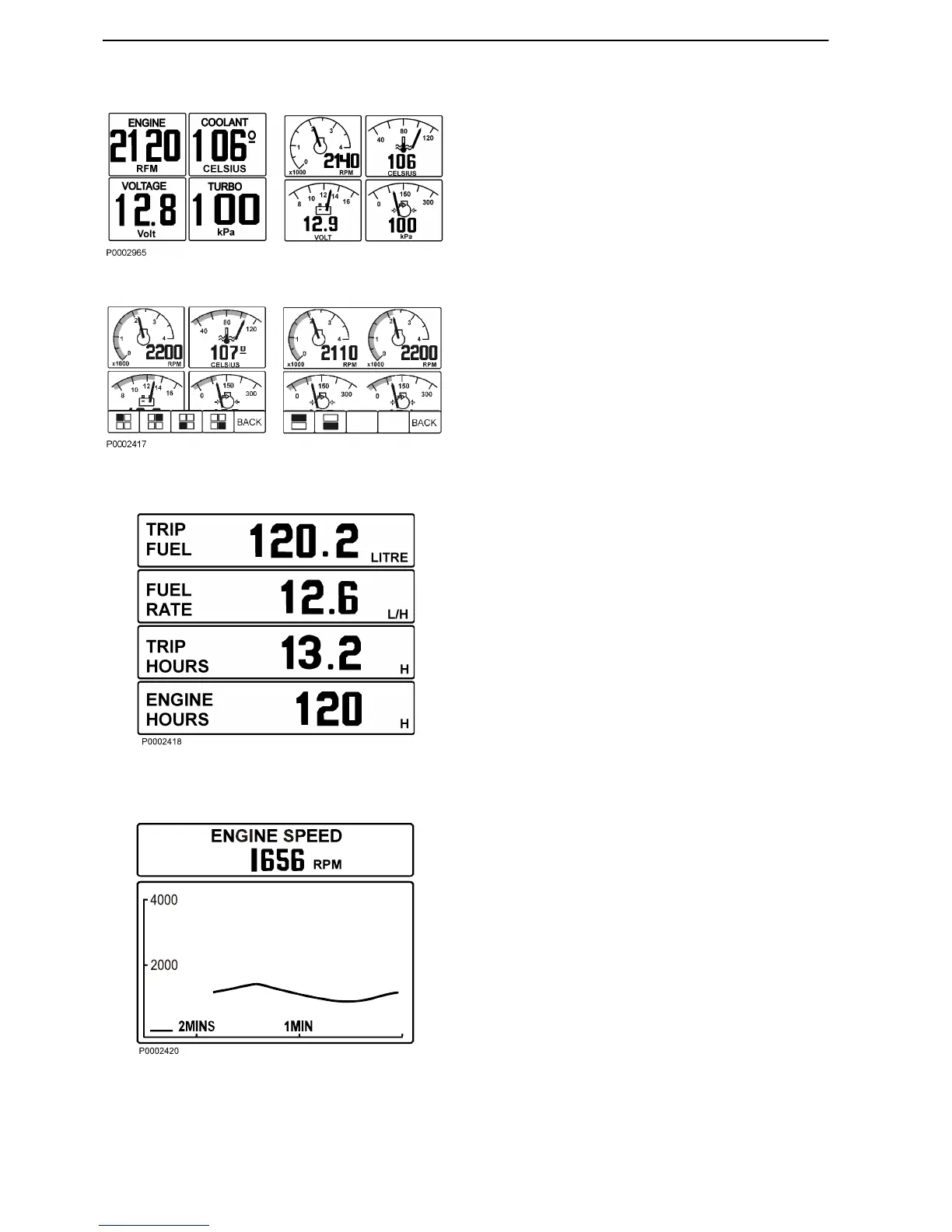
Multi, button 2
In the multi mode the information can be shown in sev-
eral windows, analogue or digital. The display can
show windows with different information or be divided
to show windows and system information. To handle
the system information, see section Instruments and
Controls page 19. To go between the different dis-
play modes, press button 2 repeatedly.
By pressing button 5 (the right arrow) you can choose
which information to be shown in the different windows.
Press repeatedly on the button which correspond to
the window, until desired information is shown.
Trip, button 3
The display works as trip computer and shows:
Trip Fuel, since last reset
Fuel Rate, fuel consumption
Trip hours, since last reset
Engine hours, total amount of operating hours
Reset by pressing button 3 for three seconds until a
beep is heard.
For twin installations the values are summarized,
except for engine hours that are shown for each
engine.
Graph, button 4
The information is shown as graphs. Press button 4
repeatedly to choose which information will be shown.
The time interval is set in the Configuration menu.
If the connection is broken there will be a straight line
in the display.
Single installation
Instruments and Controls
16 7748887 04-2008




 To Next Page