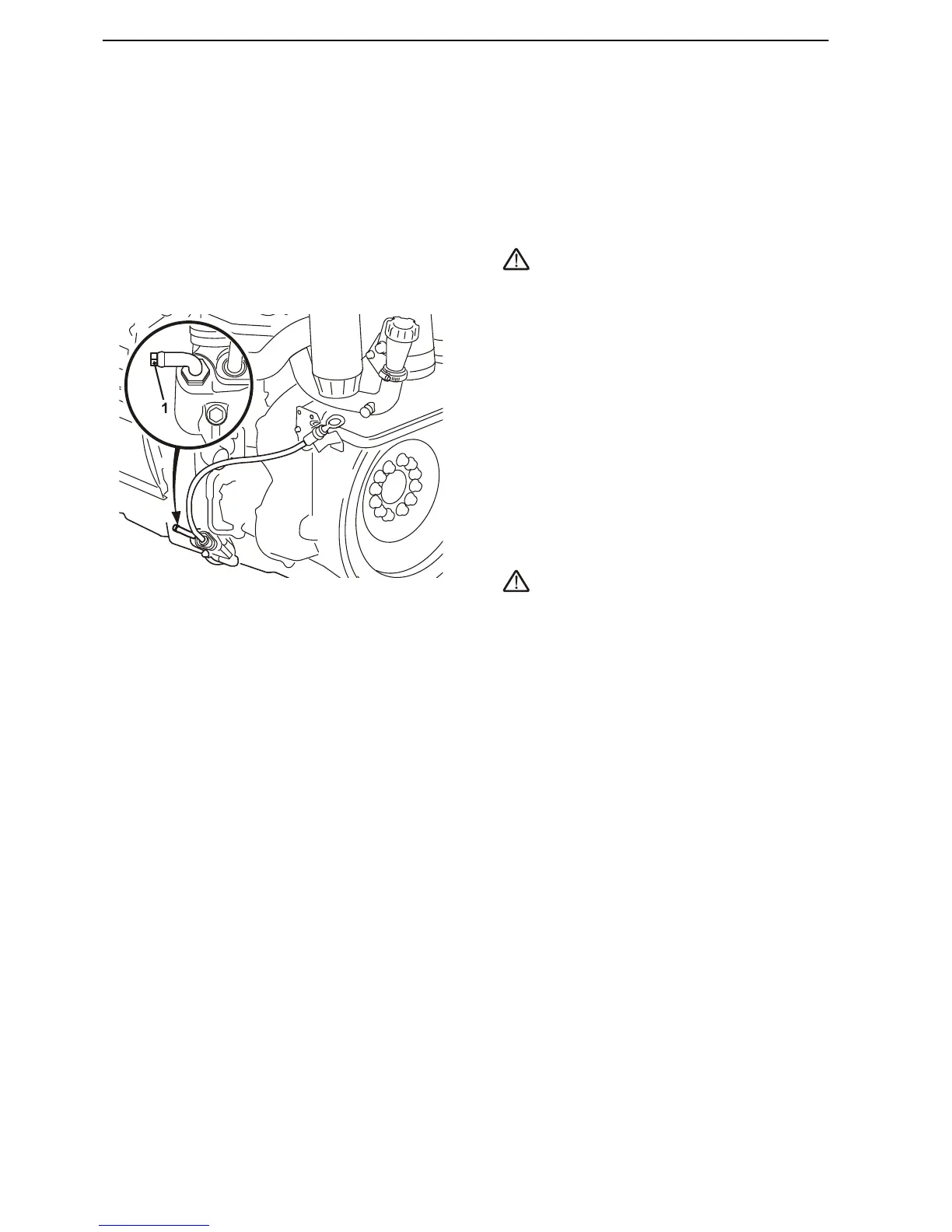
Engine Oil, Change
Always follow the recommended oil change interval.
Use an oil drain pump - an electrical oil drain pump is
available as an accessory - to pump the oil out of the
oil pan.
1 Run the engine until warm so that the oil is easier
to pump. Then stop the engine.
WARNING!
Hot oil and hot surfaces can cause burns.
2 Connect the suction pipe on the oil drain pump to
the drain pipe (1). Pump out the oil.
3 Replace the oil filter and by-pass filter at every oil
change.
4 Fill oil to the correct level through the filler opening
at the rear of the engine (2). For engine oil quantity,
refer to the Technical Data page 97 section.
IMPORTANT! Use only oils of the recommended
grades; refer to the Technical Data page 97 sec-
tion.
5 Start the engine and let it idle. Check that the low
oil pressure warning lamp goes out and that no
leaks are present at the filters.
WARNING!
Working with, or going close to a running engine is
a safety risk. Watch out for rotating components
and hot sufaces.
6 Stop the engine. Wait a few minutes before check-
ing the oil level. Top up as needed.
Hand in the old oil and oil filter to a re-cycling station.











 To Next Page