VONETS——VAR11N 150M Mini WIFI Router
20
WAN Port Status: Here display the current WAN port MAC address, Connected Type,
IP address and DNS server. You can go to WAN settings page to
do some configuration.
LAN Port Status: Here display the current LAN port MAC address, DHCP On/Off, Local
IP address and Subnet Mask. You can go to LAN Settings page to
do some configuration.
DHCP Clients: Here display the current all clients information that connected to
VAR11N, include Hostname, MAC address and IP address.
Wireless Network: Here display all clients information connected to VAR11N by
wireless.
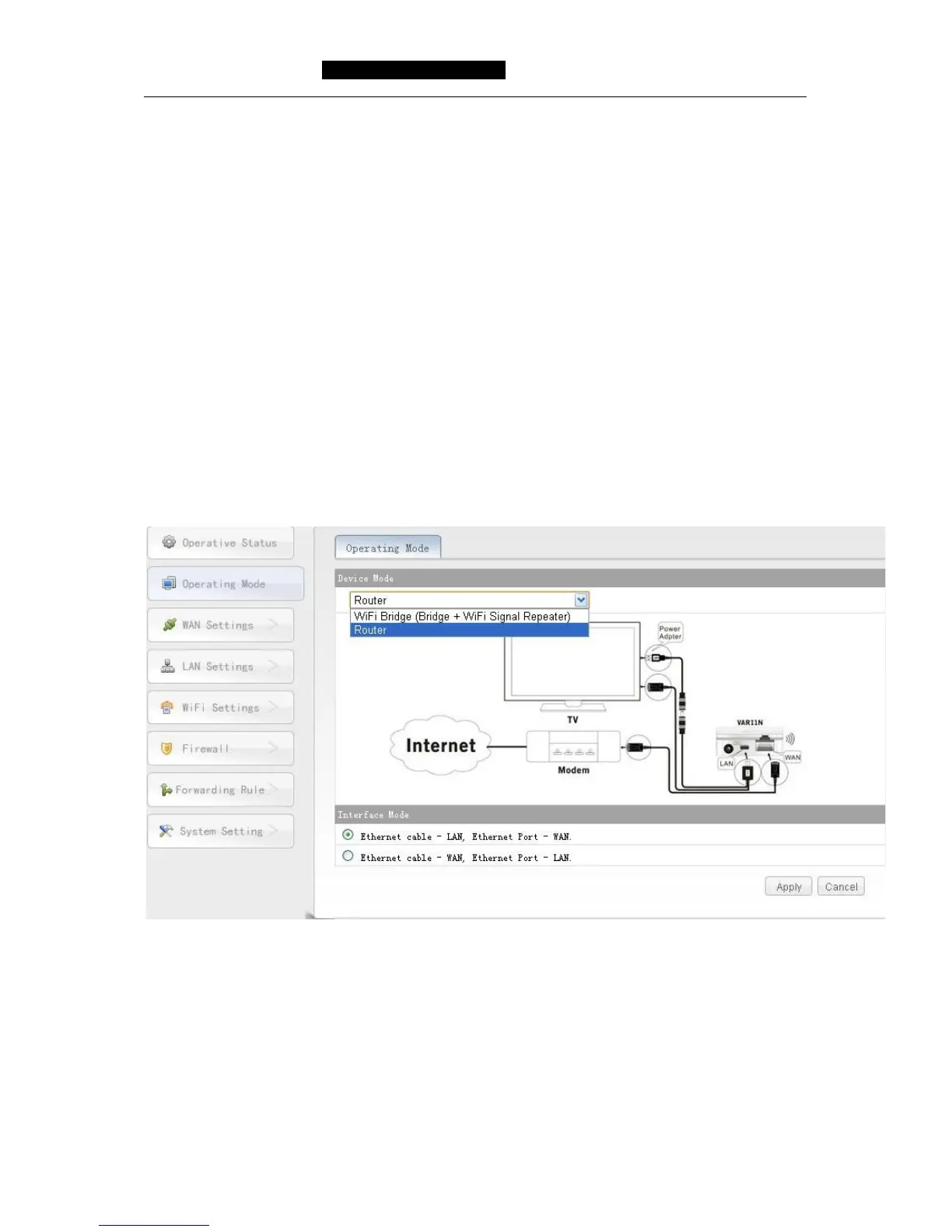
5.2 Operating Mode
Click operating mode button, can switch operating mode, such as Router mode and
WIFI Bridge(Bridge + WIFI Signal Repeater) mode, see the following picture:
Picture 5 -3 Operating Mode Picture
Remark:
1) Device Mode: can switch Router mode and WIFI Bridge (Bridge + WIFI Signal
Repeater) mode.
2) Interface Mode: the default is ethernet cable (Micro USB) is LAN, ethernet port
(RJ45 port) is WAN port, user can change ethernet cable (Micro USB) to WAN port
and ethernet port (RJ45 port) to LAN port.



 To Next Page