VONETS——VAR11N 150M Mini WIFI Router
33
By upgrading the software of the device, you will get a more stable device version
routing capabilities and value-added. You have to connect to the external network,
click Upgrade button to start the upgrade, automatic no other operation.
Chapter 6 WIFI bridge mode setting
Presentation:
1. Go to bridge mode, should change in operating mode of the routing mode
6.1 Operative Status
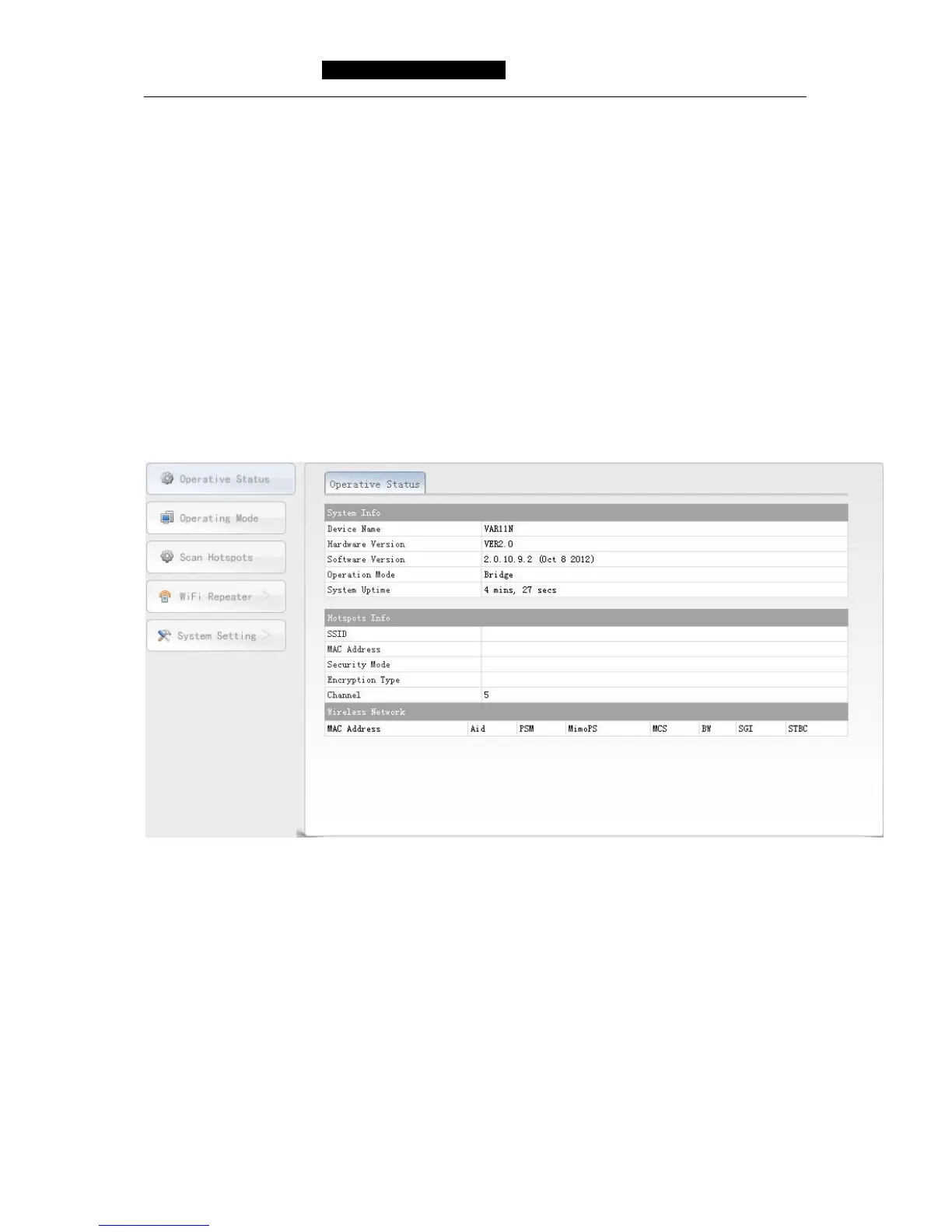
From the operative mode of WIFI router mode to WIFI bridge mode, will display the
following page of operative status, please see the following picture:
Picture 6-1 Operative Status page
Ø System Info: Here display the hardware and software version and operative
mode and system uptime.
Ø Hotspots Info: Here displays the VAR11N WIFI bridge connected to the hotspots
info.
SSID: The wireless network name of Hotspots..
MAC Address: MAC address of Hotspots.
Security Mode: The encryption method of hotspots, such as
WPA-PSK, WPA2-PSK, WEP and so on.
Encryption Type: The encryption algorithm of hotspots, such as



 To Next Page