TSLM - M601 Operational & Install Manual
Viewing and recording parameters
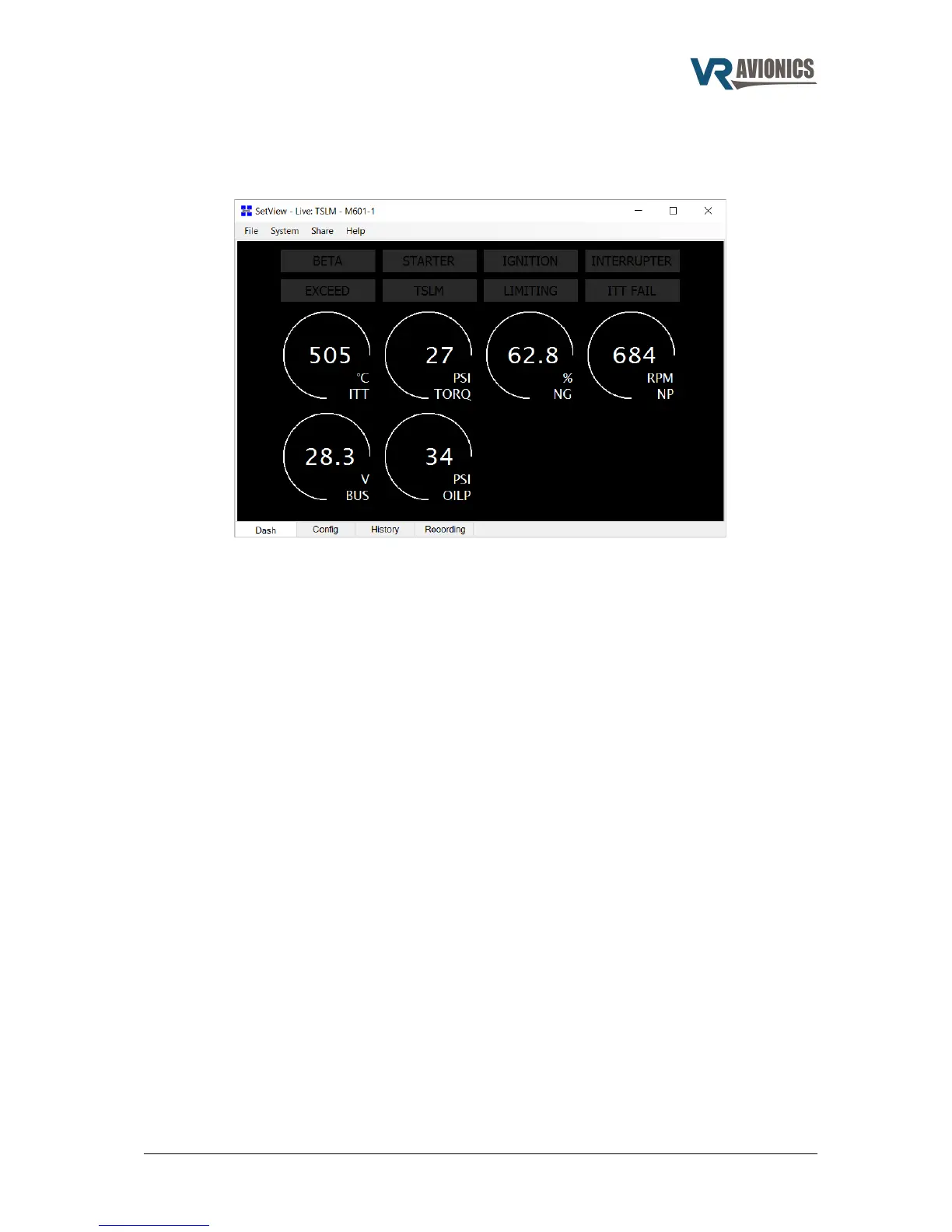
After running the SetView software, selecting the correct serial port and applying power to the
system, the SetView software should start showing the following parameters:
To make a recording select from the main menu System > Record Parameter Stream. To stop
recording thereafter select System > Stop Recording Parameter Stream. The recording will then be
saved to a file and shown in graph format for you to view.
Synchronizing with the system
By synchronizing (menu > system > synchronize) SetView will first check the firmware version of
the TSLM and any other VR units in your system (connected via CAN bus). If there is a new
version SetView will in each case ask you if you want to update. Only if you select Yes it will
update the particular unit to the new version.
A synchronize will also make SetView read the TSLM's configuration as well as those for the other
VR units in your system. The bundled configuration settings will be saved to file and can be viewed
by simply clicking on the Config tab at the bottom of SetView.
A synchronize will lastly make SetView retrieve the TSLM history logs and save it to file. The
history can then viewed by simply clicking on the History tab at the bottom of SetView or opened
at a later stage.
Sharing files via email
If you have made a recording and/or done a synchronize which will read the TSLM configuration,
you can easily share these files with others via email (menu > Share). If troubleshooting and you
require support from VR Avionics, you may email your recording and configuration to us so we can
better be able to assist you.
06/29/16 © 2016 VR Avionics page 31 of 33


 To Next Page