43
4. Using the table handswitch.
4.1 Height adjustment
Three dierent handswitches with three dierent functions are used to
adjust the table height:
Height adjustment
Tilt the handswitch (1) upwards to move the table
up. Tilt the handswitch (1) downwards to move
the table down. The drives continue to run for as
long as you hold the handswitch (1) in a tilted
position. The current height of the table is dis-
played in cm in the handswitch memory display.
- Soft start/Soft stop: The drives are operated at reduced power for a
short time after starting or before stopping.
- Safety area: For safety reasons, the table controller is equipped with
two lower stops (safety area) ex works (see section 8). In usual travel
operation, a first lower stop is traveled to before the bottom position
is reached. Only when the handswitch is pushed again does the table
travel to its lowest position at reduced speed.
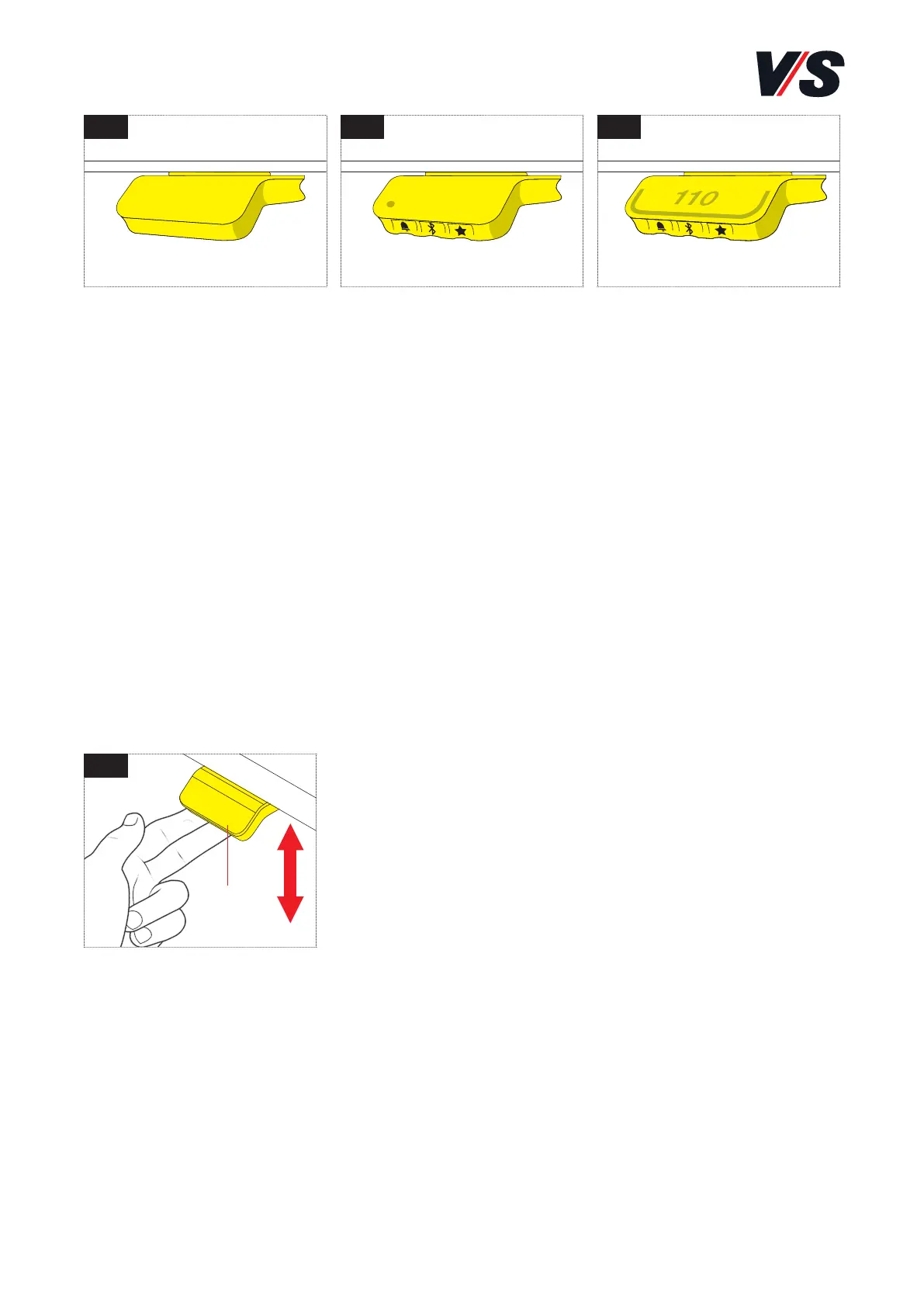
Standard handswitch
[Figure 1]
• Up/down function
Memory handswitch
[Figure 2]
• Up/down function
• 2 saved positions
• Memory function via
LED
• Bluetooth®
Handswitch Memory
display [Figure 3]
• Up/down function
• 4 saved positions
• Memory function via
light strip
• Bluetooth®
• Display
1 2 3
4
(1)



 To Next Page