- 28 -
10. DEVIATIONS
Deviations is a working mode for comparison of a measured sample with the reference mass. The
result is expressed in [%].
10.1. SETTING THE REFERENCE MASS: WEIGHING REFERENCE SAMPLE
Procedure:
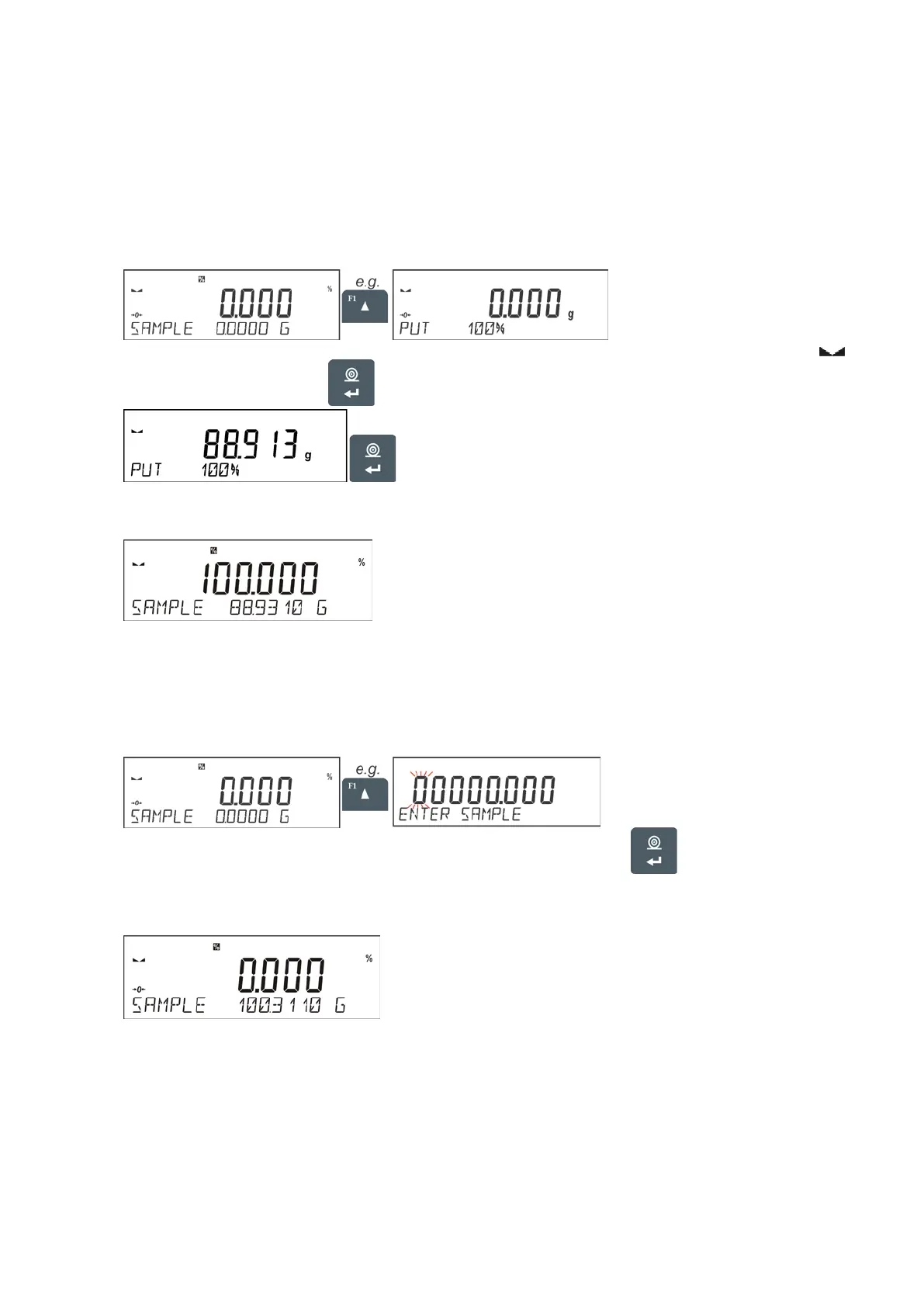
• Press F button to which function <DETERMINE SAMPLE> is assigned, <PUT 100%> editing
window is displayed.
• Place the reference sample (to represent 100%) on the pan, and when the result is stable (
symbol is displayed) press
button to confirm.
• The software automatically enters the measured load value as a reference sample and enters
<DEVIATIONS> mode displaying the value of 100.000%, the bottom line displays reference
mass value (if such an option has been selected for <INFORMATION> function).
10.2. SETTING THE REFERENCE MASS: ENTERING THE MASS VALUE
Procedure:
• Press F button to which function <ENTER SAMPLE> is assigned, <ENTER SAMPLE> editing
window is displayed.
• Use arrow buttons to enter the known reference mass value, press button to confirm.
• The software automatically enters <DEVIATIONS> mode displaying the value of 0.000%, the
bottom line displays entered reference mass value (if such an option has been selected for
<INFORMATION> function).


 To Next Page