3 Diagnostics, Troubleshooting and Testing
15
WABCO Maintenance Manual MM-0112 (Revised 07-18)
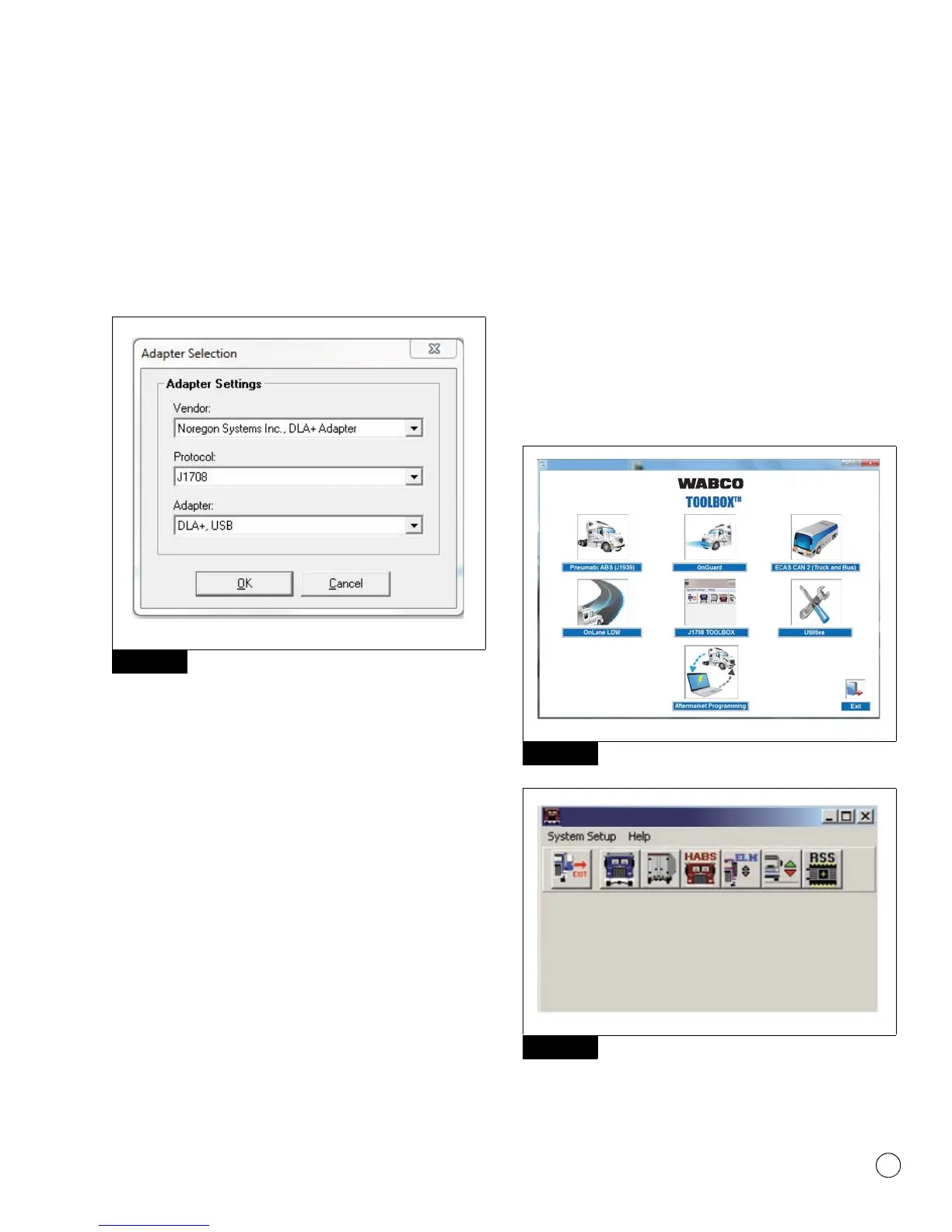
To access “Comport Settings” for TOOLBOX™ Software
versions prior to TOOLBOX™ Software 11, click on “System
Setup” from the main TOOLBOX™ page. Figure 3.6.
Make sure the “Vendor:” and “Adapter:” drop-downs are set
for the device being used and set the “Protocol:” drop-down to
J1708 OR J1939 according to the system you will be
communicating through, and click “OK”. Figure 3.4.
Figure 3.4
NOTE: When switching between J1939 and J1708
communications with TOOLBOX™ Software 11, the vehicle
ignition must be cycled between sessions to correctly
communicate with the ECU.
NOTE: TOOLBOX™ Software must be connected to the vehicle
and the vehicle ignition must be ON in order to display
information. If unable to communicate with the ECU:
앫 Verify device and data link connections are secure.
앫 Verify the device is RP1210A compliant and that the
comport settings (Vendor, Protocol, Adapter) in
TOOLBOX™ Software are correct.
앫 Verify the device software and firmware is up to date.
앫 Check all the powers and grounds coming to the ECU
including load testing.
앫 Check J1587 circuit at the ECU and the data link connector.
앫 Check J1939 circuit at the ECU and the data link connector.
4. Depending on the software version used, there will be two
options to communicate with the vehicle:
앫 If using TOOLBOX™ 11 or higher and a vehicle with
Software ECU E4.4b or higher, diagnostics over J1939
communications can be possible. Figure 3.5.
NOTE: E8 software versions will only communicate over
J1939.
앫 J1708 communications are possible with any TOOLBOX™
Software version and any D or E Version ECU. Figure 3.6.
NOTE: When switching between J1939 and J1708
communications, vehicle ignition must be cycled between
sessions to correctly communicate with ECU.
Figure 3.5
Figure 3.6
Figure 3.4
Figure 3.5
Figure 3.6
4010611a
WABCO TOOLBOX 11.5
WABCO TOOLBOX
4010612a
WABCO TOOLBOX J1 708 Diagnostics



 To Next Page